Typeshala vs Typing Tutor: Which Free Nepali Typing Software Wins in 2026?
✍️ Wilson Shrestha🕒 Updated October 2026📂 Nepali Typing
If you're learning to type in Nepali, two free programs come up again and again: Typeshala and Rapid Typing Tutor. I've used both since 2017 for day-to-day documentation, graphic design captions, and blogging, and they're built for genuinely different jobs — one for Nepali-script practice, one for general typing speed in English. Here's how they actually compare, and which one you should download first.
Quick answer: Choose Typeshala if you're typing in Nepali (Preeti or Unicode) on Windows. Choose Rapid Typing Tutor if your goal is English typing speed and you want lessons that work across more operating systems.
Typeshala vs Rapid Typing Tutor: Feature Comparison
Feature
Typeshala
Rapid Typing Tutor
Language support
Built specifically for Nepali typing (Preeti and Unicode layouts)
Built for English typing, with support for additional keyboard layouts
Target audience
Nepali learners, students, and office staff typing in Devanagari script
General typists who want to improve English speed and accuracy
Lesson style
Structured Nepali keyboard drills, finger-position guidance
Progressive lessons with accuracy/speed tracking and on-screen keyboard guide
Interface
Functional but dated; built for practice, not polish
Cleaner, more modern interface
Operating systems
Windows only
Windows, with broader cross-platform support than Typeshala
Popularity
Widely used across Nepal for Nepali-script training
Used internationally as a general-purpose typing tutor
Software updates frequently — if you're on a very recent Windows build, confirm current OS compatibility on each program's official download page before installing.
Which Should You Choose?
Pick Typeshala if you're typing in Nepali (Preeti or Unicode), you're on Windows, and you want lessons built specifically around the Nepali keyboard layout.
Pick Rapid Typing Tutor if your main goal is English typing speed, or you want a typing tutor with a more modern interface.
Most readers end up using both — Typeshala for Nepali-script documents, Rapid Typing Tutor for English practice — since neither one replaces the other.
Yes, Typeshala is free to download and use for Nepali typing practice on Windows.
Can I use Rapid Typing Tutor on Mac or Linux?
Rapid Typing Tutor is built primarily for Windows. If you're on Mac or Linux, check the current download page for compatibility before installing, since support can change between versions.
Which one is better for beginners?
Typeshala is the better starting point if you're learning Nepali script from scratch. Rapid Typing Tutor is a better fit if you're a complete beginner to typing in general and want English-first lessons.
Do I need both programs?
Not necessarily, but many Nepali users keep both installed — Typeshala for Nepali documents and Rapid Typing Tutor for everyday English typing.
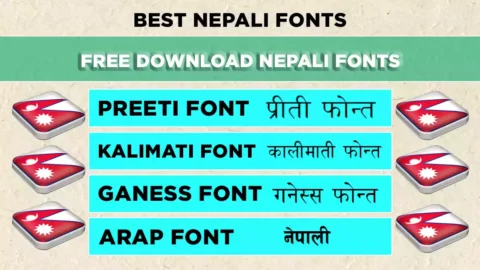
Download nine popular Nepali fonts, including Preeti, Kalimati and Kantipur, and install them on Windows or Mac in under two minutes.
9 fonts
Windows & Mac
Free for personal use
Nepali fonts are the typefaces used to write the Nepali language in design, documents, blogging and print. They are used in Nepal, and also by Nepali speakers in India and Bhutan. I use these same fonts every day for blogging and graphic design, so this list only has fonts people actually use.
Pick a font below, download the zip file, extract it and install it. If you get stuck, jump to the installation steps.
What are Nepali fonts?
Nepali is written in the Devanagari script, the same script used for Hindi and Sanskrit. Because the letterforms are so close, the text looks similar to Hindi, and you can also use Hindi fonts to display Nepali. If you want that route, see my guide to free Hindi fonts for PC.
A font for Nepali needs the full set of Devanagari characters, including conjuncts and half letters. If you are not sure how those are typed, read how to type Nepali half letters.
Unicode vs legacy fonts: know this before you download
Nepali fonts come in two kinds, and mixing them up is the most common reason text turns into strange symbols.
Legacy fonts (e.g. Preeti, Kantipur)
Unicode fonts (e.g. Kalimati)
How it works
Maps Nepali shapes onto English keys, so the font must be installed to read the text
Stores real Devanagari characters that any device can read
Personal use only. These fonts are shared here for educational purposes. If you want to use them commercially, ask the font’s creator for permission first.
Frequently asked questions
Are these Nepali fonts free?
Yes, you can download them for free. Use them for personal and educational purposes only. Commercial use needs the creator’s permission.
Do they work on both Windows and Mac?
Yes. Extract the zip file, then double-click the font file to install it on either system.
Why does my Nepali text show strange English letters?
You are probably viewing legacy font text (like Preeti) without the font installed. Install the font, or convert the text with the Unicode converter.
Can I use Hindi fonts for Nepali?
Yes. Both languages use Devanagari, so Hindi fonts display Nepali text well. See free Hindi fonts for PC.
Which font is best for websites?
Use a Unicode font such as Kalimati. Legacy fonts like Preeti will not display correctly on visitors’ devices.
Need the Kalimati font download for a Nepali office letter, a Lok Sewa form, or a design project? You can download Kalimati Regular for free below. It's the standard Nepali Unicode font used in government offices, newspapers, and schools across Nepal. This guide also shows you how to install it on Windows, Mac, Android and iPhone, how to type with it, and how to fix the problems most other download pages don't mention: boxes, broken letters, and Kalimati not appearing in Word.
Free download
Kalimati Regular – Nepali Unicode Font
File: Kalimati Regular.otf (OpenType)
Works on: Windows 7/10/11, macOS, Linux, Android (via apps)
Price: Free – no sign-up, no "human verification" pop-ups
The file downloads directly — your browser will save Kalimati-Regular.otf to your Downloads folder.
Kalimati Regular is the go-to Devanagari Unicode font for Nepali typing.
Kalimati Font at a Glance
Font name
Kalimati (Regular)
Script
Devanagari – Nepali, plus Hindi, Sanskrit and other Devanagari languages
Encoding
Unicode (not a legacy font like Preeti)
Weights
Regular only – no official Bold or Italic
File format
OpenType (.otf); a .ttf version also circulates
Designer
Sanir Karmacharya
Developed at
Madan Puraskar Pustakalaya (MPP), Lalitpur – as part of its Nepali language computing work
Cost
Free
Best for
Office letters, government forms, reports, websites, social media, print
What Is Kalimati Font?
Kalimati is a free Devanagari Unicode font made for the Nepali language. Sanir Karmacharya designed it at Madan Puraskar Pustakalaya, the Lalitpur-based library that led much of Nepal's early work on Nepali in Unicode. Over the years it has become the default choice for Nepali text in government offices, local bodies, schools, banks and newsrooms.
Because Kalimati is a Unicode font, the letters you type are stored as real Nepali characters. That means:
Your text stays readable when you email it, paste it on Facebook, or publish it on a website, even if the reader doesn't have Kalimati installed.
Google can search and index it, so it works for Nepali blogs and websites.
You can switch the text to another Unicode font (Kokila, Mangal, Nirmala UI) without it turning into gibberish.
This is the key difference from older fonts like Preeti, which only look right on a computer that has that exact font installed.
Kalimati Font Preview
Here's what Nepali text looks like in Kalimati. If you already have the font installed, the lines below will show in it; otherwise your browser uses its default Devanagari font.
नेपाली भाषामा टाइप गर्न कालिमाटी फन्ट सबैभन्दा धेरै प्रयोग गरिन्छ।
अ आ इ ई उ ऊ ऋ ए ऐ ओ औ अं अः
क ख ग घ ङ च छ ज झ ञ ट ठ ड ढ ण त थ द ध न प फ ब भ म य र ल व श ष स ह
क्ष त्र ज्ञ श्र द्ध द्व ह्म
। १ २ ३ ४ ५ ६ ७ ८ ९
How to Download Kalimati Font
Click the Download Kalimati Font button at the top of this page.
Your browser downloads Kalimati-Regular.otf directly — no preview screen, no extra steps.
The file saves to your Downloads folder. Now install it using the steps below.
Safety tip: Many "Kalimati font download" sites send you through ad pages, captchas or .exe "installers". A real font is a single .otf or .ttf file. Never run an .exe file to install a font.
How to Install Kalimati Font
Installing takes under a minute on any device. For screenshots and more detail, see my full guide on how to install Nepali fonts.
On Windows 10 and 11
Open your Downloads folder and find Kalimati-Regular.otf. If it came as a .zip, right-click and choose Extract All first.
Right-click the file and choose Install. On a shared office PC, choose Install for all users (you'll need admin rights).
Close and reopen MS Word, Excel, Photoshop or any app that was already open. Kalimati will now appear in the font list.
On Mac (macOS)
Double-click Kalimati-Regular.otf.
Font Book opens with a preview. Click Install.
Restart Pages, Word, Keynote or your design app.
On Android
Android can already display Nepali Unicode text, so you don't need Kalimati to read Nepali on your phone. To design with Kalimati (posters, status images, thumbnails), load the font inside the app:
Download the .otf file to your phone.
In apps like PixelLab, open the font menu and use the option to add or import a font, then pick the Kalimati file.
For typing, install a Nepali keyboard (for example Gboard with Nepali added). Your text will be Unicode, so it will look fine anywhere you paste it.
On iPhone and iPad
iOS shows Nepali text out of the box. To use Kalimati inside design apps, install it through a font-installer app from the App Store, or import it directly in apps that support custom fonts. Add the Nepali keyboard under Settings → General → Keyboard → Keyboards.
On Linux (Ubuntu and others)
Double-click the file and click Install in the font viewer, or copy it into ~/.local/share/fonts and run fc-cache -f.
How to Type in Kalimati Font
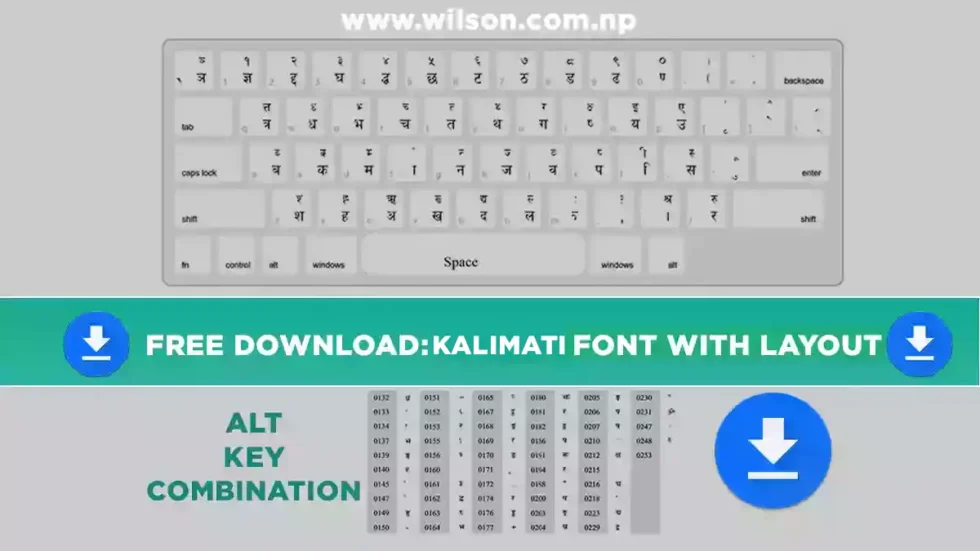
Installing the font is only half the job. To type in Nepali Unicode, you also need a Nepali Unicode keyboard layout. This is where most people get stuck, and most download pages skip it entirely. You have two main layouts to choose from:
Nepali Traditional Unicode
The key positions follow the old typewriter and Preeti layout.
Best for: typists who already know Preeti and want the same finger positions.
Nepali Romanized Unicode
Keys match English sounds: K gives क, M gives म, and so on.
Best for: beginners and anyone who types English every day.
Both layouts produce the same Unicode text, so Kalimati works with either one. Choose whichever feels natural to you.
Set up Nepali typing on Windows
Go to Settings → Time & language → Language & region → Add a language and add Nepali. This gives you Windows' built-in Nepali keyboard.
If you prefer the Romanized layout, install the Nepali Unicode Romanized keyboard released by Madan Puraskar Pustakalaya / Language Technology Kendra.
Press Windows + Space to switch between English and Nepali.
Open Word, choose Kalimati from the font list, and start typing.
Make Kalimati the default font in MS Word
Word often switches Nepali text back to Mangal or Nirmala UI. To stop this, press Ctrl + D to open the Font dialog. Under Complex scripts, set the font to Kalimati. Click Set As Default and choose All documents based on the Normal template.
Kalimati vs Preeti vs Kokila vs Mangal
These are the four Nepali fonts people ask about most. Here's how they compare:
In short: if you need Nepali text that looks the same everywhere, use Kalimati. If you need a proper bold weight, try Kokila. Use Preeti only when an older file or a typing exam requires it. For headlines and newspaper-style design, Kantipur font is another popular choice.
Kalimati Font Not Working? Common Fixes
Text shows as boxes or English letters
This almost always means the text was typed in Preeti (legacy) and then switched to Kalimati. Changing the font won't fix it. You need to convert the text from Preeti to Unicode first, then apply Kalimati. If the boxes appear only on someone else's computer, the file was probably typed in a legacy font. Retype or convert it to Unicode before sharing.
Half letters and conjuncts break in Photoshop or Illustrator
Adobe apps need their South Asian text engine turned on. In Photoshop, go to Preferences → Type and select Middle Eastern and South Asian. Then, in the Paragraph panel menu, choose Adobe World-Ready Paragraph Composer. Letters like क्ष and श्र will now join correctly.
Kalimati doesn't appear in the font list
Restart the app. Most programs only load fonts when they start.
Check that you installed the file and didn't just open it. On Windows, look for it in C:WindowsFonts.
In Word, scroll to K in the font list. Nepali fonts aren't grouped separately.
Using Kalimati in Canva
Canva lets you upload your own fonts through the Brand Kit, which requires a Canva Pro, Teams or Education plan. After uploading, type your Nepali text with a Unicode keyboard and select Kalimati.
Why This Kalimati Font Download Page Is Different
I looked at the pages that currently rank for this keyword, including government download pages and large font directories. Most of them give you a single link and nothing else. Here's what they usually leave out, and what this guide covers:
No installation steps. Government pages just say "click here to download". Here you get steps for Windows, Mac, Android, iPhone and Linux.
No credit or background. Font directories often leave the designer blank. Kalimati was made by Sanir Karmacharya at Madan Puraskar Pustakalaya.
No typing help. Almost no one explains that you need a Nepali Unicode keyboard, or the difference between the Traditional and Romanized layouts.
No troubleshooting. Boxes, broken conjuncts in Photoshop, and Word switching back to Mangal are the questions I get asked most. All of them are answered above.
Hidden downloads. Some sites add captchas or "human verification" before the file. This page links straight to the font.
My Experience Using Kalimati
I'm a web developer and designer in Kathmandu, and Kalimati is the Nepali font I install first on every new computer. I use it for Nepali documents for clients, for graphic design, and for my blog posts.
The mistake I see most often is someone typing a full letter in Preeti, emailing it, and the recipient seeing random English characters. Since I switched to Kalimati with the Unicode keyboard, that hasn't happened to me once. The same file opens correctly on a client's laptop, on my phone, and when I paste it into WordPress.
My one complaint is that Kalimati has no true bold. Word's fake bold looks a little heavy on print. For headings, I use Kalimati for the body text and pair it with a bolder Devanagari font such as Kokila Bold.
Frequently Asked Questions
Is Kalimati font free to download?
Yes. Kalimati is free to download and use for typing Nepali in documents, forms and websites. If you plan to bundle the font file inside a commercial product, check the licence notes included with the font first.
Is Kalimati a Unicode font?
Yes. Kalimati is a Nepali Unicode font, which is why it's the standard for government and office work. Preeti is the popular non-Unicode (legacy) font.
Does Windows come with Kalimati pre-installed?
No. Windows includes other Devanagari fonts such as Mangal, Nirmala UI and Kokila, but Kalimati has to be downloaded and installed separately.
Is there a Kalimati Bold font?
There's no official Kalimati Bold. Kalimati comes in a single Regular weight. Files sold or shared as "Kalimati Bold" are usually renamed copies. Use your app's bold button, or use Kokila when you need a real bold.
Can I use Kalimati on my website?
Yes. Because Kalimati is Unicode, Nepali text on your site is readable and searchable even without it. To make the text display in Kalimati for every visitor, host the font file on your server and load it with CSS @font-face.
How do I convert Preeti text to Kalimati?
Paste the Preeti text into a Preeti-to-Unicode converter, copy the result, and apply the Kalimati font. Simply changing the font from Preeti to Kalimati will not work, because the underlying characters are different.
Which keyboard layout should I use with Kalimati?
Use Nepali Traditional Unicode if you already know Preeti typing. Use Nepali Romanized Unicode if you're a beginner. Both produce the same Unicode text.
Preeti Font Download – Free Nepali Font with Keyboard Layout
By Wilson Shrestha · Graphic designer & web developer, Kathmandu · Updated
Download the Preeti font for free, install it in under a minute, and start typing Nepali using the full Preeti keyboard layout, Alt key codes and practice tips below.
100% freeWindows, Mac & LinuxNo sign-upVirus-free TTF file
Preeti is the most popular traditional Nepali font in Nepal. Printing presses, designers, schools and offices have used it for decades to create invitation cards, certificates, banners, notices and office documents. If you have ever received a Nepali file that only showed English letters like “g]kfn”, it was written in Preeti and the font simply was not installed.
I have used Preeti for years in my own graphic design and document work, so this guide covers what people actually need: the font file, installation steps for every device, the complete keyboard layout, Alt codes for tricky characters and how to convert Preeti text to Unicode.
Preeti Font at a Glance
Font name
Preeti
Script
Devanagari (Nepali)
Style
Traditional, print-friendly
File type
TrueType (.ttf)
Encoding
Non-Unicode (ASCII-mapped)
Works on
Windows, macOS, Linux
Best for
Print, invitations, certificates, design
Price
Free
Download Preeti Font for Free
Click the button below to download the Preeti font file. It is a standard TrueType font that works in MS Word, Excel, PowerPoint, Photoshop, Illustrator, CorelDRAW, Canva (desktop upload) and most other software.
Tip: Download fonts only from trusted sites. A real font file ends in .ttf or .otf. Never run an .exe file that claims to be a font.
How to Install Preeti Font (Windows, Mac & Android)
Windows 10 / 11
Download the Preeti .ttf file.
Right-click it and choose Install (or Install for all users).
Close and reopen Word or Photoshop.
Select Preeti from the font list.
macOS
Double-click the .ttf file.
Font Book opens. Click Install Font.
Restart Pages, Word or your design app.
Choose Preeti and type.
Android / iPhone
Phones cannot install Preeti as a system font.
Use apps that accept custom fonts (e.g. PixelLab) and import the .ttf.
For chatting and social media, type in Nepali Unicode instead.
Text still showing English letters? The font is not installed on that computer, or the app was opened before installation. Install the font and restart the app.
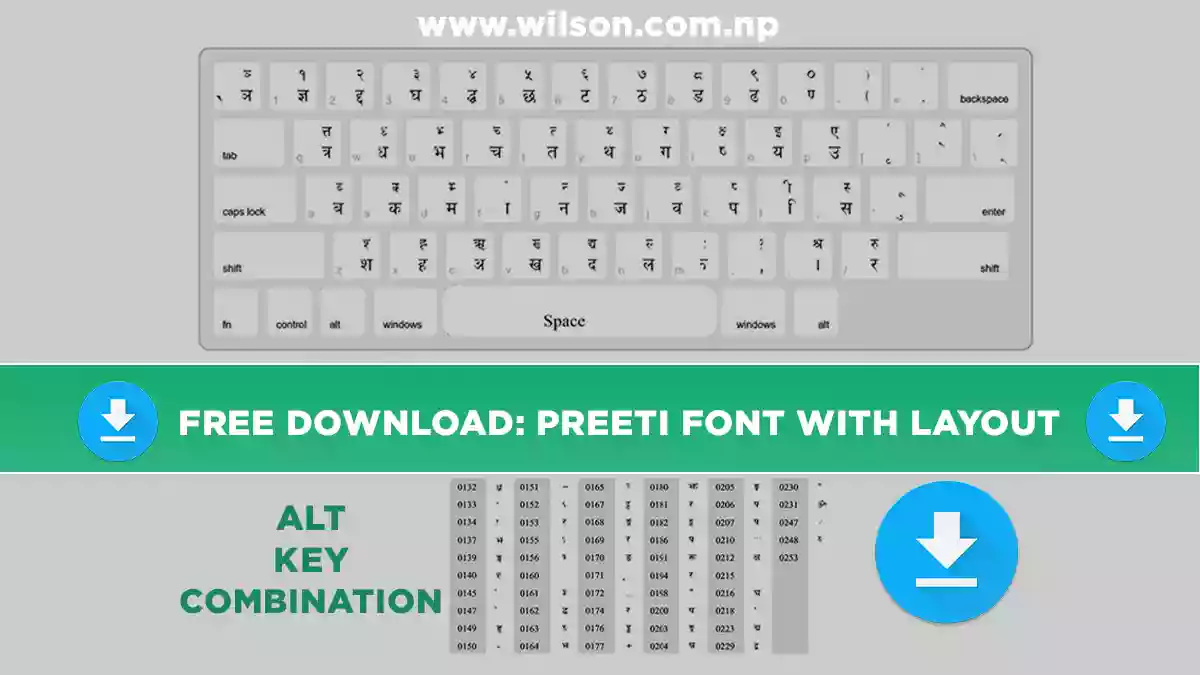
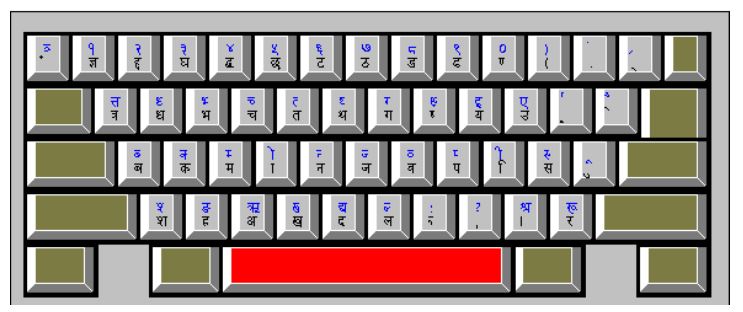
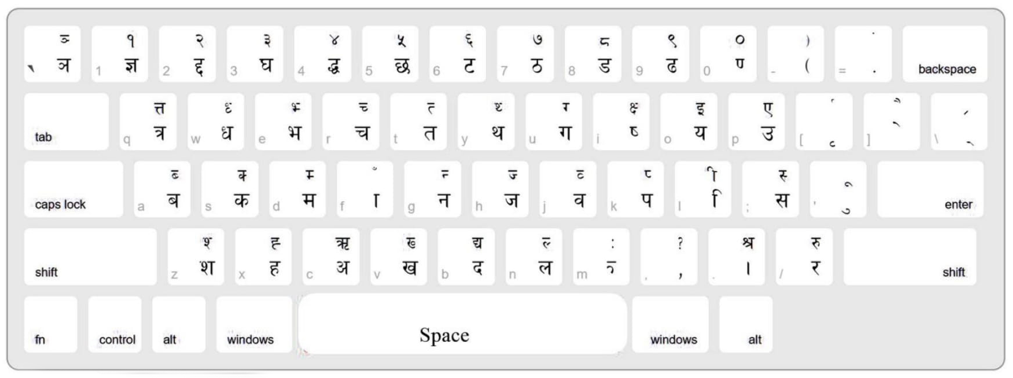
Preeti Font Keyboard Layout
Preeti places Nepali letters on a normal English keyboard. The lower character on each key appears when you press the key alone. The upper character appears when you hold Shift.
Preeti keyboard layout. Click the image to open the full-size version for printing.
Preeti Key Chart: Which Key Types Which Letter
Here is the same layout as searchable text, so you can quickly find any letter.
Consonants and vowels (no Shift)
Key
Nepali
Key
Nepali
Key
Nepali
a
ब
s
क
d
म
f
ा
g
न
h
ज
j
व
k
प
l
ि
;
स
q
त्र
w
ध
e
भ
r
च
t
त
y
थ
u
ग
i
ष
o
य
p
उ
z
श
x
ह
c
अ
v
ख
b
द
n
ल
/
र
1
ज्ञ
2
द्द
3
घ
4
द्ध
5
छ
6
ट
7
ठ
8
ड
9
ढ
0
ण
.
।
,
,
Useful Shift combinations
Keys
Nepali
Keys
Nepali
Keys
Nepali
Shift+I
क्ष
Shift+Q
त्त
Shift+.
श्र
Shift+O
इ
Shift+P
ए
Shift+C
ऋ
Shift+L
ी
Shift+M
ः
Shift+/
रु
Shift+B
द्य
Shift+1…0
१ … ०
Shift+;
स्
Half letters: hold Shift with a consonant key to get its half form, e.g. Shift+S = क्, Shift+G = न्, Shift+K = प्.
Practice examples
Type this
You get
g]kfn
नेपाल
gd:t]
नमस्ते
sfd
काम
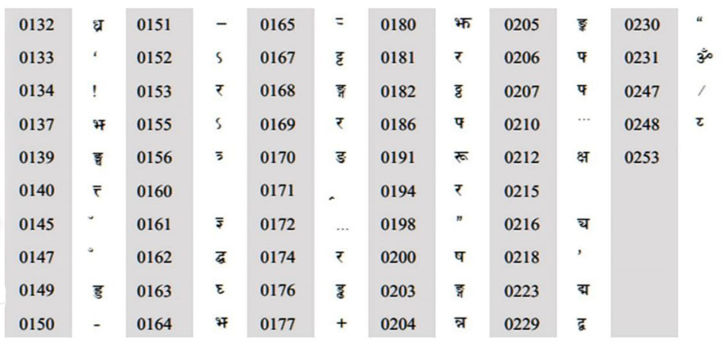
Preeti Alt Key Codes for Special Characters
Some characters are not on the keyboard. To type them, hold Alt and type the 4-digit code on the numeric keypad (Num Lock on). For example, Alt + 0231 types ॐ.
Full Preeti Alt code chart. Codes only work with the numeric keypad, not the top number row.
Using a laptop without a number pad? Turn on the on-screen keyboard (Windows: Win+Ctrl+O), enable its numeric keypad in Options, and use those keys with Alt.
Preeti vs Unicode: Which One Should You Use?
This is the most common source of confusion. Preeti is a non-Unicode font: it only changes how English characters look. Unicode fonts like Kalimati or Mangal store real Nepali characters that display correctly everywhere.
🖨️ Use Preeti for
Printing press and offset jobs
Wedding cards, certificates, banners
Photoshop / CorelDRAW design work
Editing old Preeti documents
🌐 Use Unicode for
Websites, blogs and SEO
Facebook, Messenger, Viber, email
Online government forms
Files you share with others
How to Convert Preeti to Unicode (and Back)
If you need to post Preeti text online, or a client sends Unicode text that must go into a Preeti design, use a converter. I built a free one that works in your browser:
Copy your Preeti text (it will look like English letters).
Yes. Preeti is free to download and use for personal and everyday work such as documents, invitation cards and design projects.
Why does my Preeti text show English letters?
The Preeti font is not installed on that device, or the text is being viewed somewhere that only supports Unicode (like Facebook or a website). Install the font, or convert the text to Unicode.
Can I use Preeti font on my phone?
Not as a system font. You can import the .ttf into design apps that support custom fonts. For messaging and social media, type in Nepali Unicode instead.
How do I type ॐ, क्ष and ज्ञ in Preeti?
Press Alt + 0231 (numeric keypad) for ॐ, Shift + I for क्ष, and the 1 key for ज्ञ.
Is Preeti the same as Kalimati?
No. Preeti is a non-Unicode font mainly used for print and design. Kalimati is a Unicode font used for websites, government online forms and sharing text digitally.
Does Preeti work in MS Word and Photoshop?
Yes. After installing the font, restart the program and choose Preeti from the font list. It works in Word, Excel, PowerPoint, Photoshop, Illustrator and CorelDRAW.
Ready to Type in Nepali?
Download the Preeti font, keep the layout handy and practise with Typeshala. You will be typing confidently within a week.
Wilson Shrestha is a graphic designer and web developer from Kathmandu, Nepal. He uses Nepali fonts daily in print, branding and web projects, and builds free tools for Nepali typists.
Free Hindi Fonts Download for PC: Where to Find and How to Install Them
Free Hindi fonts are essential for anyone looking to type in Hindi on their PC. These fonts allow users to create documents, emails, and other text-based content in Hindi, making it easier to communicate with others who speak the language. With the popularity of Hindi increasing globally, the demand for free Hindi fonts has also been on the rise.
There are many websites that offer free Hindi fonts for download. These fonts come in a variety of styles and designs, making it easy for users to find the perfect font for their needs. Some websites even offer font packages that include multiple fonts, allowing users to experiment with different styles and designs. Additionally, many of these websites also provide instructions on how to install the fonts on a PC, making it easy for users to get started.
Hindi is one of the most widely spoken languages in the world and is the official language of India. If you are someone who works with Hindi language content, it is essential to have access to a variety of Hindi fonts on your PC. Here are a few reasons why downloading free Hindi fonts for PC is important:
1. Better readability and comprehension
Using the same font for all Hindi content can lead to boredom and lack of interest in reading. By using different fonts, you can make the content more visually appealing, which can lead to better readability and comprehension. With a wide variety of free Hindi fonts available for download, you can choose the best font that suits your content and enhances its readability.
2. Improved aesthetics
Fonts play a crucial role in the overall aesthetics of any content. Using the right font can make the content more attractive and pleasing to the eyes. With the availability of free Hindi fonts for download, you can experiment with different fonts and choose the one that best complements your content.
3. Enhanced creativity
Having access to a variety of Hindi fonts can also enhance your creativity. With different fonts available, you can experiment with various font styles, sizes, and colors to create unique and visually appealing content. This can help you stand out from the crowd and make your content more memorable.
4. Cost-effective
Purchasing Hindi fonts can be expensive, especially if you require multiple fonts for various projects. However, with the availability of free Hindi fonts for download, you can save a significant amount of money. You can download and use as many fonts as you need without worrying about the cost.
In conclusion, downloading free Hindi fonts for PC is essential for anyone who works with Hindi language content. With a wide variety of fonts available for download, you can choose the best font that suits your content and enhances its readability, aesthetics, and creativity. Additionally, downloading free Hindi fonts is cost-effective and can save you a significant amount of money.
Where to Find Free Hindi Fonts for PC
For those looking for free Hindi fonts for their PC, there are several websites that offer a wide range of options. In this section, we will discuss some of the most popular websites for free Hindi font downloads and provide tips for finding high-quality fonts.
Popular Websites for Free Hindi Fonts Download
HindiFonts.com:This website offers a vast collection of trendy, stylish, and high-quality Hindi fonts for any device, including mobile, tablet, desktop, Apple, Windows, Linux, and iPad. Users can download fonts for free and preview how their desired text looks using the “Enter Your Text To Preview” feature.
IndiaTyping.com:This website provides all types of Hindi fonts for free download, including the popular Devlys Hindi font, Mangal, and many more. Users can also download Hindi keyboard layouts for the Typewriter (Remington) layout used in Hindi typing.
TypingGuru.net:This website offers over 1000 free Hindi fonts for Windows and Mac, including Chanakya font, Devnagari font, Krishna font, Kruti Dev font, Kundli font, New Delhi font, and more. Users can also find fonts for other languages and typing tutorials.
Tips for Finding High-Quality Free Hindi Fonts
Look for websites that offer a wide range of fonts and font styles to choose from. This will give you more options to find the perfect font for your needs.
Check the font’s compatibility with your device and software before downloading. Some fonts may not work with certain operating systems or software programs.
Read user reviews and ratings to get an idea of the font’s quality and usability. This can help you avoid downloading fonts that may have issues with readability or other problems.
Consider the font’s licensing before downloading. Some fonts may be free for personal use only, while others may require attribution or payment for commercial use.
In conclusion, finding free Hindi fonts for your PC is easy with the help of popular websites like HindiFonts.com, IndiaTyping.com, and TypingGuru.net. By following the tips provided, you can ensure that you find high-quality fonts that are compatible with your device and software, and meet your specific needs.
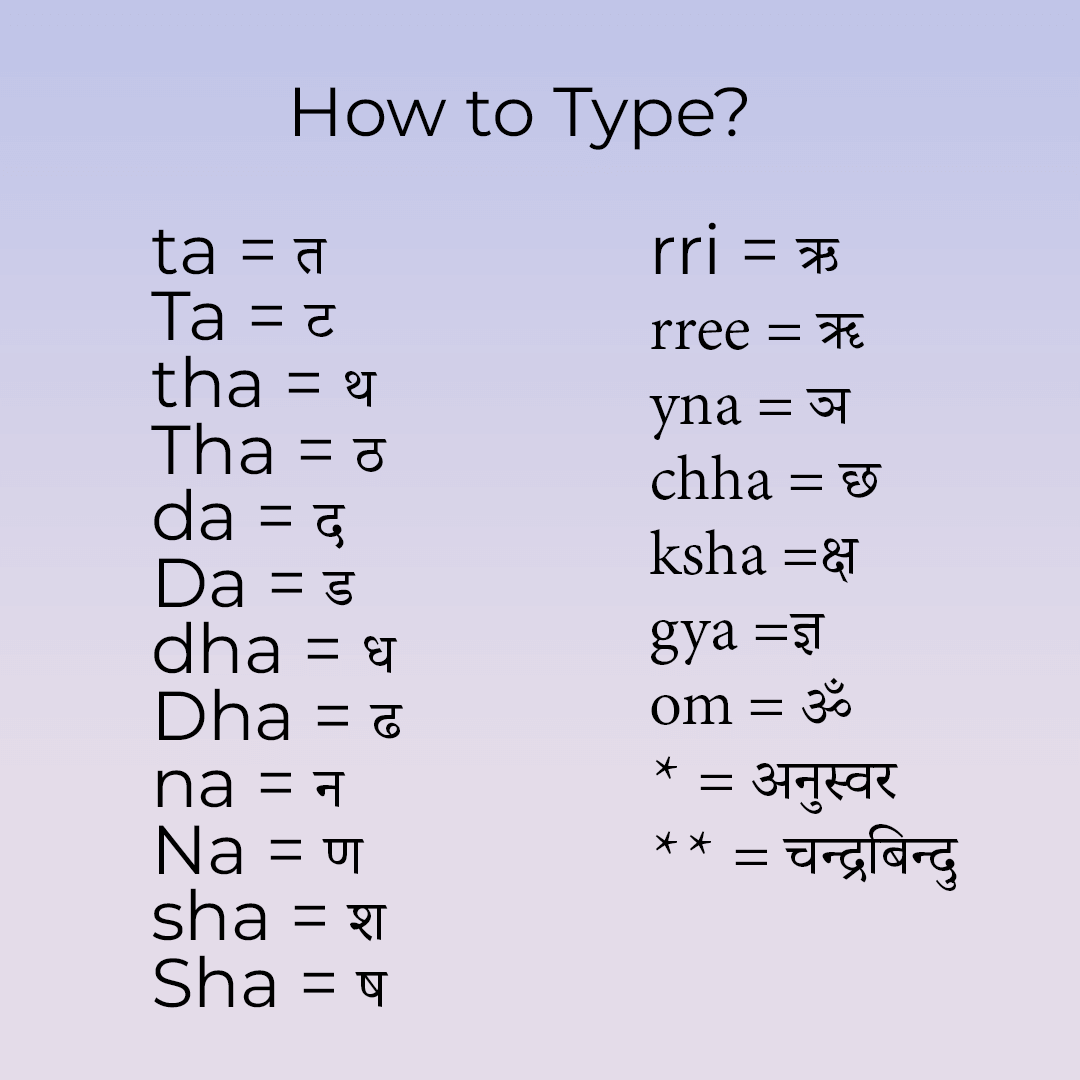
You are in the right place, you will find an easy and quick English and Nepali Unicode converter plus a converter for Unicode to Preeti Font. So that you can perform both tasks on the same page. I have created this because it was not available on another site.
I use this page everyday in my day to day life for my work like Graphic designing, blogging, and Nepali Documentation.
Easy way to convert English letters to Nepali letters Unicode. No need to know Nepali Typing, now you can convert English alphabets to Nepali letters. It automatically translates your English letter into Nepali letters.
You can use this in sending messages, Graphic design, Documents, or letter typing.
शब्दको अन्त्यमा हलन्त राख्नको लागि backslash (\) अक्षर प्रयोग गर्नुहोस् । Example: bas = बस, bas\ = बस् |
If a Nepali letter gets wrongly analyzed with the preceding letter, use the slash (/) key to separate. Example: pratishatko = प्रतिशत्को, pratishat/ko = प्रतिशतको |
Combine English into your Nepali Unicode text: Simply put any English text inside the curly {} brackets to keep it in English. Example: yo {mobile} mero ho. = यो mobile मेरो हो