
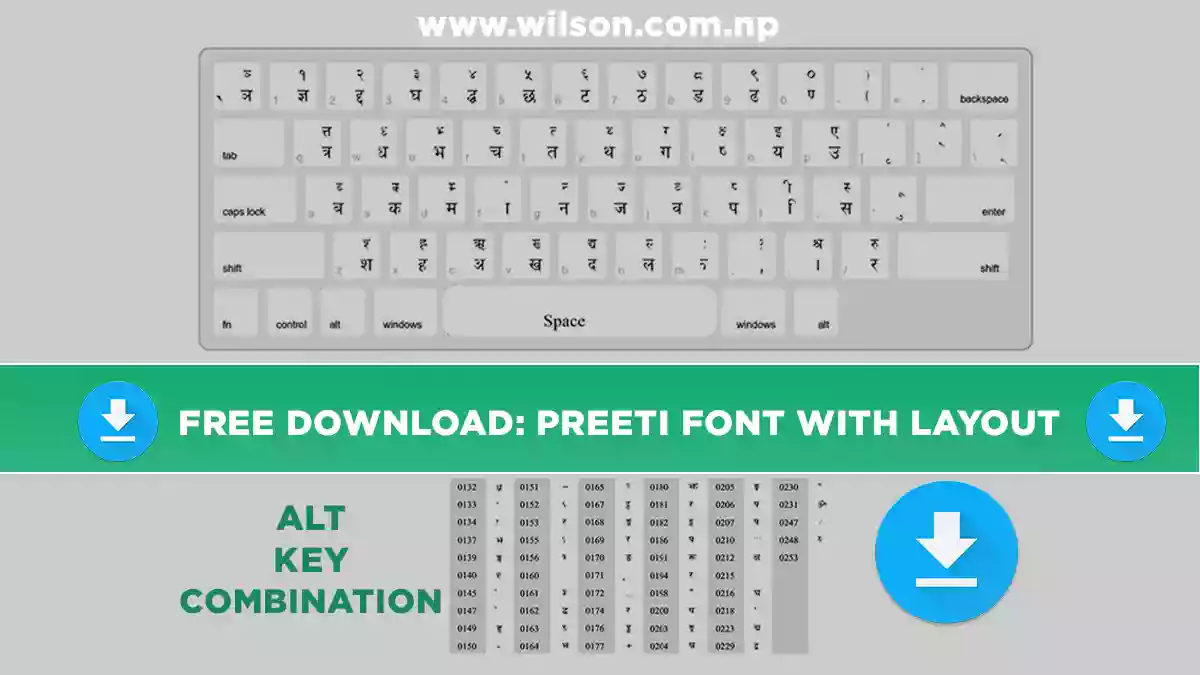
Preeti Font Download – Free Nepali Font with Keyboard Layout
Download the Preeti font for free, install it in under a minute, and start typing Nepali using the full Preeti keyboard layout, Alt key codes and practice tips below.
Preeti is the most popular traditional Nepali font in Nepal. Printing presses, designers, schools and offices have used it for decades to create invitation cards, certificates, banners, notices and office documents. If you have ever received a Nepali file that only showed English letters like “g]kfn”, it was written in Preeti and the font simply was not installed.
I have used Preeti for years in my own graphic design and document work, so this guide covers what people actually need: the font file, installation steps for every device, the complete keyboard layout, Alt codes for tricky characters and how to convert Preeti text to Unicode.
Preeti Font at a Glance
| Font name | Preeti |
| Script | Devanagari (Nepali) |
| Style | Traditional, print-friendly |
| File type | TrueType (.ttf) |
| Encoding | Non-Unicode (ASCII-mapped) |
| Works on | Windows, macOS, Linux |
| Best for | Print, invitations, certificates, design |
| Price | Free |
Download Preeti Font for Free
Click the button below to download the Preeti font file. It is a standard TrueType font that works in MS Word, Excel, PowerPoint, Photoshop, Illustrator, CorelDRAW, Canva (desktop upload) and most other software.
How to Install Preeti Font (Windows, Mac & Android)
- Download the Preeti .ttf file.
- Right-click it and choose Install (or Install for all users).
- Close and reopen Word or Photoshop.
- Select Preeti from the font list.
- Double-click the .ttf file.
- Font Book opens. Click Install Font.
- Restart Pages, Word or your design app.
- Choose Preeti and type.
- Phones cannot install Preeti as a system font.
- Use apps that accept custom fonts (e.g. PixelLab) and import the .ttf.
- For chatting and social media, type in Nepali Unicode instead.
Preeti Font Keyboard Layout
Preeti places Nepali letters on a normal English keyboard. The lower character on each key appears when you press the key alone. The upper character appears when you hold Shift.
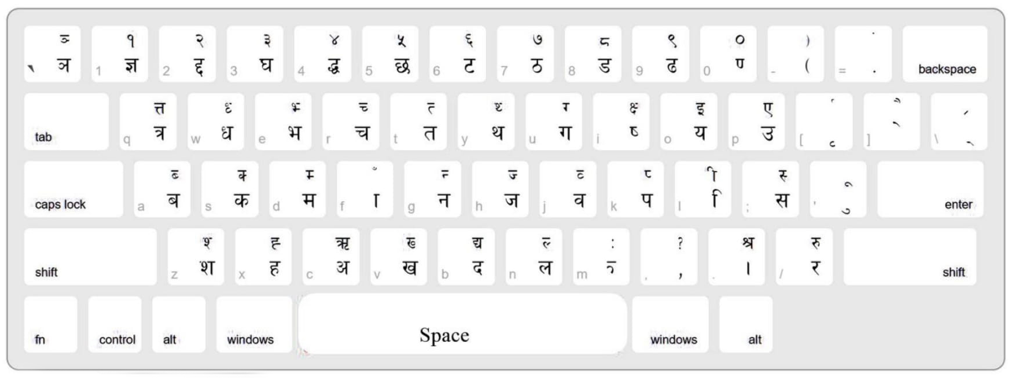
Preeti Key Chart: Which Key Types Which Letter
Here is the same layout as searchable text, so you can quickly find any letter.
Consonants and vowels (no Shift)
| Key | Nepali | Key | Nepali | Key | Nepali |
|---|---|---|---|---|---|
| a | ब | s | क | d | म |
| f | ा | g | न | h | ज |
| j | व | k | प | l | ि |
| ; | स | q | त्र | w | ध |
| e | भ | r | च | t | त |
| y | थ | u | ग | i | ष |
| o | य | p | उ | z | श |
| x | ह | c | अ | v | ख |
| b | द | n | ल | / | र |
| 1 | ज्ञ | 2 | द्द | 3 | घ |
| 4 | द्ध | 5 | छ | 6 | ट |
| 7 | ठ | 8 | ड | 9 | ढ |
| 0 | ण | . | । | , | , |
Useful Shift combinations
| Keys | Nepali | Keys | Nepali | Keys | Nepali |
|---|---|---|---|---|---|
| Shift+I | क्ष | Shift+Q | त्त | Shift+. | श्र |
| Shift+O | इ | Shift+P | ए | Shift+C | ऋ |
| Shift+L | ी | Shift+M | ः | Shift+/ | रु |
| Shift+B | द्य | Shift+1…0 | १ … ० | Shift+; | स् |
Practice examples
| Type this | You get |
|---|---|
| g]kfn | नेपाल |
| gd:t] | नमस्ते |
| sfd | काम |
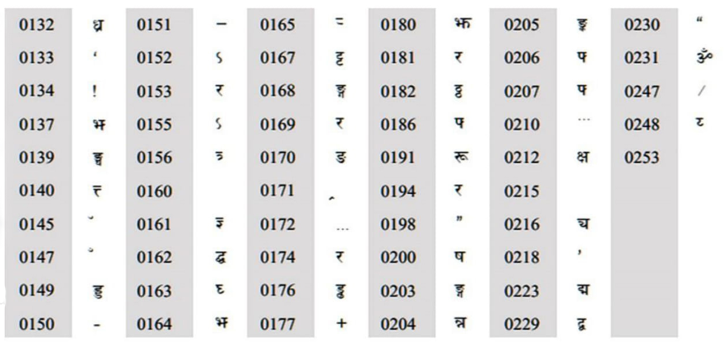
Preeti Alt Key Codes for Special Characters
Some characters are not on the keyboard. To type them, hold Alt and type the 4-digit code on the numeric keypad (Num Lock on). For example, Alt + 0231 types ॐ.
Preeti vs Unicode: Which One Should You Use?
This is the most common source of confusion. Preeti is a non-Unicode font: it only changes how English characters look. Unicode fonts like Kalimati or Mangal store real Nepali characters that display correctly everywhere.
🖨️ Use Preeti for
- Printing press and offset jobs
- Wedding cards, certificates, banners
- Photoshop / CorelDRAW design work
- Editing old Preeti documents
🌐 Use Unicode for
- Websites, blogs and SEO
- Facebook, Messenger, Viber, email
- Online government forms
- Files you share with others
How to Convert Preeti to Unicode (and Back)
If you need to post Preeti text online, or a client sends Unicode text that must go into a Preeti design, use a converter. I built a free one that works in your browser:
- Copy your Preeti text (it will look like English letters).
- Open the Preeti to Unicode converter and paste it in.
- Copy the Unicode result and paste it anywhere: Facebook, Word, or your website.
How to Learn Preeti Typing Fast
- Print the layout above and keep it next to your keyboard for the first week.
- Learn the home row first: a s d f g h j k l ; give you ब क म ा न ज व प ि स.
- Practise 15 minutes daily with Typeshala, a free typing tutor for Nepali and English.
- Type real words: your name, address and common words build speed faster than random drills.
Frequently Asked Questions
Is Preeti font free to download?
Yes. Preeti is free to download and use for personal and everyday work such as documents, invitation cards and design projects.
Why does my Preeti text show English letters?
The Preeti font is not installed on that device, or the text is being viewed somewhere that only supports Unicode (like Facebook or a website). Install the font, or convert the text to Unicode.
Can I use Preeti font on my phone?
Not as a system font. You can import the .ttf into design apps that support custom fonts. For messaging and social media, type in Nepali Unicode instead.
How do I type ॐ, क्ष and ज्ञ in Preeti?
Press Alt + 0231 (numeric keypad) for ॐ, Shift + I for क्ष, and the 1 key for ज्ञ.
Is Preeti the same as Kalimati?
No. Preeti is a non-Unicode font mainly used for print and design. Kalimati is a Unicode font used for websites, government online forms and sharing text digitally.
Does Preeti work in MS Word and Photoshop?
Yes. After installing the font, restart the program and choose Preeti from the font list. It works in Word, Excel, PowerPoint, Photoshop, Illustrator and CorelDRAW.
Ready to Type in Nepali?
Download the Preeti font, keep the layout handy and practise with Typeshala. You will be typing confidently within a week.
⬇ Download Preeti Font Free