Kalimati Font Download
"@context": "https://schema.org",
"@type": "FAQPage",
"mainEntity": [
{
"@type": "Question",
"name": "Is Kalimati font free to download?",
"acceptedAnswer": {
"@type": "Answer",
"text": "Yes. Kalimati is free to download and use for typing Nepali in documents, forms and websites. If you plan to bundle the font file inside a commercial product, check the licence notes included with the font first."
}
},
{
"@type": "Question",
"name": "Is Kalimati a Unicode font?",
"acceptedAnswer": {
"@type": "Answer",
"text": "Yes. Kalimati is a Nepali Unicode font, which is why it's the standard for government and office work. Preeti is the popular non-Unicode (legacy) font."
}
},
{
"@type": "Question",
"name": "Does Windows come with Kalimati pre-installed?",
"acceptedAnswer": {
"@type": "Answer",
"text": "No. Windows includes other Devanagari fonts such as Mangal, Nirmala UI and Kokila, but Kalimati has to be downloaded and installed separately."
}
},
{
"@type": "Question",
"name": "Is there a Kalimati Bold font?",
"acceptedAnswer": {
"@type": "Answer",
"text": "There's no official Kalimati Bold. Kalimati comes in a single Regular weight. Files sold or shared as "Kalimati Bold" are usually renamed copies. Use your app's bold button, or use Kokila when you need a real bold."
}
},
{
"@type": "Question",
"name": "Can I use Kalimati on my website?",
"acceptedAnswer": {
"@type": "Answer",
"text": "Yes. Because Kalimati is Unicode, Nepali text on your site is readable and searchable even without it. To make the text display in Kalimati for every visitor, host the font file on your server and load it with CSS @font-face."
}
},
{
"@type": "Question",
"name": "How do I convert Preeti text to Kalimati?",
"acceptedAnswer": {
"@type": "Answer",
"text": "Paste the Preeti text into a Preeti-to-Unicode converter, copy the result, and apply the Kalimati font. Simply changing the font from Preeti to Kalimati will not work, because the underlying characters are different."
}
},
{
"@type": "Question",
"name": "Which keyboard layout should I use with Kalimati?",
"acceptedAnswer": {
"@type": "Answer",
"text": "Use Nepali Traditional Unicode if you already know Preeti typing. Use Nepali Romanized Unicode if you're a beginner. Both produce the same Unicode text."
}
}
]
}
Updated October 2026
Need the Kalimati font download for a Nepali office letter, a Lok Sewa form, or a design project? You can download Kalimati Regular for free below. It's the standard Nepali Unicode font used in government offices, newspapers, and schools across Nepal. This guide also shows you how to install it on Windows, Mac, Android and iPhone, how to type with it, and how to fix the problems most other download pages don't mention: boxes, broken letters, and Kalimati not appearing in Word.
Free download
Kalimati Regular – Nepali Unicode Font
- File: Kalimati Regular.otf (OpenType)
- Works on: Windows 7/10/11, macOS, Linux, Android (via apps)
- Price: Free – no sign-up, no "human verification" pop-ups
The file downloads directly — your browser will save Kalimati-Regular.otf to your Downloads folder.
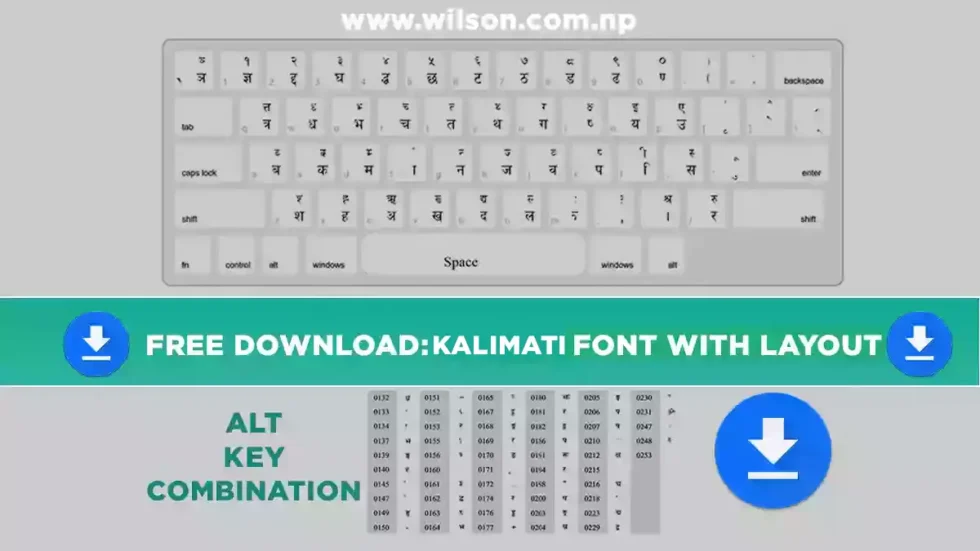
Kalimati Font at a Glance
| Font name | Kalimati (Regular) |
| Script | Devanagari – Nepali, plus Hindi, Sanskrit and other Devanagari languages |
| Encoding | Unicode (not a legacy font like Preeti) |
| Weights | Regular only – no official Bold or Italic |
| File format | OpenType (.otf); a .ttf version also circulates |
| Designer | Sanir Karmacharya |
| Developed at | Madan Puraskar Pustakalaya (MPP), Lalitpur – as part of its Nepali language computing work |
| Cost | Free |
| Best for | Office letters, government forms, reports, websites, social media, print |
What Is Kalimati Font?
Kalimati is a free Devanagari Unicode font made for the Nepali language. Sanir Karmacharya designed it at Madan Puraskar Pustakalaya, the Lalitpur-based library that led much of Nepal's early work on Nepali in Unicode. Over the years it has become the default choice for Nepali text in government offices, local bodies, schools, banks and newsrooms.
Because Kalimati is a Unicode font, the letters you type are stored as real Nepali characters. That means:
- Your text stays readable when you email it, paste it on Facebook, or publish it on a website, even if the reader doesn't have Kalimati installed.
- Google can search and index it, so it works for Nepali blogs and websites.
- You can switch the text to another Unicode font (Kokila, Mangal, Nirmala UI) without it turning into gibberish.
This is the key difference from older fonts like Preeti, which only look right on a computer that has that exact font installed.
Kalimati Font Preview
Here's what Nepali text looks like in Kalimati. If you already have the font installed, the lines below will show in it; otherwise your browser uses its default Devanagari font.
नेपाली भाषामा टाइप गर्न कालिमाटी फन्ट सबैभन्दा धेरै प्रयोग गरिन्छ।
अ आ इ ई उ ऊ ऋ ए ऐ ओ औ अं अः
क ख ग घ ङ च छ ज झ ञ ट ठ ड ढ ण त थ द ध न प फ ब भ म य र ल व श ष स ह
क्ष त्र ज्ञ श्र द्ध द्व ह्म
। १ २ ३ ४ ५ ६ ७ ८ ९
How to Download Kalimati Font
- Click the Download Kalimati Font button at the top of this page.
- Your browser downloads Kalimati-Regular.otf directly — no preview screen, no extra steps.
- The file saves to your Downloads folder. Now install it using the steps below.
Safety tip: Many "Kalimati font download" sites send you through ad pages, captchas or .exe "installers". A real font is a single .otf or .ttf file. Never run an .exe file to install a font.
How to Install Kalimati Font
Installing takes under a minute on any device. For screenshots and more detail, see my full guide on how to install Nepali fonts.
On Windows 10 and 11
- Open your Downloads folder and find Kalimati-Regular.otf. If it came as a .zip, right-click and choose Extract All first.
- Right-click the file and choose Install. On a shared office PC, choose Install for all users (you'll need admin rights).
- Close and reopen MS Word, Excel, Photoshop or any app that was already open. Kalimati will now appear in the font list.
On Mac (macOS)
- Double-click Kalimati-Regular.otf.
- Font Book opens with a preview. Click Install.
- Restart Pages, Word, Keynote or your design app.
On Android
Android can already display Nepali Unicode text, so you don't need Kalimati to read Nepali on your phone. To design with Kalimati (posters, status images, thumbnails), load the font inside the app:
- Download the .otf file to your phone.
- In apps like PixelLab, open the font menu and use the option to add or import a font, then pick the Kalimati file.
- For typing, install a Nepali keyboard (for example Gboard with Nepali added). Your text will be Unicode, so it will look fine anywhere you paste it.
On iPhone and iPad
iOS shows Nepali text out of the box. To use Kalimati inside design apps, install it through a font-installer app from the App Store, or import it directly in apps that support custom fonts. Add the Nepali keyboard under Settings → General → Keyboard → Keyboards.
On Linux (Ubuntu and others)
Double-click the file and click Install in the font viewer, or copy it into ~/.local/share/fonts and run fc-cache -f.
How to Type in Kalimati Font
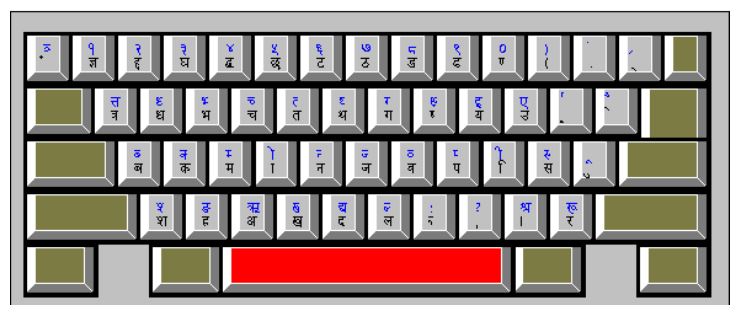
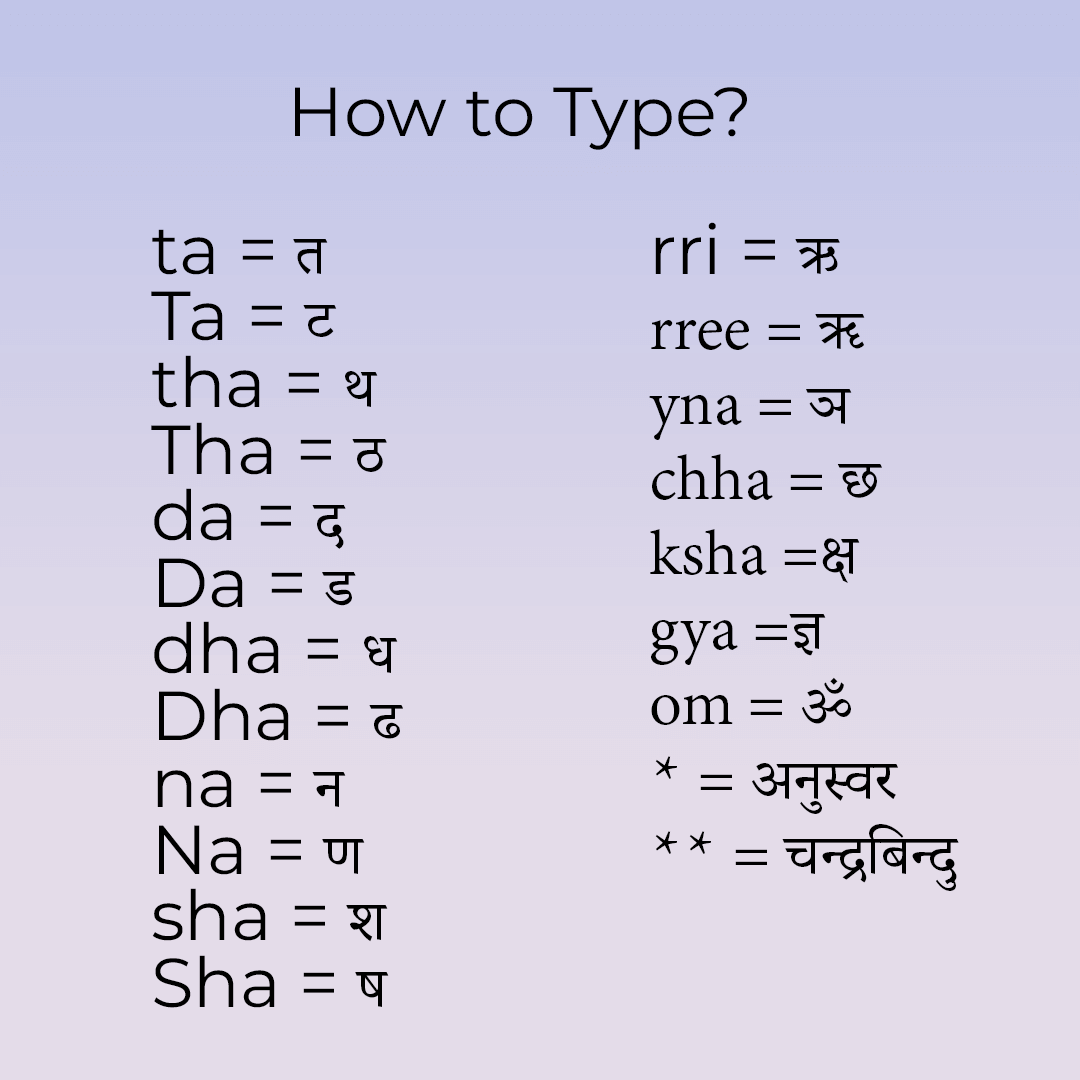
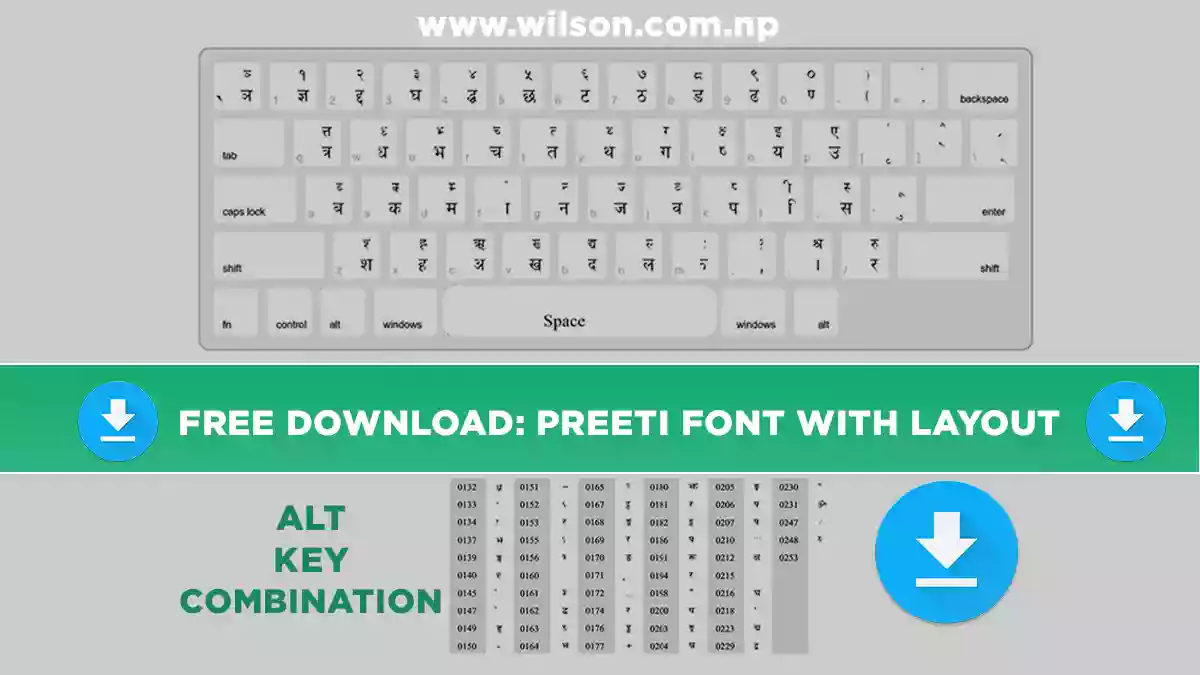
Installing the font is only half the job. To type in Nepali Unicode, you also need a Nepali Unicode keyboard layout. This is where most people get stuck, and most download pages skip it entirely. You have two main layouts to choose from:
Nepali Traditional Unicode
The key positions follow the old typewriter and Preeti layout.
Best for: typists who already know Preeti and want the same finger positions.
Nepali Romanized Unicode
Keys match English sounds: K gives क, M gives म, and so on.
Best for: beginners and anyone who types English every day.
Both layouts produce the same Unicode text, so Kalimati works with either one. Choose whichever feels natural to you.
Set up Nepali typing on Windows
- Go to Settings → Time & language → Language & region → Add a language and add Nepali. This gives you Windows' built-in Nepali keyboard.
- If you prefer the Romanized layout, install the Nepali Unicode Romanized keyboard released by Madan Puraskar Pustakalaya / Language Technology Kendra.
- Press Windows + Space to switch between English and Nepali.
- Open Word, choose Kalimati from the font list, and start typing.
Make Kalimati the default font in MS Word
Word often switches Nepali text back to Mangal or Nirmala UI. To stop this, press Ctrl + D to open the Font dialog. Under Complex scripts, set the font to Kalimati. Click Set As Default and choose All documents based on the Normal template.
Kalimati vs Preeti vs Kokila vs Mangal
These are the four Nepali fonts people ask about most. Here's how they compare:
| Font | Type | Works when shared? | Best use |
|---|---|---|---|
| Kalimati | Unicode | Yes | Office documents, government forms, web |
| Preeti | Legacy (non-Unicode) | Only if the reader has Preeti | Older print and DTP files, typing tests |
| Kokila | Unicode | Yes | Documents with Bold/Italic, formal print |
| Mangal | Unicode | Yes | Built-in Windows fallback |
In short: if you need Nepali text that looks the same everywhere, use Kalimati. If you need a proper bold weight, try Kokila. Use Preeti only when an older file or a typing exam requires it. For headlines and newspaper-style design, Kantipur font is another popular choice.
Kalimati Font Not Working? Common Fixes
Text shows as boxes or English letters
This almost always means the text was typed in Preeti (legacy) and then switched to Kalimati. Changing the font won't fix it. You need to convert the text from Preeti to Unicode first, then apply Kalimati. If the boxes appear only on someone else's computer, the file was probably typed in a legacy font. Retype or convert it to Unicode before sharing.
Half letters and conjuncts break in Photoshop or Illustrator
Adobe apps need their South Asian text engine turned on. In Photoshop, go to Preferences → Type and select Middle Eastern and South Asian. Then, in the Paragraph panel menu, choose Adobe World-Ready Paragraph Composer. Letters like क्ष and श्र will now join correctly.
Kalimati doesn't appear in the font list
- Restart the app. Most programs only load fonts when they start.
- Check that you installed the file and didn't just open it. On Windows, look for it in C:WindowsFonts.
- In Word, scroll to K in the font list. Nepali fonts aren't grouped separately.
Using Kalimati in Canva
Canva lets you upload your own fonts through the Brand Kit, which requires a Canva Pro, Teams or Education plan. After uploading, type your Nepali text with a Unicode keyboard and select Kalimati.
Why This Kalimati Font Download Page Is Different
I looked at the pages that currently rank for this keyword, including government download pages and large font directories. Most of them give you a single link and nothing else. Here's what they usually leave out, and what this guide covers:
- No installation steps. Government pages just say "click here to download". Here you get steps for Windows, Mac, Android, iPhone and Linux.
- No credit or background. Font directories often leave the designer blank. Kalimati was made by Sanir Karmacharya at Madan Puraskar Pustakalaya.
- No typing help. Almost no one explains that you need a Nepali Unicode keyboard, or the difference between the Traditional and Romanized layouts.
- No troubleshooting. Boxes, broken conjuncts in Photoshop, and Word switching back to Mangal are the questions I get asked most. All of them are answered above.
- Hidden downloads. Some sites add captchas or "human verification" before the file. This page links straight to the font.
My Experience Using Kalimati
I'm a web developer and designer in Kathmandu, and Kalimati is the Nepali font I install first on every new computer. I use it for Nepali documents for clients, for graphic design, and for my blog posts.
The mistake I see most often is someone typing a full letter in Preeti, emailing it, and the recipient seeing random English characters. Since I switched to Kalimati with the Unicode keyboard, that hasn't happened to me once. The same file opens correctly on a client's laptop, on my phone, and when I paste it into WordPress.
My one complaint is that Kalimati has no true bold. Word's fake bold looks a little heavy on print. For headings, I use Kalimati for the body text and pair it with a bolder Devanagari font such as Kokila Bold.
Frequently Asked Questions
Is Kalimati font free to download?
Yes. Kalimati is free to download and use for typing Nepali in documents, forms and websites. If you plan to bundle the font file inside a commercial product, check the licence notes included with the font first.
Is Kalimati a Unicode font?
Yes. Kalimati is a Nepali Unicode font, which is why it's the standard for government and office work. Preeti is the popular non-Unicode (legacy) font.
Does Windows come with Kalimati pre-installed?
No. Windows includes other Devanagari fonts such as Mangal, Nirmala UI and Kokila, but Kalimati has to be downloaded and installed separately.
Is there a Kalimati Bold font?
There's no official Kalimati Bold. Kalimati comes in a single Regular weight. Files sold or shared as "Kalimati Bold" are usually renamed copies. Use your app's bold button, or use Kokila when you need a real bold.
Can I use Kalimati on my website?
Yes. Because Kalimati is Unicode, Nepali text on your site is readable and searchable even without it. To make the text display in Kalimati for every visitor, host the font file on your server and load it with CSS @font-face.
How do I convert Preeti text to Kalimati?
Paste the Preeti text into a Preeti-to-Unicode converter, copy the result, and apply the Kalimati font. Simply changing the font from Preeti to Kalimati will not work, because the underlying characters are different.
Which keyboard layout should I use with Kalimati?
Use Nepali Traditional Unicode if you already know Preeti typing. Use Nepali Romanized Unicode if you're a beginner. Both produce the same Unicode text.
More Free Nepali Fonts
The classic legacy font, plus its keyboard layout Kokila Font Download
A Unicode font with real Bold and Italic Kantipur Font Download
A newspaper-style Nepali font for headlines All Nepali Fonts
The complete free Nepali font collection
Ready to type in Nepali?
Download Kalimati, install it in under a minute, and start typing Nepali that looks right everywhere.
Download Kalimati FontNeed help? Follow the Nepali font installation guide.