Typeshala Free Download for Windows – Nepali & English Typing Tutor
Typeshala is a free, offline typing tutor that teaches Nepali (Preeti layout) and English touch typing on Windows. Download it below, install it in a few minutes, then follow the step-by-step guide to go from hunting for keys to typing Nepali without looking.
 By Wilson Shrestha
Taught 100+ students
Updated
12 min read
By Wilson Shrestha
Taught 100+ students
Updated
12 min read
Typeshala for Windows
Nepali & English typing tutor · Free
- FileTypeshala.zip
- Size15.1 MB
- Works onWindows XP to 11
- PriceFree, no sign-up
- InternetOnly to download
- LanguagesNepali & English
On this page
What Is Typeshala?
Typeshala (टाइपशाला, "typing school") is a Windows typing tutor with two modes: Nepali and English. It teaches touch typing, which means typing without looking at the keys, through guided lessons, a free-typing mode and the Ramayan typing game.
Nepali computer institutes and schools have used it for well over a decade because it does one job well. It teaches the Nepali Preeti keyboard layout, which many offices still use, and it runs on almost any Windows PC without internet.
Office and government work
Many government, banking and administrative jobs in Nepal expect you to type in Nepali.
Faster everyday writing
Write documents, emails and social posts in Nepali directly, without a converter.
Learn by playing
The Ramayan game turns speed drills into a challenge, so daily practice doesn't feel like a chore.
Is Typeshala free?
Yes. Typeshala is free to download and use, and you don't need an account. Nepali training institutes have shared it freely for years; this page keeps a copy so you can download it from one place.
Typeshala System Requirements
Typeshala is a lightweight program, so almost any Windows PC can run it.
- Operating system
- Windows XP, Vista, 7, 8, 10 and 11
- Processor
- Pentium 4 or equivalent
- Memory (RAM)
- 512 MB or more
- Storage
- About 100 MB free space
- Display
- Any standard screen
- Input
- A physical keyboard (best for practice)
Using a Mac, Chromebook or phone? Typeshala only runs on Windows. Use the free online version instead.
How to Download and Install Typeshala on Windows 10/11
The whole process takes a few minutes, and you only need internet for the download.
- Download the ZIP file
Click Download Typeshala at the top of this page. Your browser saves Typeshala.zip (15.1 MB) to your Downloads folder.
- Extract the ZIP
Right-click Typeshala.zip, choose Extract All…, then click Extract. Don't run the program from inside the ZIP, or it may not work properly.
- Run Typeshala as administrator
Open the extracted folder, right-click Typeshala.exe and choose Run as administrator. Click Yes when Windows asks for permission.
- Finish setup and open Typeshala
If a setup window opens, accept the terms and finish the installation. Then open Typeshala from its desktop shortcut or from the extracted folder.
Video: installing Typeshala

The video only loads when you press play, so it doesn't slow the page down.
Typeshala Not Working on Windows 10 or 11? Try These Fixes
Typeshala was built for older versions of Windows, so newer PCs sometimes need a setting or two changed. Work through these fixes in order.
Typeshala won't open or closes straight away
- Right-click Typeshala.exe (or its desktop shortcut) and choose Properties.
- Open the Compatibility tab.
- Tick Run this program in compatibility mode for and choose Windows XP (Service Pack 3).
- Tick Run this program as an administrator.
- Click Apply, then OK, and open Typeshala again. If it still fails, repeat with Windows 7.
"Windows protected your PC" message
Windows SmartScreen shows this warning for many older programs from publishers it doesn't recognise. If you downloaded the file from this page, click More info, then Run anyway. If you're unsure, check the file on VirusTotal first.
Your antivirus blocks or deletes the file
Some antivirus tools flag old programs like Typeshala by mistake. Upload Typeshala.zip to VirusTotal to check it. Only restore it from quarantine if the scan is clean, and never switch your antivirus off completely.
Nepali letters show as boxes or English letters
Typeshala's Nepali lessons use the Preeti font. If you see boxes or random English letters, install it from our Preeti font download guide, then restart Typeshala.
The window is tiny or blurry on a high-resolution screen
Open Properties → Compatibility → Change high DPI settings, tick Override high DPI scaling behavior, choose System and click OK.
Still stuck? Follow the full Typeshala not opening on Windows 11 guide. If that doesn't help, send me a message with your Windows version and a screenshot of the error, and I'll help you get it running.
How to Use Typeshala: A Step-by-Step Guide
I've taught Nepali typing to more than 100 students with Typeshala, and this is the order I recommend. It works for complete beginners and for people who already type English but not Nepali.
Choose Nepali or English mode
Typeshala asks you to pick a language when it starts. If you've never touch-typed, start with English for a few days to learn where your fingers go, then switch to Nepali. If you already type English without looking, go straight to Nepali.
Follow the lessons in order
The lessons move from the home row to the top row and the bottom row, then on to numbers, symbols and full sentences. Don't skip ahead: each lesson builds on the keys from the one before.
Watch the on-screen keyboard, not your hands
An on-screen keyboard highlights the next key and the finger to use. Keep your eyes on the screen and follow it. Using the wrong finger now creates habits that are hard to fix later.
Practise with free-hand typing
Once the lessons feel easy, switch to free-hand mode and type any text you like, such as a Nepali newspaper article, a government notice or an English email. Real text prepares you for real work.
Play the Ramayan typing game
The Ramayan game is Typeshala's best-known feature: you type characters and words quickly to advance in the game. Play for about 10 minutes after each lesson to build speed without it feeling like a drill.
Check your speed and accuracy
Typeshala shows your speed in words per minute (WPM) and your accuracy after each exercise. Use these targets to measure your progress:
| Practice period | Speed goal | Accuracy goal |
|---|---|---|
| Week 1 | 10–20 WPM | 80% or higher |
| Week 2 | 20–30 WPM | 85% or higher |
| Weeks 3–4 | 30–40 WPM | 90% or higher |
Accuracy comes first. If you fall below the accuracy goal, slow down until you're back above it.
Keep a 15–30 minute daily routine
Short daily sessions work better than long weekly ones. A simple plan is 5 minutes of home-row warm-up, 15 minutes of lessons and 10 minutes of the Ramayan game.
Typeshala Nepali Keyboard Layout (Preeti)
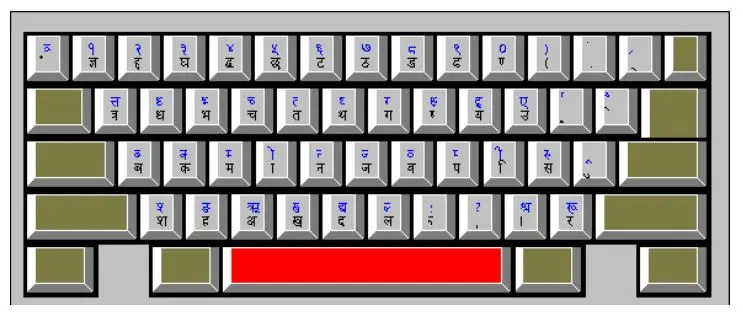
Typeshala's Nepali mode uses the Preeti layout, a typewriter-style layout where each English key types a Nepali character. Learn the home row first. Your fingers rest there and return to it after every keystroke.
Preeti layout, lowercase keys. Highlighted keys are where your eight fingers rest; F and J have small bumps so your index fingers can find them without looking. Hold Shift for the second character on each key.
Home row keys
- Aबba
- Sकka
- Dमma
- Fाaa sign
- Gनna
- Hजja
- Jवwa
- Kपpa
- Lिi sign
- ;सsa
- 'ुu sign
Preeti vs Unicode: which should you learn?
Preeti is a legacy font. Text typed in Preeti only looks Nepali on computers that have the font installed, so it often breaks when you email it or post it online. Unicode Nepali works everywhere, including websites, email, Facebook and phones.
The practical path is to learn the layout with Typeshala, then type in Unicode for everyday use. The Nepali Unicode Traditional layout keeps the same typewriter-style key positions for most characters, so your muscle memory carries over. The Romanized layout is different: it maps sounds to English letters (for example, K types क), so it's a separate skill. To turn old Preeti documents into Unicode, use the Nepali Unicode converter.
Typeshala Features
Typeshala keeps things simple. These are the tools you'll use most.
Nepali and English modes
Pick a language on the start screen. Both modes use the same lessons and tools.
Step-by-step lessons
Guided lessons take you from the home row to full sentences, at any age.
On-screen keyboard guide
Shows the next key and which finger to use, so you never need to look down.
Free-hand typing
Practise with any text you choose, from news articles to office letters.
Ramayan typing game
The classic speed game many Nepali learners remember from computer class.
Speed and accuracy results
See your WPM and accuracy after every exercise to track progress.
7 Tips to Learn Nepali Typing Faster
- Practise every day15–30 minutes daily works far better than two hours once a week.
- Never look at the keyboardIf you keep glancing down, lay a light cloth over your hands until the habit stops.
- Get accurate before you get fastType slowly and correctly. Speed follows once your fingers know the keys.
- Use all ten fingersReturn to the home row (ब क म ा and व प ि स) after every key.
- Drill the vowel signs separatelySigns like ा, ि and ु appear in almost every Nepali word, so practise them on their own.
- Keep a layout chart nearby for the first weekGlance at a printed chart instead of the keys, then put it away in week two.
- Type real Nepali textUse free-hand mode with a newspaper article or an office notice to prepare for real work.
Typeshala Pros and Cons
Typeshala is best for beginners who need Nepali typing for school, office or government work. Experienced typists who want detailed analytics may prefer a modern web tool.
Pros
- Free, with no account needed
- Works fully offline
- Teaches both Nepali (Preeti) and English
- Structured lessons suited to beginners
- The Ramayan game makes practice fun
Cons
- Windows only
- Dated design
- May need compatibility settings on Windows 10/11
- Teaches Preeti rather than Unicode directly
- Limited statistics for advanced typists
Typeshala vs Other Typing Tutors
Here's how the Typeshala download compares with the free online version on this site and two popular English typing tutors.
| Feature | Typeshala (download) | Typeshala Online | TypingMaster | Keybr |
|---|---|---|---|---|
| Platform | Windows PC | Any browser, any device | Windows PC | Any browser |
| Works offline | Yes | No | Yes | No |
| Nepali (Preeti) lessons | Yes | Yes (Preeti & Traditional) | No | No |
| English lessons | Yes | Yes | Yes | Yes |
| Price | Free | Free | Free version + paid Pro | Free |
| Standout feature | Ramayan typing game | Live WPM test and custom text | Structured English course | Lessons that adapt to your weak keys |
| Best for | Nepali beginners on a PC | Phones, Macs and quick tests | English typing on Windows | English speed training |
Swipe the table to compare all four →
Verdict: To learn Nepali typing on a Windows PC without internet, Typeshala is still the most practical free choice. On a phone, Mac or Chromebook, use Typeshala Online. For extra English speed training, Keybr is a good addition. If Typeshala won't run on your PC at all, try these Typeshala alternatives for Windows 11.
Practise Typeshala Online
Want to try before you install, or practise on a phone or Mac? The free online Typeshala runs in any modern browser.
- Preeti and Nepali Traditional layouts
- Live WPM and accuracy test
- Nepali, English and numbers modes
- 8 lessons, Easy to Expert, row by row
- Custom text: paste anything to practise
- Works on phones, tablets, Macs and PCs
What Instructors and Students Say
I have been using Typeshala for more than 10 years of my working career. I used it to teach my students Nepali typing. There has been no issue with this software while working with it. It is user-friendly and easy for new learners.
I did what my teacher Suraj Raj Shrestha told me, and I am doing well in Nepali and English typing. I think it is the best software to start your typing journey. Highly recommended to beginners.
Disclosure: Suraj is my colleague at Blueprint Technologies, and Gunjan is one of his students.
Typeshala FAQs
Is Typeshala free to download?
Yes. Typeshala is completely free to download and use, and you don't need to create an account.
Does Typeshala work on Windows 10 and Windows 11?
Yes. On Windows 10 and 11, run Typeshala as administrator. If it still won't open, set compatibility mode to Windows XP (Service Pack 3), as shown in the fixes section above.
Can I use Typeshala without internet?
Yes. You only need internet to download the 15.1 MB ZIP file. After that, Typeshala works fully offline.
Is Typeshala available for Mac, Android or iPhone?
No. Typeshala is a Windows program. On a Mac, Chromebook or phone, use the free online Typeshala in your browser instead.
Is the Typeshala download safe?
You can scan Typeshala.zip for free on VirusTotal before opening it. Windows may show a SmartScreen warning for older programs like Typeshala; the warning alone doesn't mean a file is harmful.
Does Typeshala teach Preeti or Unicode typing?
Typeshala teaches the Preeti layout. The Nepali Unicode Traditional layout keeps the same key positions for most characters, so what you learn carries over to Unicode typing.
How long does it take to learn Nepali typing with Typeshala?
With 15–30 minutes of practice a day, a realistic goal is about 30 words per minute in three to four weeks. Focus on accuracy first; speed follows.
What is the difference between Nepali Typeshala and English Typeshala?
They're the same program. Typeshala has a Nepali mode for the Preeti layout and an English mode for the standard QWERTY layout, and you choose one when it starts.
I learned Nepali typing on Typeshala and later taught it to more than 100 students as an instructor at a typing institute in Nepal. Today I'm a web developer at Blueprint Technologies Pvt. Ltd. in Kathmandu, and Typeshala is still the first tool I recommend to anyone learning Nepali typing.
More Nepali Typing Resources
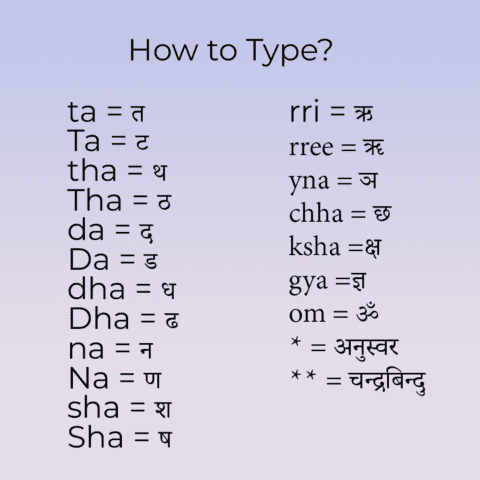

Explore the Complete Typeshala Guide
Looking for the right Nepali typing software? Visit our complete Typeshala guide to compare Typeshala, TypeSolute and Typesalute, find Windows 10 and Windows 11 installation instructions, fix common errors, and discover effective Nepali typing practice methods.
- Compare Typeshala versions and compatibility.
- Find download and installation instructions.
- Learn typing speed, accuracy and practice techniques.
this is nice
Nice Work
Asyr thety you doing today my god kate Ganda ganda comments kri hau ke xa hal khabar hjr ko bf xa ke hospital ma xa ke hospital ma xu ke I
very important for me
Nice
Nice
gulariya 7 bardiya
why iam not download it when it download it may not open this file can you have solutation
Solved. Click this Download button on top ⬆️