Select Page

Yomari Purnima Festival: Discover Its Rich Cultural Significance

Yomari Purnima Festival: Discover Its Rich Cultural Significance

The Yomari Purnima festival is a cherished celebration within the vibrant tapestry of Nepalese festivals. This unique festival is not only a tribute to the harvest season but also a profound expression of cultural heritage and religious devotion. At its heart lies the making of Yomari, a traditional delicacy that embodies the spirit of prosperity and community. Understanding Yomari Purnima provides a fascinating glimpse into the rich cultural and religious traditions of Nepal.

📌 Key Takeaways

  • Yomari Purnima is a vibrant Nepalese festival with deep cultural roots.
  • The festival celebrates the harvest and is marked by the making of Yomari, a traditional delicacy.
  • Understanding Yomari Purnima offers insight into Nepal’s rich cultural and religious traditions.

id=”understanding-the-yomari-purnima-festival” class=”autoblogger-h2″ style=”font-size: 1.75rem; font-weight: 800; color: #0f172a; margin: 2.5rem 0 1.25rem 0; border-bottom: 2px solid #e2e8f0; padding-bottom: 0.5rem;”>Understanding the Yomari Purnima Festival

Origins and History

Yomari Purnima is deeply rooted in the traditions of the Newar community in Nepal, an indigenous group with a rich cultural legacy. The festival is celebrated on the full moon day of the month of Mangsir, which typically falls in November or December. Historically, it marks the end of the rice harvest season, a time when the community gives thanks for the bounty of the land.

The name “Yomari” is derived from two Newari words: “ya,” meaning “to like,” and “mari,” meaning “delicacy.” According to legend, the festival began when a couple, who had just harvested their rice, created a new type of food called Yomari to celebrate their prosperity. They offered it to the gods, and it was so well-received that it became a staple of the festival.

Cultural Significance

The Yomari Purnima festival is more than just a celebration of harvest; it is a time for families and communities to come together in gratitude and prayer. It is believed that worshipping during this festival brings wealth and prosperity. The Newar community, in particular, sees this as a time to honor the goddess Annapurna, the deity of grains and nourishment, as well as Kubera, the god of wealth.

How Yomari Purnima is Celebrated

Traditional Customs

Central to the Yomari Purnima festival is the preparation of Yomari, a special steamed dumpling made from rice flour and filled with sweet ingredients such as chaku (a type of molasses) and sesame seeds. The making of Yomari is a communal activity, often involving family members of all ages. This act of cooking together strengthens familial bonds and fosters a sense of unity.

Communities also gather to engage in traditional music and dance, which are integral to the festival’s celebrations. The rhythmic beats of traditional instruments and the graceful movements of dancers create an atmosphere of joy and togetherness.

Modern Celebrations

In modern times, while the essence of the festival remains the same, celebrations have expanded to include larger community events. Urban areas host public gatherings where people from different backgrounds can partake in the festivities. These events often feature cultural performances and exhibitions that showcase the diversity of Nepalese traditions.

The Significance of Yomari in the Festival - Yomari Purnima festival
The Significance of Yomari in the Festival

The Significance of Yomari in the Festival

Symbolism of Yomari

Yomari is more than just a culinary delight; it symbolizes wealth, prosperity, and the bounty of the harvest. Its unique shape, resembling a fish or a conch shell, is also significant. In Hindu culture, the conch shell is considered sacred and is associated with auspicious beginnings.

Yomari Recipe

Creating Yomari requires a few simple ingredients, but the process is a cherished tradition. Here’s a basic overview of how Yomari is made:

  1. Mix Rice Flour: Begin by mixing rice flour with warm water to form a smooth dough.
  2. Prepare Filling: Combine chaku with shredded coconut and sesame seeds to make the filling.
  3. Shape Dumplings: Shape the dough into small cones, fill them with the sweet mixture, and seal them.
  4. Steam: Steam the dumplings until they are cooked through.

For a detailed recipe, you can explore this [traditional Yomari recipe](https://www.foodnepal.com/recipe-yomari).

Connecting Yomari Purnima to Other Nepalese Festivals - Yomari Purnima festival
Connecting Yomari Purnima to Other Nepalese Festivals

Connecting Yomari Purnima to Other Nepalese Festivals

Comparison with Other Festivals

Yomari Purnima shares thematic elements with other Nepalese festivals, such as Dashain and Tihar, which also celebrate prosperity and community. However, each festival has its unique customs and deities, reflecting the rich tapestry of Nepalese cultural events.

Cultural Integration

The integration of various cultural and religious practices is a hallmark of Nepalese festivals. Yomari Purnima exemplifies this by blending Hindu and Buddhist traditions, showcasing the country’s diverse spiritual heritage.

Experiencing Yomari Purnima: A Guide for Visitors

Where to Celebrate

For those interested in experiencing Yomari Purnima firsthand, visiting Kathmandu or Bhaktapur offers an authentic glimpse into the celebrations. These areas are known for their vibrant festivals and welcoming communities.

Tips for Visitors

To make the most of your visit:

  • Engage with Locals: Participating in local community events allows for a deeper understanding of the festival’s significance.
  • Try Yomari: Don’t miss the opportunity to taste freshly made Yomari, which is often offered to visitors.
  • Respect Traditions: Be mindful of local customs and traditions, showing respect for the cultural practices you observe.

💡 Pro Tips: Planning your visit during the Yomari Purnima festival can provide a unique cultural experience, offering insights into Nepal’s traditions and hospitality.

The Yomari Purnima festival is a vibrant celebration that encapsulates the essence of Nepalese culture and tradition. Through the making of Yomari and communal festivities, it fosters a sense of unity and gratitude. Whether you’re a cultural enthusiast or a curious traveler, witnessing this festival offers a profound connection to Nepal’s rich heritage. As you explore the festival, you’ll discover not only the delicious taste of Yomari but also the enduring spirit of community and celebration that defines Nepalese festivals.

Frequently Asked Questions

What is the Yomari Purnima festival?

Yomari Purnima is a Nepalese festival celebrating the harvest with traditional customs and cultural activities.

How is Yomari made?

Yomari is a steamed dumpling made from rice flour and filled with sweet ingredients, traditionally prepared during the festival.

Why is Yomari Purnima important?

Yomari Purnima holds cultural and religious significance, symbolizing prosperity and community unity.

Kokila Font Download: Free, Safe Install & Hindi Typing Fix
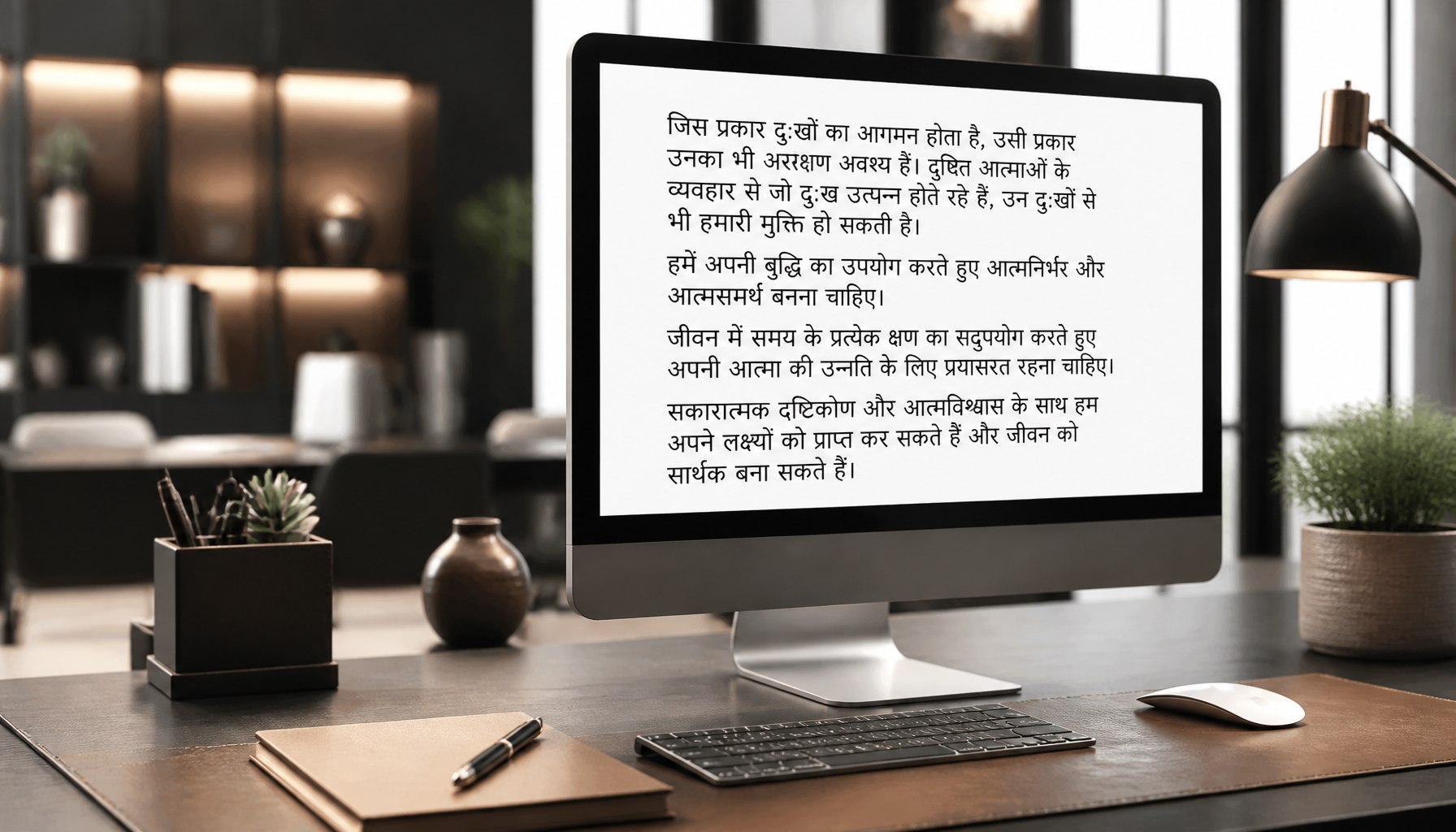
Kokila Font Download: Free, Safe Install & Hindi Typing Fix

Kokila Font Download: Free, Safe Install & Hindi Typing Fix

If you’re looking to enhance your Hindi typing experience, downloading the Kokila Font is the first [step](https://wilson.com.np/?p=238717). This widely used font is perfect for clear and precise Hindi text, making it a popular choice among typists, designers, and content creators. In this guide, we’ll walk you through how to download and install the Kokila Font safely, troubleshoot common issues, and explore additional resources.

Overview of Kokila Font Download

What is Kokila Font?

Kokila is a Devanagari script font, primarily used for typing in Hindi. Its clear and legible design makes it a popular choice for documents, presentations, and digital content that require Hindi text. Designed to be compatible with most operating systems, Kokila Font is available for free download, facilitating easy access for anyone in need of a reliable Hindi font.

Benefits of Using Kokila Font

  • Clarity: Kokila Font offers exceptional clarity and readability, crucial for effective communication in Hindi.
  • Compatibility: It supports a wide range of applications and operating systems, ensuring seamless integration.
  • Free Access: Being freely available, it is accessible to anyone looking to enhance their Hindi typing without incurring additional costs.

System Requirements & Compatibility

Supported Operating Systems

The Kokila Font is compatible with both Windows and macOS, ensuring broad usability. Whether you’re using a personal computer or a professional setup, Kokila Font integrates smoothly, making it a versatile choice for various platforms.

File Size and Format

The font is provided in the TTF (TrueType Font) format, which guarantees wide compatibility across different systems and applications. The file size is minimal, ensuring a quick download and installation process without occupying significant storage space.

SpecificationDetails
File FormatTTF (TrueType Font)
Compatible OSWindows, macOS
File SizeMinimal, quick to download

Step-by-Step Installation Guide for Kokila Font

Downloading the Kokila Font

To start, you’ll need to download the Kokila Font from a verified source. Use the link provided below to ensure a safe and virus-free download:

>>>[Download Kokila Font]<<<

Installing on Windows

  1. Download the TTF File: Click on the download link to save the font file to your computer.
  2. Locate the File: Once downloaded, navigate to your ‘Downloads’ folder to find the Kokila Font file.
  3. Install the Font: Right-click on the font file and select Install. Windows will automatically install the font.
  4. Verify Installation: Open any text editor and check the font list to ensure Kokila Font is available.

Installing on macOS

  1. Download the TTF File: Use the download link to save the font file.
  2. Open Font Book: Locate the downloaded file and double-click it to open in Font Book.
  3. Install the Font: In Font Book, click Install Font to add Kokila Font to your system.
  4. Verify Installation: Open TextEdit or any other application to confirm the font is accessible.

Ensuring Safety: Virus-Free Kokila Font

Checking for Viruses

Before installing any file, it’s crucial to ensure it’s free from viruses. Use trusted antivirus software to scan the Kokila Font file after downloading.

Safe Download Practices

  • Verify the Source: Always download fonts from verified and trusted sources.
  • Use Antivirus Software: Regularly update your antivirus software to protect against potential threats.

Troubleshooting Hindi Typing Issues

Common Problems

While Kokila Font is generally reliable, users may encounter issues such as incorrect character display or typing errors. These problems often stem from improper installation or compatibility settings.

Fixing Typing Errors

  1. Check Installation: Ensure the font is correctly installed by repeating the installation steps.
  2. Update Software: Make sure your text editor or word processor is updated to the latest version.
  3. Language Settings: Verify that your system’s language settings are correctly configured for Hindi.

💡 Pro Tip: If issues persist, consider consulting [Microsoft Typography](https://docs.microsoft.com/en-us/typography/) for official font documentation and troubleshooting tips.

Additional Resources and Support

Where to Find More Fonts

If you’re interested in exploring other Hindi fonts, platforms like [Google Fonts Guide](https://developers.google.com/fonts/docs/getting_started) offer extensive resources and guides on font installation and usage.

Community Support

Join online forums and communities dedicated to typography and Hindi language support. These platforms can provide valuable insights, troubleshooting advice, and tips for optimizing your Hindi typing experience.

⚠️ Important Note: Always engage with reputable communities and verify the authenticity of the advice or resources provided.

By following this comprehensive guide, you’ll be well-equipped to download, install, and use the Kokila Font effectively. Whether you’re addressing typing issues or exploring additional resources, this guide serves as a complete toolkit for enhancing your Hindi typing capabilities.

Frequently Asked Questions

How can I download Kokila Font for free?

Follow the provided link for a free, safe download.

Why is Kokila Font not displaying correctly?

Ensure correct installation and compatibility with your system.

Is Kokila Font safe to use?

Yes, when downloaded from a verified source and scanned for viruses.

How to Install Nepali Font on Windows 11 (2026 Guide)

How to Install Nepali Font on Windows 11 (Complete 2026 Guide)

Quick Answer

To install a Nepali font on Windows 11, download a .ttf or .otf font file, right-click it and choose Install for all users. Then open Settings › Time & language › Language & region, click Add a language, select Nepali (नेपाली), and install it. Press Win + Space to switch between English and Nepali while typing.

Windows 11 handles Nepali better than any version before it — Devanagari rendering is built in, and a Nepali keyboard layout ships with the OS. Yet most people still end up staring at empty squares, a font that refuses to appear in Microsoft Word, or a keyboard that types the wrong characters entirely.

Almost every one of those problems traces back to a single misunderstanding: there are two completely different kinds of Nepali font, and installing the wrong one for your task guarantees frustration. This guide covers the installation itself, which font type you actually need, how to enable Nepali typing, and how to fix the errors that trip people up — verified on Windows 11 (24H2 and later).

1Unicode vs. Preeti: Which Nepali Font Do You Actually Need?

This is the step nearly every other guide skips, and it is the reason most Nepali font installations "fail" even when the file installed perfectly.

Unicode fonts (Mangal, Kalimati, Kokila, Aparajita) store real Devanagari characters. Type नेपाल in a Unicode font and it stays नेपाल everywhere — in email, on Facebook, in a searchable PDF, on a phone that has never had your font installed.

Legacy fonts (Preeti, Kantipur, Sagarmatha, Fontasy Himali, Aakriti) are a clever illusion. They map English letters to Devanagari-looking shapes. The letters g]kfn are literally what's stored — they only look like नेपाल because the Preeti font is drawing them that way. Send that text to anyone without the font and they see gibberish.

 Unicode (Mangal, Kalimati)Legacy (Preeti, Kantipur)
Text stays readable elsewhereYes — on any deviceNo — needs the font installed
Searchable & copy-paste safeYesNo
Works online / social mediaYesNo
Needs a font download?No — Mangal is built into Windows 11Yes
Typing layoutNepali keyboard (built in)Preeti layout (muscle memory from Typeshala)
Best forEveryday use, web, email, official documentsOpening old files, print/press work, legacy office templates

Which should you choose? Pick Unicode unless you have a specific reason not to — it is the modern standard and needs almost no setup. Install a legacy font like Preeti or Kantipur only when you need to open older documents or you already type with the Preeti layout. Many people install both, and that is perfectly fine.

2Where to Download Nepali Fonts Safely

Font files are executable-adjacent, so where you get them matters. Stick to these three routes:

  • Already on your PC. Windows 11 ships with Mangal, Nirmala UI, Aparajita and Kokila — all Unicode Devanagari fonts. If you only need to read and write standard Nepali, you may not need to download anything at all. Skip to step 4.
  • The Microsoft Store. The All Nepali Fonts package installs through the Store with no loose files to handle — the safest option if you are wary of downloads.
  • A trusted font archive. For legacy fonts, use a maintained collection such as our free Nepali fonts download page, or grab the classic newspaper font directly from our Kantipur font download.
⚠️

Avoid random "free font" aggregator sites. Nepali fonts are frequently repackaged inside .exe installers bundled with adware. A genuine font download is a .ttf, .otf, or a .zip containing them — never an installer that asks for extra permissions.

3How to Install the Nepali Font on Windows 11

If your download arrived as a ZIP, extract it first — Windows cannot install a font from inside a compressed folder. Right-click the ZIP, choose Extract All, then pick whichever method below suits you.

Method 1 — Right-click install (fastest)

  1. Open the extracted folder and find your font file. It will end in .ttf or .otf.
  2. Right-click the font file and choose Install for all users. If you only see a short menu, click Show more options first.
  3. Approve the admin prompt. Installing for all users requires administrator permission — this is what makes the font available in every app and every user account.

That is it. Choosing Install instead of Install for all users also works and skips the admin prompt, but the font is then only available to your own account and occasionally will not appear in apps running with elevated permissions.

Method 2 — Drag and drop into Settings

  1. Press Win + I to open Settings.
  2. Go to Personalization › Fonts.
  3. Drag your font files into the "Drag and drop to install" box at the top. Windows installs them instantly, no restart required.

Method 3 — The Control Panel Fonts folder (legacy)

  1. Press Win + R, type control fonts and press Enter.
  2. Drag the font files into the window that opens. This is the same folder Windows has used for decades and still works reliably in Windows 11.

Method 4 — Straight from the Microsoft Store

  1. Open Settings › Personalization › Fonts and click Get more fonts in Microsoft Store.
  2. Search for "Nepali", then install the package you want. Store fonts update automatically and are the lowest-risk option.
💡

Verify the install worked: open Settings › Personalization › Fonts and search for the font name. If it appears there, it is installed system-wide — any app that still cannot see it simply needs to be closed and reopened.

Step-by-step guide to install Nepali Unicode font on a Windows 11 computer
Installing a Nepali font on Windows 11 takes under a minute — the keyboard setup is the part most people miss.

4Enable the Nepali Keyboard in Windows 11

Installing a font lets your PC display Nepali. It does not let you type it. For that you need to add the Nepali input language — a separate step, and the one people most often skip.

  1. Press Win + I and go to Time & language › Language & region.
  2. Click "Add a language" next to Preferred languages.
  3. Search for "Nepali" and select नेपाली (Nepali), then click Next.
  4. Confirm the language features. Make sure Basic typing is ticked — this is the component that installs the keyboard. You can safely untick "Set as my Windows display language" unless you want the whole interface in Nepali.
  5. Click Install and wait a few seconds. A language icon (ENG) now appears in your taskbar near the clock.
⌨️

Switch languages instantly: press Win + Space to cycle between English and Nepali. Alt + Shift does the same thing on most setups. You can also click the ENG indicator in the taskbar.

5Start Typing in Nepali

Which keys produce which characters depends entirely on the font type you chose in step 1.

Typing in Unicode (the Nepali keyboard)

Switch to Nepali with Win + Space and start typing. Windows uses the Nepali Traditional layout, which is the standard Devanagari arrangement — the same one used across government and education in Nepal. Set your document font to Mangal, Kalimati or Nirmala UI and the text will render correctly anywhere it is sent.

If you have never learned the Traditional layout, you have two shortcuts. Practise it properly with Typeshala, the classic Nepali typing tutor — or type phonetically in English and convert with our English to Nepali Unicode converter, which turns "mero desh Nepal" into मेरो देश नेपाल instantly.

Typing in Preeti or Kantipur

Legacy fonts do not use the Nepali keyboard — keep Windows on English, then simply select Preeti or Kantipur as the font in your document. The keys map to Devanagari shapes through the font itself, which is why Preeti typists learn a separate layout. Switching Windows to Nepali while using Preeti is a very common cause of scrambled output.

6Troubleshooting: 8 Problems and Their Fixes

ProblemCause & fix
Font missing from Word / PhotoshopThe app cached its font list at launch. Fully close and reopen it. If it still does not appear, reinstall using Install for all users.
Empty squares or boxes (□□□)The font you have selected has no Devanagari characters. Switch the text to Mangal or Kalimati — this is not a Windows fault, it is a font-coverage issue.
Nepali text turns into English gibberish for othersYou typed in Preeti/Kantipur, which is device-dependent. Retype in Unicode, or run the text through a Preeti-to-Unicode converter before sending.
No language icon in the taskbarBasic typing was not installed with the language. Go to Language & region, click the next to Nepali › Language options, and add the keyboard.
"Install" missing from right-click menuEither the file is still inside a ZIP (extract it first), or you are on the compact Windows 11 menu — click Show more options.
Matras or characters overlap incorrectlyAn outdated font build without proper OpenType shaping. Download a current version, or switch to a maintained Unicode font like Kalimati.
Works in Word but not in ChromeWebsites specify their own fonts. Set a Devanagari fallback under Chrome › Settings › Appearance › Customise fonts.
"You need administrator permission"Choose plain Install instead of Install for all users — this installs to your own profile and needs no admin rights.

Key takeaways

  • Unicode for everything modern — it travels; Preeti and Kantipur do not.
  • Fonts and keyboards are separate. Installing a font never enables typing on its own.
  • Windows 11 already has Mangal. Many people need no download whatsoever.
  • Right-click → Install for all users prevents most "font not showing" problems before they start.
  • Win + Space is the only shortcut you really need to remember.

7Frequently Asked Questions

Is Nepali font free to download for Windows 11?

Yes. Every widely used Nepali font — Preeti, Kantipur, Sagarmatha, Kalimati and the Unicode families — is free for personal use, and Windows 11 already includes Mangal and Nirmala UI at no cost. Only a handful of commercial display fonts carry a licence fee, and those are clearly marked as such.

Which Nepali font is best for Windows 11?

Kalimati is the best all-round choice for on-screen Nepali — it is Unicode, well-shaped and highly readable. Mangal is the safest default because it is already installed on every Windows 11 machine. Choose Preeti or Kantipur only for legacy documents or print work that specifically requires them.

Do I need to install a font to type Nepali on Windows 11?

No. Windows 11 ships with Devanagari-capable fonts, so you only need to add the Nepali keyboard under Time & language › Language & region. You only need to install a font if you want a specific typeface such as Preeti, Kantipur or Kalimati.

What is the difference between Preeti and Nepali Unicode?

Preeti maps English letters to Devanagari-shaped glyphs — the underlying text is still English characters, so it only displays correctly on devices with Preeti installed. Unicode stores genuine Nepali characters that display correctly everywhere, are searchable, and can be copied between apps without breaking.

How do I switch between English and Nepali on the keyboard?

Press Win + Space to cycle through your installed input languages, or Alt + Shift. You can also click the language indicator (ENG / NEP) in the taskbar next to the clock.

Why is my Nepali font showing boxes or question marks?

The selected font does not contain Devanagari characters — the text itself is fine. Highlight the text and change it to Mangal, Kalimati or Nirmala UI. If boxes appear only in one application, that app is falling back to a font without Nepali support.

Can I install Nepali fonts without administrator rights?

Yes. Right-click the font file and choose Install rather than Install for all users. The font installs into your own user profile and works in most applications, though it will not be available to other accounts on the PC.

How do I convert Preeti text to Unicode?

Paste the Preeti text into a converter that remaps the glyphs to real Devanagari characters. Our Nepali Unicode converter handles this, and the resulting text can be used in email, on the web and in any document without needing the Preeti font installed.

Final Thoughts

The whole process comes down to three things: install the font file, add the Nepali keyboard, and pick Unicode unless a legacy document forces your hand. Get those right and Nepali typing on Windows 11 stops being a recurring annoyance and simply becomes part of how you work.

If you hit a problem this guide does not cover, describe it in the comments below — I read every one and keep this article updated as Windows 11 changes.

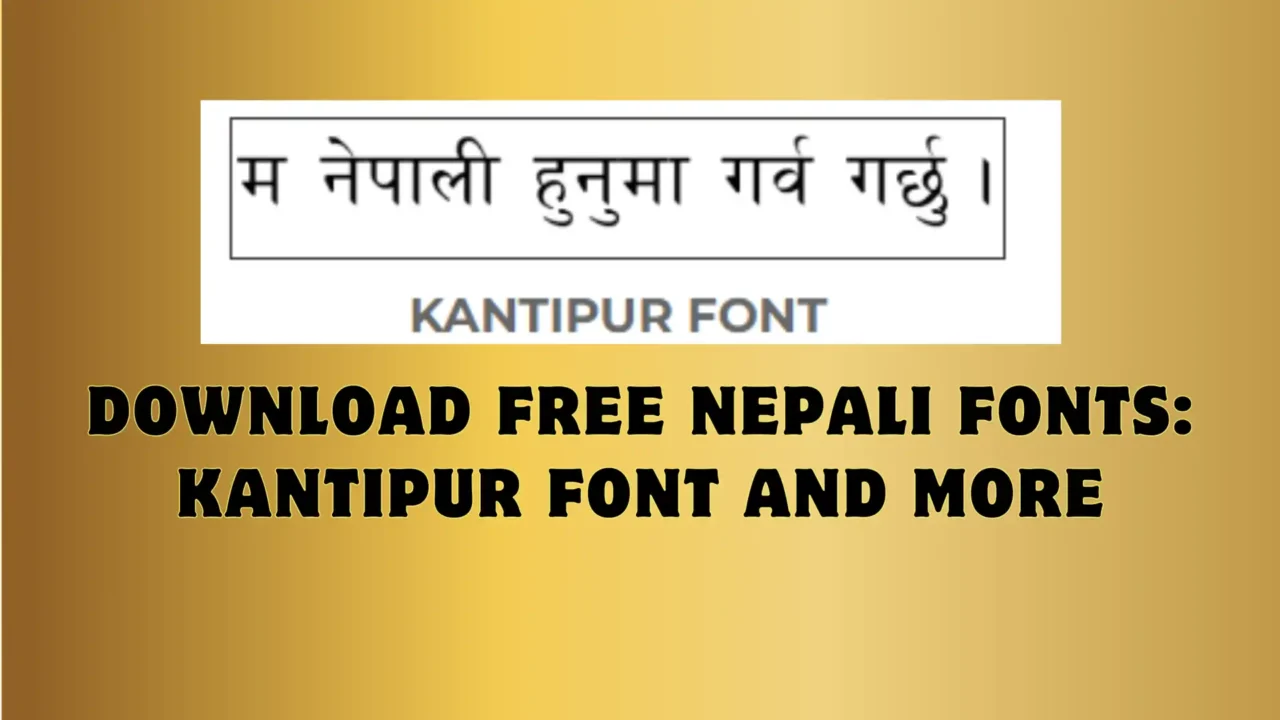
Download Free Nepali Fonts: Kantipur Font and More

Kantipur Font is the most used and classic Nepali Font which is used by most writers, designers, etc. It is a simple-looking Open Type Font and an easy-to-read font. And also, It slightly seems like a Preety font in clarity and readability. One of the top most famous Newspaper of Nepal use this font which is Kantipur Newspaper. It is in Nepali Devanagari language.

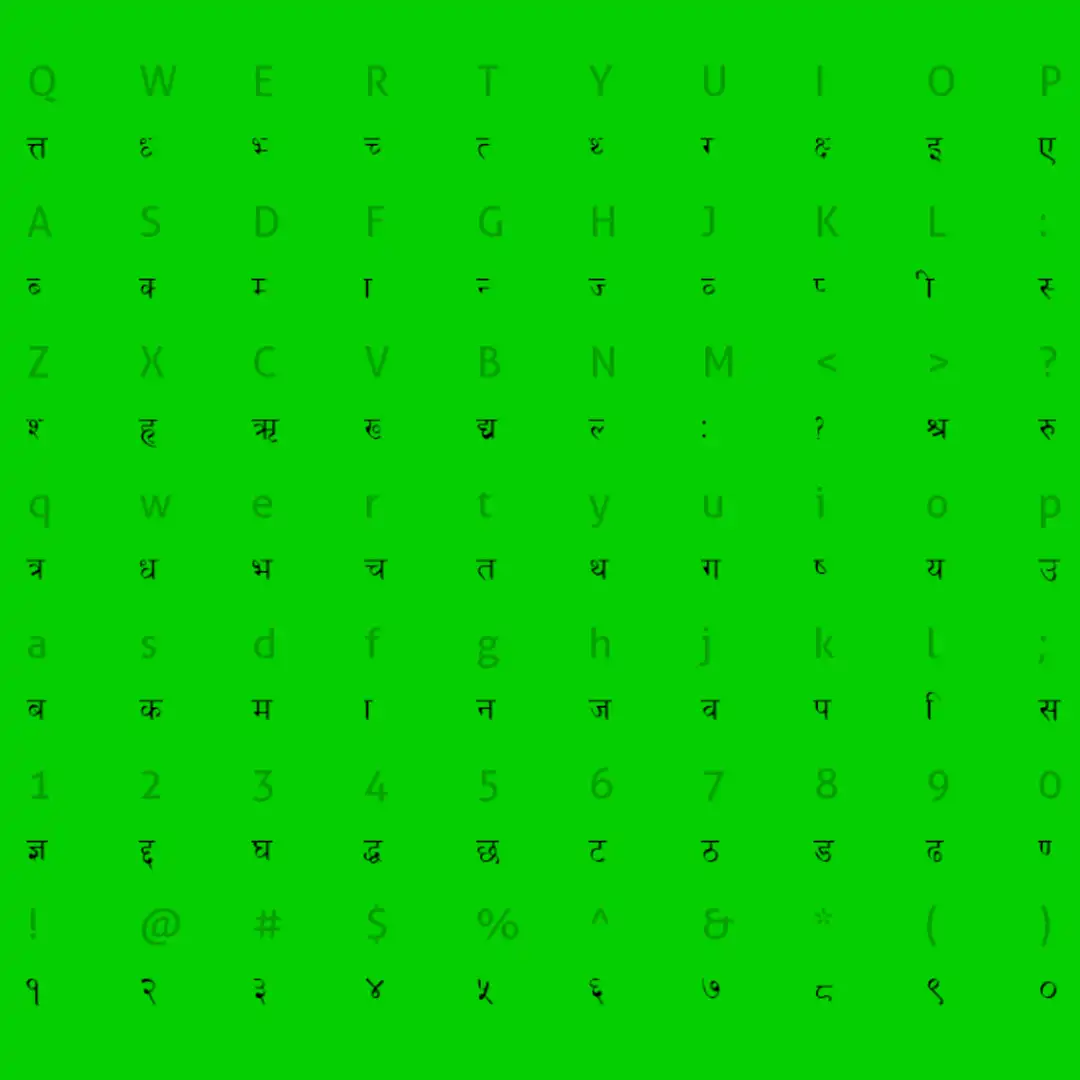
character map of Kantipur Nepali font

How to install Kantipur Font on your computer?

For Windows users, You can extract the zip file and double-click the font file, then press the Install button on top. Then it will be installed on your system and ready to use. If still it is not showing on your system then you just need to restart your computer.

For Mac OS Users, it’s the same as Windows users. You just need to open the font file by double-clicking and then pressing the install button. Then it will be ready to use.


>>>MORE FREE NEPALI FONTS<<<

[dsm_animated_gradient_text _builder_version=”4.24.2″ _module_preset=”default” animated_gradient_text=”RELATED POST” hover_enabled=”0″ sticky_enabled=”0″ custom_margin=”||10px|||”][/dsm_animated_gradient_text]
Download Free Nepali Fonts: Kantipur Font and More

Download Free Nepali Fonts: Kantipur Font and More

Kantipur Font is the most used and classic Nepali Font which is used by most writers, designers, etc. It is a simple-looking Open Type Font and an easy-to-read font. And also, It slightly seems like a Preety font in clarity and readability. One of the top most famous...

FREE DOWNLOAD KALIMATI FONT

FREE DOWNLOAD KALIMATI FONT

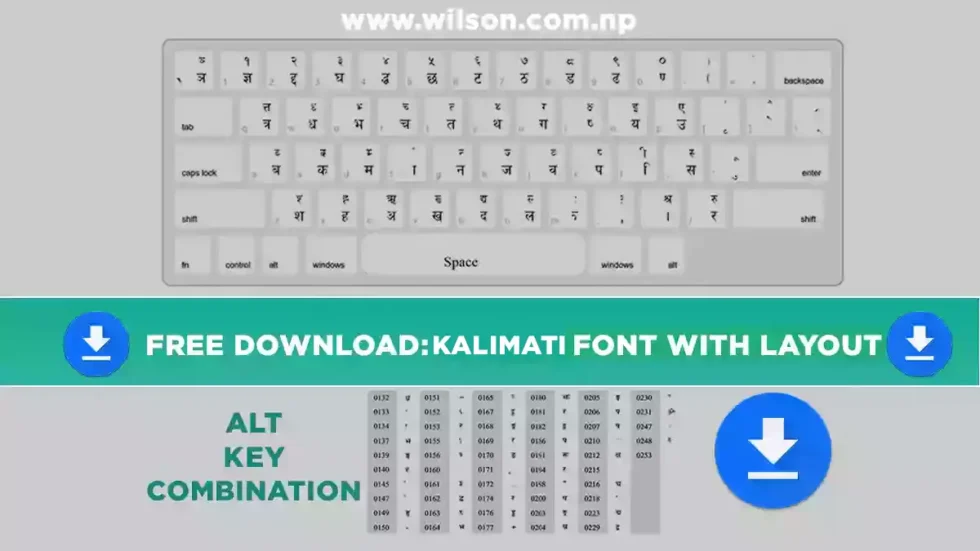
Are you looking to free download kalimati font? You are at the right place, I have provided a download link button down below so that you can free download Kalimati font. I have used this font for different purposes of my work like graphic designing, Nepali Document...

FREE DOWNLOAD: PREETI FONT WITH LAYOUT

FREE DOWNLOAD: PREETI FONT WITH LAYOUT

In Nepal, Preeti Font is one of the most used fonts in local Graphic Design, Nepali Documentation, blogger, etc. It is the most simple to read and elegant choice for all the users. Preeti Font is a combination of style and Legibility, which makes it an ideal choice...

Free Hindi Fonts Download for PC

Free Hindi Fonts Download for PC: Where to Find and How to Install Them Free Hindi fonts are essential for anyone looking to type in Hindi on their PC. These fonts allow users to create documents, emails, and other text-based content in Hindi, making it easier to...

FREE DOWNLOAD KALIMATI FONT

FREE DOWNLOAD KALIMATI FONT

Are you looking to free download kalimati font?

You are at the right place, I have provided a download link button down below so that you can free download Kalimati font.

I have used this font for different purposes of my work like graphic designing, Nepali Document typing, and in blogging as well. It is one of the best-looking and easy-to-read fonts available in the font market of Nepal. That’s the reason it is the most popular Nepali typing font.

Kalimati is a Devanagari font that is inspired by traditional Nepali calligraphy, but it has been updated to be more modern and accessible. Kalimati is used for a variety of uses, such as websites, apps, and print materials. You can Free Download Kalimati Font from the given link below.

Font NameKalimati
DesignerGoogle Fonts
Release Date2010
StyleSerif
CopyrightGoogle Fonts
LicenseSIL Open Font License 1.1

Kalimati Regular is one of the fonts of the Nepali language. Many artists like to use this style of calligraphy in their designs.

If you are going to do any kind of graphics or work on any kind of web design project, we highly recommend trying out Kalimati Regular in your projects. Not only will it make all your images stand out but it helps you get more traffic to your website. Download this font for free.

कालिमाती

Kalimati font

The Devanagari typeface behind most Nepali typing — used in government forms, newspapers, and everyday design work. Free to download, with support for both Unicode and Traditional keying.

Download Kalimati font

Free to use, under the SIL Open Font License 1.1.

What Kalimati looks like

Kalimati is a clean, simple Devanagari face — legible at small sizes and comfortable to read in long paragraphs, which is why it's held on as a standard for Nepali print and typing.

नेपाली भाषामा टाइप गर्न कालिमाती फन्ट प्रयोग गरिन्छ।
Vowels
अ आ इ ई उ ऊ ऋ ए ऐ ओ औ अं अः
Consonants
क ख ग घ ङ च छ ज झ ञ ट ठ ड ढ ण त थ द ध न प फ ब भ म य र ल व श ष स ह
Numerals
० १ २ ३ ४ ५ ६ ७ ८ ९

Preview shown in a fallback Devanagari serif. Once you add @font-face pointing at your hosted Kalimati file, this block will render in the real font.

Quick facts

Font family
Kalimati
Style
Regular (single weight)
Script support
Devanagari
Version
1.20 — 696 glyphs
Format
TrueType (.ttf)
License
SIL Open Font License 1.1
Developed by
Sanir Karmacharya, Madan Puraskar Pustakalaya
Best for
Nepali typing, print, web, government documents

Unicode vs Traditional: which one do you need

Kalimati is used two different ways, and mixing them up is the most common reason Nepali text turns into boxes or gibberish on another computer.

Traditional

  • Keys map to visual glyph shapes, not to real Devanagari characters
  • Only displays correctly when this exact font is installed on the reader's device
  • Common in older desktop-publishing and print files

Unicode

  • Keys map to standard Unicode Devanagari characters
  • Displays correctly everywhere — browsers, phones, Word — even without Kalimati installed
  • The right choice for websites, documents you'll share, and social media
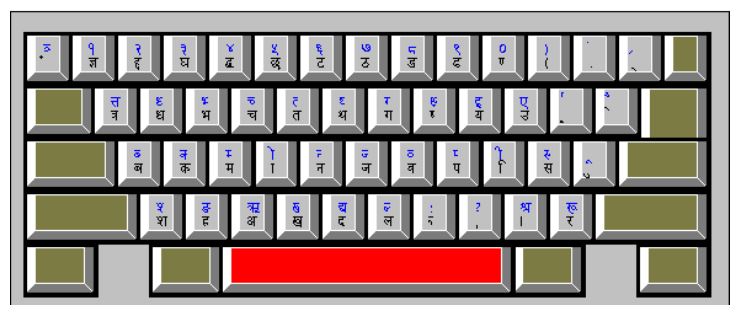
Add your keyboard layout chart here Drop in an image of the Kalimati key map (traditional and Unicode) so people can see exactly which key types which letter.

How to install Kalimati

Same three steps on any system: download, install, restart your apps.

  1. Download the font and unzip it if it arrived as a .zip file.
  2. Right-click the Kalimati.ttf file and choose Install (or Install for all users if you're setting it up for every account on the PC).
  3. Restart Word, Photoshop, or whatever app you're using — Kalimati will now show up in the font list.
  1. Double-click the downloaded Kalimati.ttf file.
  2. Click Install Font in the Font Book preview window that opens.
  3. Reopen your app — Kalimati is now available in the font menu.

Who made the Kalimati font?

Kalimati was developed by Sanir Karmacharya at the Madan Puraskar Pustakalaya (MPP) in Kathmandu, the organization behind much of Nepal's Unicode font standardization work. The current release is version 1.20, with 696 glyphs of Devanagari support.

If you've seen "Kalimati font by Laxman Nepal" in search results, that's the title of a popular download post on a different site — not a credit for the font itself. The typeface's origin traces back to MPP.

Common questions

No — Kalimati ships as a single Regular weight. For a bolder look, use your app's synthetic bold setting, or pair it with a separate bold Devanagari font for headings.

Yes. It's released under the SIL Open Font License 1.1, which allows free use, modification, and redistribution — including in commercial design work.

That's almost always a Traditional-vs-Unicode mismatch. If the text was typed with Traditional keying, it will only look correct on a device that also has Kalimati installed. Switch to Unicode Kalimati for anything you plan to share online.

Kalimati.ttf — a standard TrueType file that installs the same way as any other font on Windows or Mac.

Ready to start typing in Nepali?

Download Kalimati, install it in under a minute, and you're set for Word, Photoshop, or the web.

Download Kalimati font
[dsm_blog_carousel use_excerpt="off" use_date="off" use_author="off" _builder_version="4.23.1" _module_preset="default" hover_enabled="0" global_colors_info="{}" include_categories="122" sticky_enabled="0"][/dsm_blog_carousel]

FREE DOWNLOAD: PREETI FONT WITH LAYOUT

FREE DONWLOAD PREETI FONT WITH LAYOUT
In Nepal, Preeti Font is one of the most used fonts in local Graphic Design, Nepali Documentation, blogger, etc. It is the most simple to read and elegant choice for all the users. Preeti Font is a combination of style and Legibility, which makes it an ideal choice for both print and digital media. It is also used in Government office documentation. I have also used this font in my daily life as in graphic design and to create documents. So here I have provided to Free download of Preeti Font just in one click.
[dsm_button button_one_text=”CLICK HERE TO DOWNLOAD” button_one_url=”https://wilson.com.np/wp-content/uploads/2022/10/Preeti-Normal.zip” button_one_url_new_window=”on” button_alignment=”center” _builder_version=”4.23.1″ _module_preset=”default” custom_button_one=”on” button_one_text_size=”25px” button_one_text_color=”#FFFFFF” button_one_bg_use_color_gradient=”on” button_one_bg_color_gradient_stops=”#12876f 0%|#0c5a4a 100%” button_one_border_radius=”50px” button_one_icon=”||divi||400″ button_one_on_hover=”off” global_colors_info=”{}”][/dsm_button]
Preeti Font is one of the oldest computer font of Nepal. It is developed by Ananda K. Maharjan and officially released in 1996.

NamePreeti Font
TypeNepali Font
DesignerAnanda K. Maharjan
Release Year1996
AppearanceElegant and Traditional
ReadabilityHigh
VersatilitySuitable for Various Applications
Used in
Wedding Invitations, Certificates, Cultural Publications
Graphic Design, Printing press, Documentation, blogs

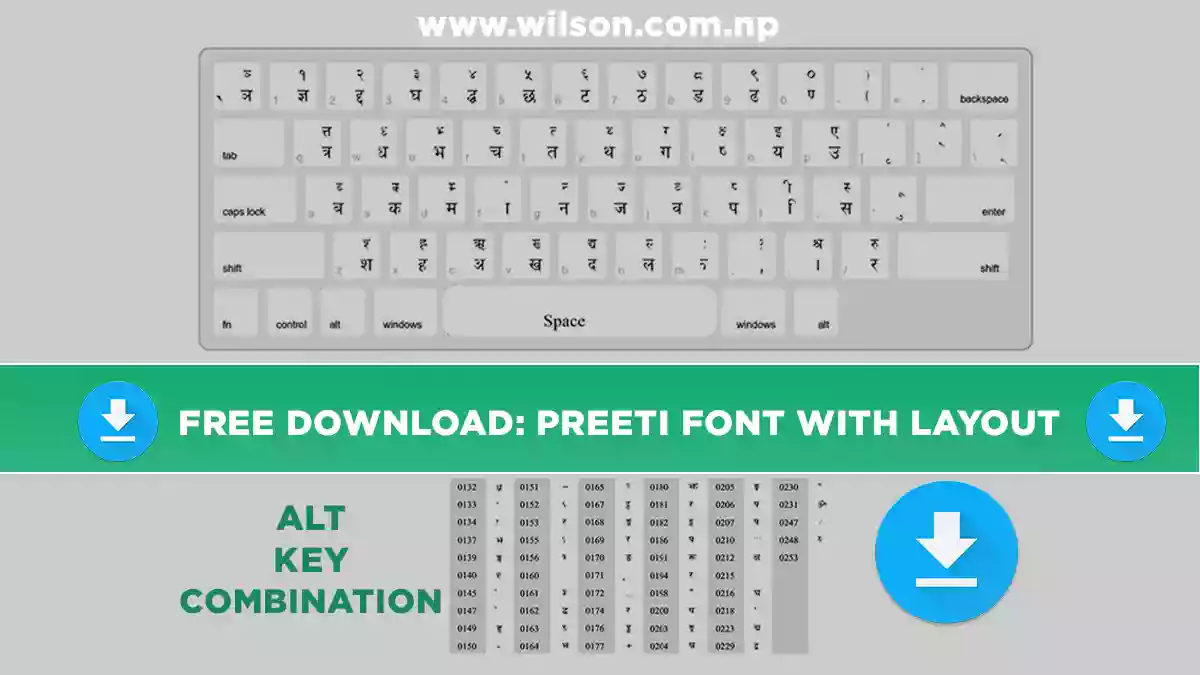
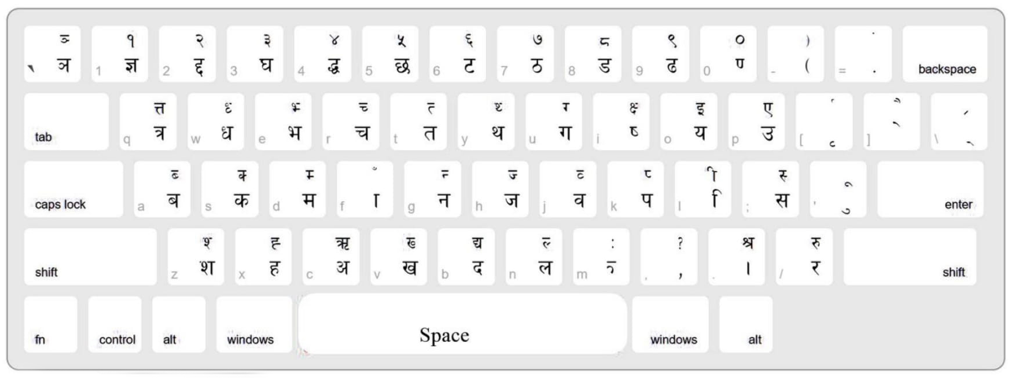
To be able to use this font, first of all, you need to Download this font from the above button (CLICK HERE TO DOWNLOAD). Then you need to learn to type this font from your keyboard. I will provide you Preeti font layout so that it will be helpful for you to type by watching the placement of words on the keyboard. Also, I am suggesting you download Typeshala to practice typing.

PREETI FONT KEYBOARD LAYOUT

PREETI FONT KEYBOARD LAYOUT

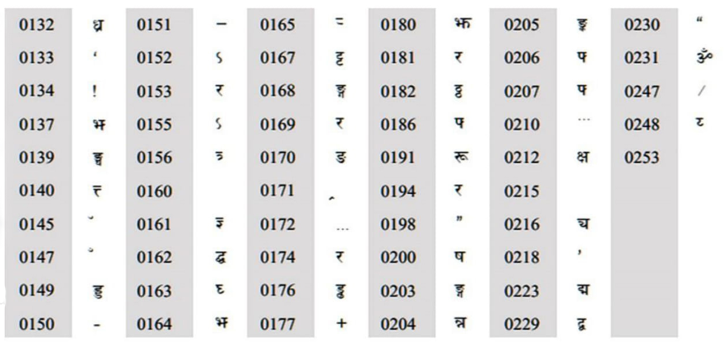
Alt key Combination

preeti font alt key keyboard combination