Kokila Font Download: Free, Safe Install & Hindi Typing Fix
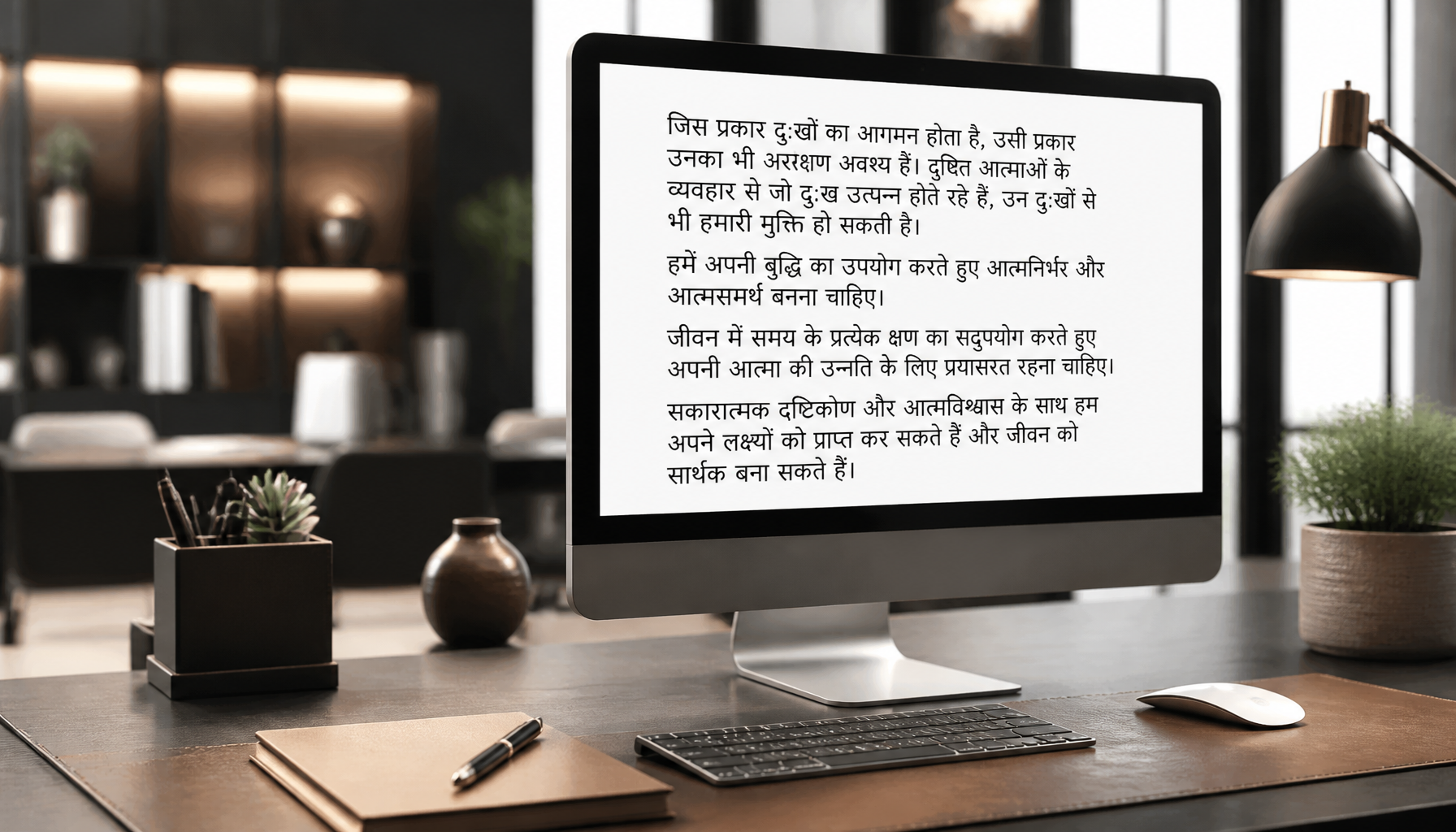
Kokila Devanagari Hindi font sample displayed on a desktop monitor
✓ Verified against Microsoft Typography docs

Kokila Font Download: Safe Install Guide & Hindi Typing Fix

📅 Updated October 14, 2026 🔤 Devanagari / Hindi 🪟 Windows · 🍎 macOS

Kokila is one of the most common fonts for typing and reading Hindi text on Windows — which also means there's a good chance it's already on your computer and you don't need to download anything at all. This guide covers how to check, how to install it if you genuinely don't have it, and how to fix the typing and display problems people run into most often.

What Is Kokila Font?

Kokila is a Devanagari (Hindi) typeface designed by Modular Infotech (MODI) of Pune, India, and licensed to Microsoft for distribution with Windows and Office. It's built as a Unicode OpenType font, which is why it displays correctly across modern apps, browsers, and devices without needing a separate keyboard layout — unlike older ASCII-mapped fonts such as Preeti, which require their own typing system (see our Preeti font and keyboard layout guide if that's what you're actually looking for).

Kokila comes in four styles — Regular, Bold, Italic, and Bold Italic — and is commonly used for Hindi body text in documents, forms, and presentations where clarity at small sizes matters.

Is Kokila Font Already on Your Computer?

🔍 Check this first

Microsoft has shipped Kokila with every version of Windows since Windows 7, and it's also available inside Office through cloud fonts. Save yourself the download.

Check on Windows

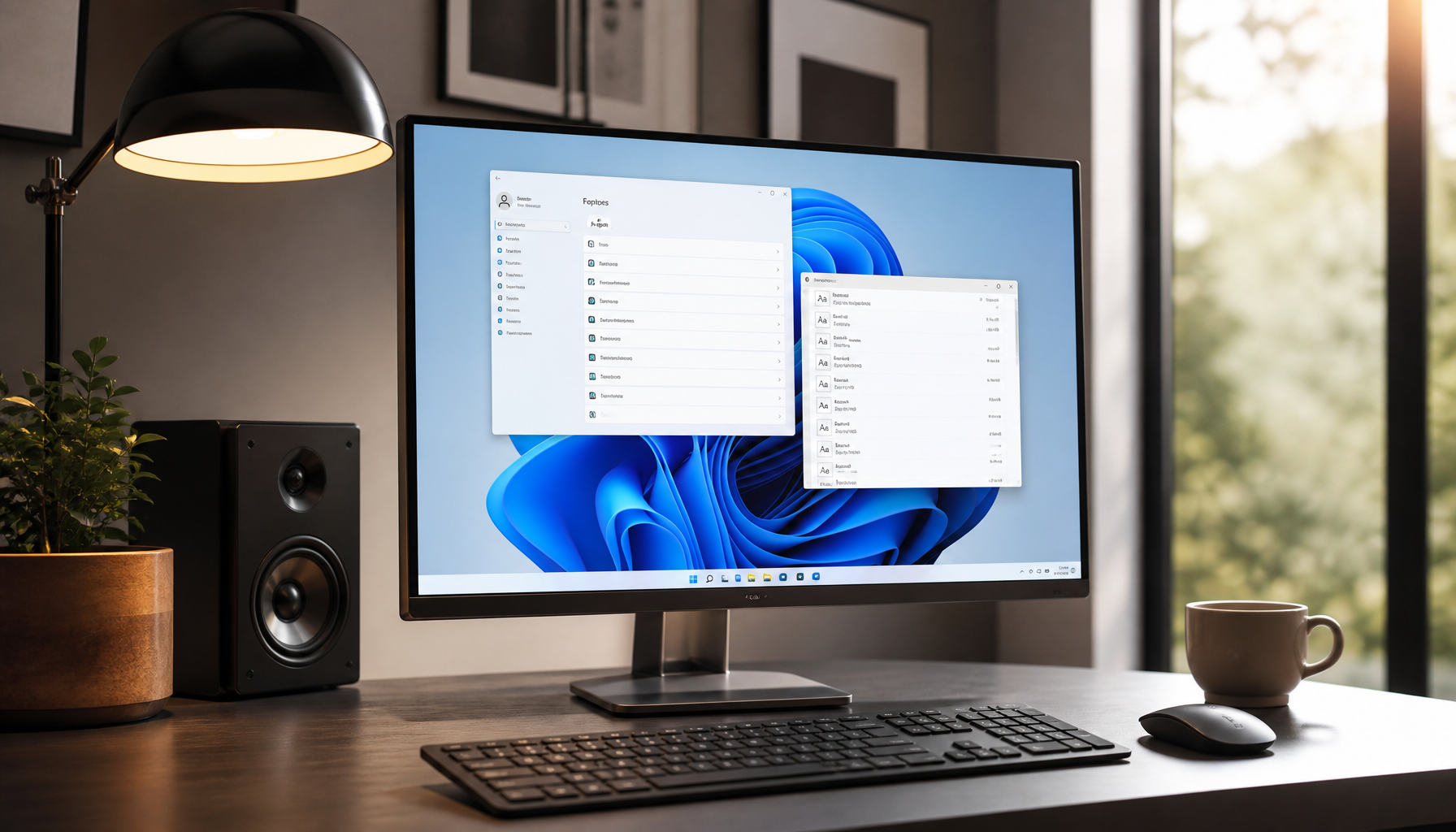
  1. Open the Start Menu and search for Font Settings.
  2. Type Kokila into the search box at the top of the Fonts list.
  3. If it appears, it's already installed — open Word or any text editor, select the Hindi text, and choose Kokila from the font dropdown.

Check on macOS

Kokila is not bundled with macOS by default, since it's a Windows/Office system font. Open Font Book and search "Kokila" to confirm — if it's missing, follow the install steps below.

Kokila Font Specifications

SpecificationDetails
Designer / FoundryModular Infotech (MODI), Pune, India — licensed to Microsoft
FormatOpenType (TTF), Unicode-based
Script supportDevanagari (Hindi), Latin
StylesRegular, Bold, Italic, Bold Italic (4 total)
File namesKokila.ttf, Kokilab.ttf, Kokilai.ttf, Kokilabi.ttf
Bundled withWindows 7, 8, 8.1, 10, 11; available in Office via cloud fonts

How to Download Kokila Font

If you've checked and Kokila genuinely isn't on your system — most often the case on macOS, or on a stripped-down Windows install — you can get the Regular style here:

⬇ Download Kokila Font (.ttf)
Always scan downloaded font files with your antivirus software before installing.

Since Kokila is a Microsoft-licensed font rather than an independent freeware release, the safest long-term option for Windows users is installing it through Windows Update's optional fonts or Office's cloud fonts rather than a third-party file. Use the link above only if those aren't available to you.

Installing on Windows

  1. Download the file using the link above.
  2. Locate it in your Downloads folder.
  3. Right-click the .ttf file and select Install.
  4. Restart any open apps — Kokila won't appear in already-open programs until they're restarted.

Installing on macOS

  1. Download the file using the link above.
  2. Double-click it to open it in Font Book.
  3. Click Install Font.
  4. Restart the app you want to use it in, then select Kokila from the font menu.
🛡️ Is it safe to download?

Treat any font file like any other download:

  • Scan it with your antivirus software before opening it.
  • Prefer Windows' built-in optional fonts or Office's cloud fonts when possible — that comes directly from Microsoft.
  • Avoid sites that bundle fonts with separate "installer" or "downloader" executables — a genuine font file is a plain .ttf, nothing more.

Fixing Common Hindi Typing Problems With Kokila Font

Hindi text shows as boxes or question marks

This almost always means the application isn't reading the text as Unicode. Check that the document or webpage's encoding is set to UTF-8, and that you're not pasting text originally typed in a legacy ASCII font like Preeti — those use a completely different character mapping and will display as gibberish in Kokila even though both are "Hindi fonts."

Kokila doesn't appear in the font list after installing

Close and fully reopen the application — Word, Photoshop, and most editors cache the font list at launch. On Windows, if it still doesn't appear after restarting the app, restart your PC.

Typing works but the letters look wrong or disconnected

This is usually a typing-method mismatch, not a font problem. If you're using a transliteration tool or a Preeti-style keyboard layout, the output isn't real Unicode Devanagari and won't render correctly in Kokila. Use a Unicode-based typing method, such as Google Input Tools or Windows' built-in Devanagari keyboard.

Word or Excel keeps switching to Mangal instead

Mangal is Windows' default Devanagari font, so apps often fall back to it automatically. Select your Hindi text and manually choose Kokila from the font dropdown, or set it as the default font for new documents in your app's settings.

Kokila Font vs. Mangal Font

Kokila

Compact, book-style letterforms. Easier to read in long paragraphs and print layouts. Not Windows' default — must be manually selected.

Mangal

Bolder strokes. Windows' default Devanagari font, so it's what you'll see unless you specify otherwise.

If a file looks correct in one but garbled in the other when opened on a different computer, the issue is almost always that only one of the two fonts is installed there — install both to avoid this when sharing files.

Frequently Asked Questions

Do I need to download Kokila font, or is it already on my PC?

Check first — Kokila has shipped with every Windows version since Windows 7. Search "Kokila" in Windows Font Settings before downloading anything.

Why is Kokila Font not displaying correctly?

This usually means the app is still using a fallback font, or the text wasn't typed in Unicode. Confirm Kokila is manually selected from the font dropdown, and check that the source text used a Unicode Devanagari input method rather than a legacy font like Preeti.

Is Kokila Font safe to download?

Treat it like any font file: scan it with antivirus software before installing, and prefer getting it through Windows' or Office's built-in font sources when that option is available to you.

Is Kokila Font free to use?

Kokila is licensed by its designer, Modular Infotech, to Microsoft for distribution with Windows and Office — it isn't an independent open-source or freeware font. For personal use on a licensed copy of Windows or Office you're covered under Microsoft's font-use terms; for redistribution or commercial/enterprise use, check Microsoft's font licensing terms directly.

What's the difference between Kokila and Mangal?

Both are Microsoft Devanagari system fonts. Mangal is bolder and is Windows' default; Kokila is more compact and often preferred for long-form reading and print layouts.
Related Guides

How to Install Nepali Font on Windows 11 (2026 Guide)

How to Install Nepali Font on Windows 11 (Complete 2026 Guide)

Quick Answer

To install a Nepali font on Windows 11, download a .ttf or .otf font file, right-click it and choose Install for all users. Then open Settings › Time & language › Language & region, click Add a language, select Nepali (नेपाली), and install it. Press Win + Space to switch between English and Nepali while typing.

Windows 11 handles Nepali better than any version before it — Devanagari rendering is built in, and a Nepali keyboard layout ships with the OS. Yet most people still end up staring at empty squares, a font that refuses to appear in Microsoft Word, or a keyboard that types the wrong characters entirely.

Almost every one of those problems traces back to a single misunderstanding: there are two completely different kinds of Nepali font, and installing the wrong one for your task guarantees frustration. This guide covers the installation itself, which font type you actually need, how to enable Nepali typing, and how to fix the errors that trip people up — verified on Windows 11 (24H2 and later).

1Unicode vs. Preeti: Which Nepali Font Do You Actually Need?

This is the step nearly every other guide skips, and it is the reason most Nepali font installations "fail" even when the file installed perfectly.

Unicode fonts (Mangal, Kalimati, Kokila, Aparajita) store real Devanagari characters. Type नेपाल in a Unicode font and it stays नेपाल everywhere — in email, on Facebook, in a searchable PDF, on a phone that has never had your font installed.

Legacy fonts (Preeti, Kantipur, Sagarmatha, Fontasy Himali, Aakriti) are a clever illusion. They map English letters to Devanagari-looking shapes. The letters g]kfn are literally what's stored — they only look like नेपाल because the Preeti font is drawing them that way. Send that text to anyone without the font and they see gibberish.

 Unicode (Mangal, Kalimati)Legacy (Preeti, Kantipur)
Text stays readable elsewhereYes — on any deviceNo — needs the font installed
Searchable & copy-paste safeYesNo
Works online / social mediaYesNo
Needs a font download?No — Mangal is built into Windows 11Yes
Typing layoutNepali keyboard (built in)Preeti layout (muscle memory from Typeshala)
Best forEveryday use, web, email, official documentsOpening old files, print/press work, legacy office templates
✅

Which should you choose? Pick Unicode unless you have a specific reason not to — it is the modern standard and needs almost no setup. Install a legacy font like Preeti or Kantipur only when you need to open older documents or you already type with the Preeti layout. Many people install both, and that is perfectly fine.

2Where to Download Nepali Fonts Safely

Font files are executable-adjacent, so where you get them matters. Stick to these three routes:

  • Already on your PC. Windows 11 ships with Mangal, Nirmala UI, Aparajita and Kokila — all Unicode Devanagari fonts. If you only need to read and write standard Nepali, you may not need to download anything at all. Skip to step 4.
  • The Microsoft Store. The All Nepali Fonts package installs through the Store with no loose files to handle — the safest option if you are wary of downloads.
  • A trusted font archive. For legacy fonts, use a maintained collection such as our free Nepali fonts download page, or grab the classic newspaper font directly from our Kantipur font download.
⚠️

Avoid random "free font" aggregator sites. Nepali fonts are frequently repackaged inside .exe installers bundled with adware. A genuine font download is a .ttf, .otf, or a .zip containing them — never an installer that asks for extra permissions.

3How to Install the Nepali Font on Windows 11

If your download arrived as a ZIP, extract it first — Windows cannot install a font from inside a compressed folder. Right-click the ZIP, choose Extract All, then pick whichever method below suits you.

Method 1 — Right-click install (fastest)

  1. Open the extracted folder and find your font file. It will end in .ttf or .otf.
  2. Right-click the font file and choose Install for all users. If you only see a short menu, click Show more options first.
  3. Approve the admin prompt. Installing for all users requires administrator permission — this is what makes the font available in every app and every user account.

That is it. Choosing Install instead of Install for all users also works and skips the admin prompt, but the font is then only available to your own account and occasionally will not appear in apps running with elevated permissions.

Method 2 — Drag and drop into Settings

  1. Press Win + I to open Settings.
  2. Go to Personalization › Fonts.
  3. Drag your font files into the "Drag and drop to install" box at the top. Windows installs them instantly, no restart required.

Method 3 — The Control Panel Fonts folder (legacy)

  1. Press Win + R, type control fonts and press Enter.
  2. Drag the font files into the window that opens. This is the same folder Windows has used for decades and still works reliably in Windows 11.

Method 4 — Straight from the Microsoft Store

  1. Open Settings › Personalization › Fonts and click Get more fonts in Microsoft Store.
  2. Search for "Nepali", then install the package you want. Store fonts update automatically and are the lowest-risk option.
💡

Verify the install worked: open Settings › Personalization › Fonts and search for the font name. If it appears there, it is installed system-wide — any app that still cannot see it simply needs to be closed and reopened.

Step-by-step guide to install Nepali Unicode font on a Windows 11 computer
Installing a Nepali font on Windows 11 takes under a minute — the keyboard setup is the part most people miss.

4Enable the Nepali Keyboard in Windows 11

Installing a font lets your PC display Nepali. It does not let you type it. For that you need to add the Nepali input language — a separate step, and the one people most often skip.

  1. Press Win + I and go to Time & language › Language & region.
  2. Click "Add a language" next to Preferred languages.
  3. Search for "Nepali" and select नेपाली (Nepali), then click Next.
  4. Confirm the language features. Make sure Basic typing is ticked — this is the component that installs the keyboard. You can safely untick "Set as my Windows display language" unless you want the whole interface in Nepali.
  5. Click Install and wait a few seconds. A language icon (ENG) now appears in your taskbar near the clock.
⌨️

Switch languages instantly: press Win + Space to cycle between English and Nepali. Alt + Shift does the same thing on most setups. You can also click the ENG indicator in the taskbar.

5Start Typing in Nepali

Which keys produce which characters depends entirely on the font type you chose in step 1.

Typing in Unicode (the Nepali keyboard)

Switch to Nepali with Win + Space and start typing. Windows uses the Nepali Traditional layout, which is the standard Devanagari arrangement — the same one used across government and education in Nepal. Set your document font to Mangal, Kalimati or Nirmala UI and the text will render correctly anywhere it is sent.

If you have never learned the Traditional layout, you have two shortcuts. Practise it properly with Typeshala, the classic Nepali typing tutor — or type phonetically in English and convert with our English to Nepali Unicode converter, which turns "mero desh Nepal" into मेरो देश नेपाल instantly.

Typing in Preeti or Kantipur

Legacy fonts do not use the Nepali keyboard — keep Windows on English, then simply select Preeti or Kantipur as the font in your document. The keys map to Devanagari shapes through the font itself, which is why Preeti typists learn a separate layout. Switching Windows to Nepali while using Preeti is a very common cause of scrambled output.

6Troubleshooting: 8 Problems and Their Fixes

ProblemCause & fix
Font missing from Word / PhotoshopThe app cached its font list at launch. Fully close and reopen it. If it still does not appear, reinstall using Install for all users.
Empty squares or boxes (□□□)The font you have selected has no Devanagari characters. Switch the text to Mangal or Kalimati — this is not a Windows fault, it is a font-coverage issue.
Nepali text turns into English gibberish for othersYou typed in Preeti/Kantipur, which is device-dependent. Retype in Unicode, or run the text through a Preeti-to-Unicode converter before sending.
No language icon in the taskbarBasic typing was not installed with the language. Go to Language & region, click the ⋯ next to Nepali › Language options, and add the keyboard.
"Install" missing from right-click menuEither the file is still inside a ZIP (extract it first), or you are on the compact Windows 11 menu — click Show more options.
Matras or characters overlap incorrectlyAn outdated font build without proper OpenType shaping. Download a current version, or switch to a maintained Unicode font like Kalimati.
Works in Word but not in ChromeWebsites specify their own fonts. Set a Devanagari fallback under Chrome › Settings › Appearance › Customise fonts.
"You need administrator permission"Choose plain Install instead of Install for all users — this installs to your own profile and needs no admin rights.

Key takeaways

  • Unicode for everything modern — it travels; Preeti and Kantipur do not.
  • Fonts and keyboards are separate. Installing a font never enables typing on its own.
  • Windows 11 already has Mangal. Many people need no download whatsoever.
  • Right-click → Install for all users prevents most "font not showing" problems before they start.
  • Win + Space is the only shortcut you really need to remember.

7Frequently Asked Questions

Is Nepali font free to download for Windows 11?

Yes. Every widely used Nepali font — Preeti, Kantipur, Sagarmatha, Kalimati and the Unicode families — is free for personal use, and Windows 11 already includes Mangal and Nirmala UI at no cost. Only a handful of commercial display fonts carry a licence fee, and those are clearly marked as such.

Which Nepali font is best for Windows 11?

Kalimati is the best all-round choice for on-screen Nepali — it is Unicode, well-shaped and highly readable. Mangal is the safest default because it is already installed on every Windows 11 machine. Choose Preeti or Kantipur only for legacy documents or print work that specifically requires them.

Do I need to install a font to type Nepali on Windows 11?

No. Windows 11 ships with Devanagari-capable fonts, so you only need to add the Nepali keyboard under Time & language › Language & region. You only need to install a font if you want a specific typeface such as Preeti, Kantipur or Kalimati.

What is the difference between Preeti and Nepali Unicode?

Preeti maps English letters to Devanagari-shaped glyphs — the underlying text is still English characters, so it only displays correctly on devices with Preeti installed. Unicode stores genuine Nepali characters that display correctly everywhere, are searchable, and can be copied between apps without breaking.

How do I switch between English and Nepali on the keyboard?

Press Win + Space to cycle through your installed input languages, or Alt + Shift. You can also click the language indicator (ENG / NEP) in the taskbar next to the clock.

Why is my Nepali font showing boxes or question marks?

The selected font does not contain Devanagari characters — the text itself is fine. Highlight the text and change it to Mangal, Kalimati or Nirmala UI. If boxes appear only in one application, that app is falling back to a font without Nepali support.

Can I install Nepali fonts without administrator rights?

Yes. Right-click the font file and choose Install rather than Install for all users. The font installs into your own user profile and works in most applications, though it will not be available to other accounts on the PC.

How do I convert Preeti text to Unicode?

Paste the Preeti text into a converter that remaps the glyphs to real Devanagari characters. Our Nepali Unicode converter handles this, and the resulting text can be used in email, on the web and in any document without needing the Preeti font installed.

Final Thoughts

The whole process comes down to three things: install the font file, add the Nepali keyboard, and pick Unicode unless a legacy document forces your hand. Get those right and Nepali typing on Windows 11 stops being a recurring annoyance and simply becomes part of how you work.

If you hit a problem this guide does not cover, describe it in the comments below — I read every one and keep this article updated as Windows 11 changes.

Kantipur Font Free Download for Windows, Mac & Linux

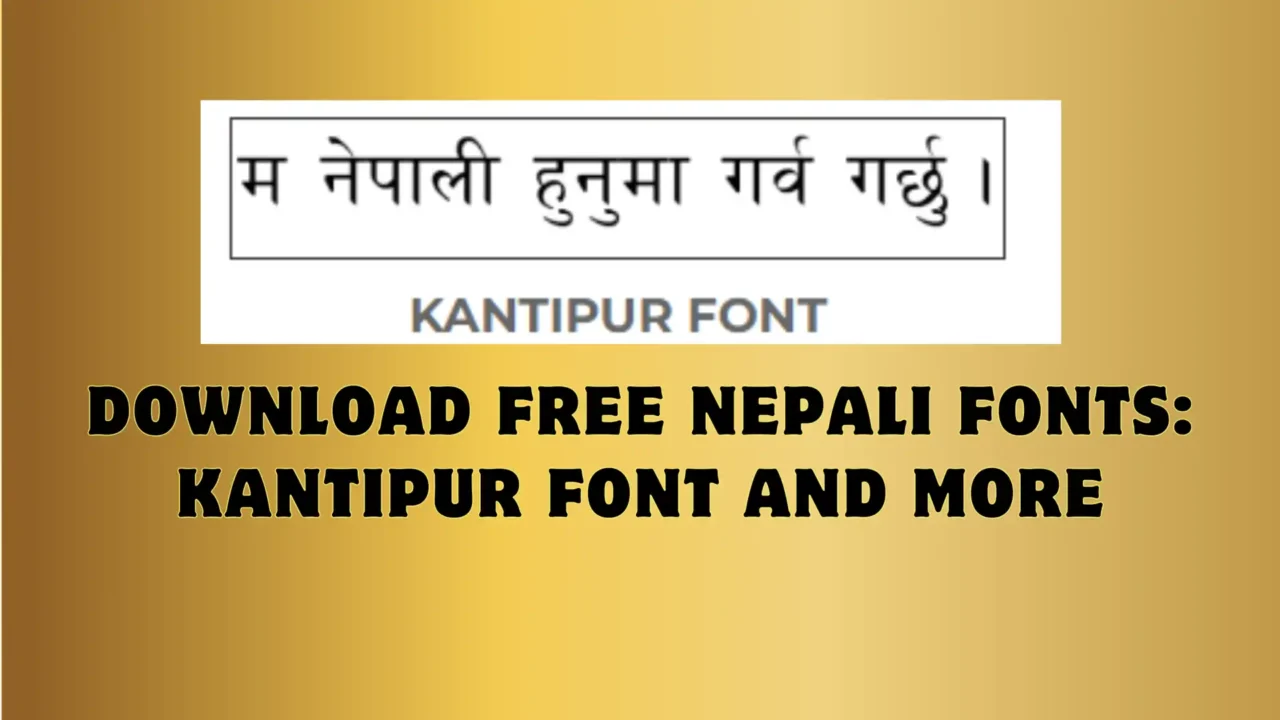
Download Free Nepali Fonts: Kantipur Font and More

Kantipur Font Free Download for Windows, Mac & Linux

Kantipur is one of the most widely recognized Nepali Devanagari fonts, in the same classic family as Preeti and Kanchan. Here's how to get it, install it correctly on any OS, and understand how it actually works before you use it.

ScriptDevanagari (Nepali)
Font typeLegacy, non-Unicode
Works onWindows, Mac, Linux
Known forStyle used by Kantipur Daily
Best forPersonal documents & design

What is the Kantipur font?

Kantipur is a classic Nepali font for typing and designing in Devanagari script — the same visual style long associated with Kantipur Daily, one of Nepal's largest newspapers. It's simple, highly legible, and close in shape and clarity to the Preeti font, which is why the two are often confused or used side by side.

Like Preeti, Kanchan, and most of the fonts in this family, Kantipur is a legacy (non-Unicode) font: it works by remapping regular English keys to Devanagari characters, rather than using the Unicode Devanagari standard. That one fact explains almost every install or display problem people run into with it — see the comparison below before you install.

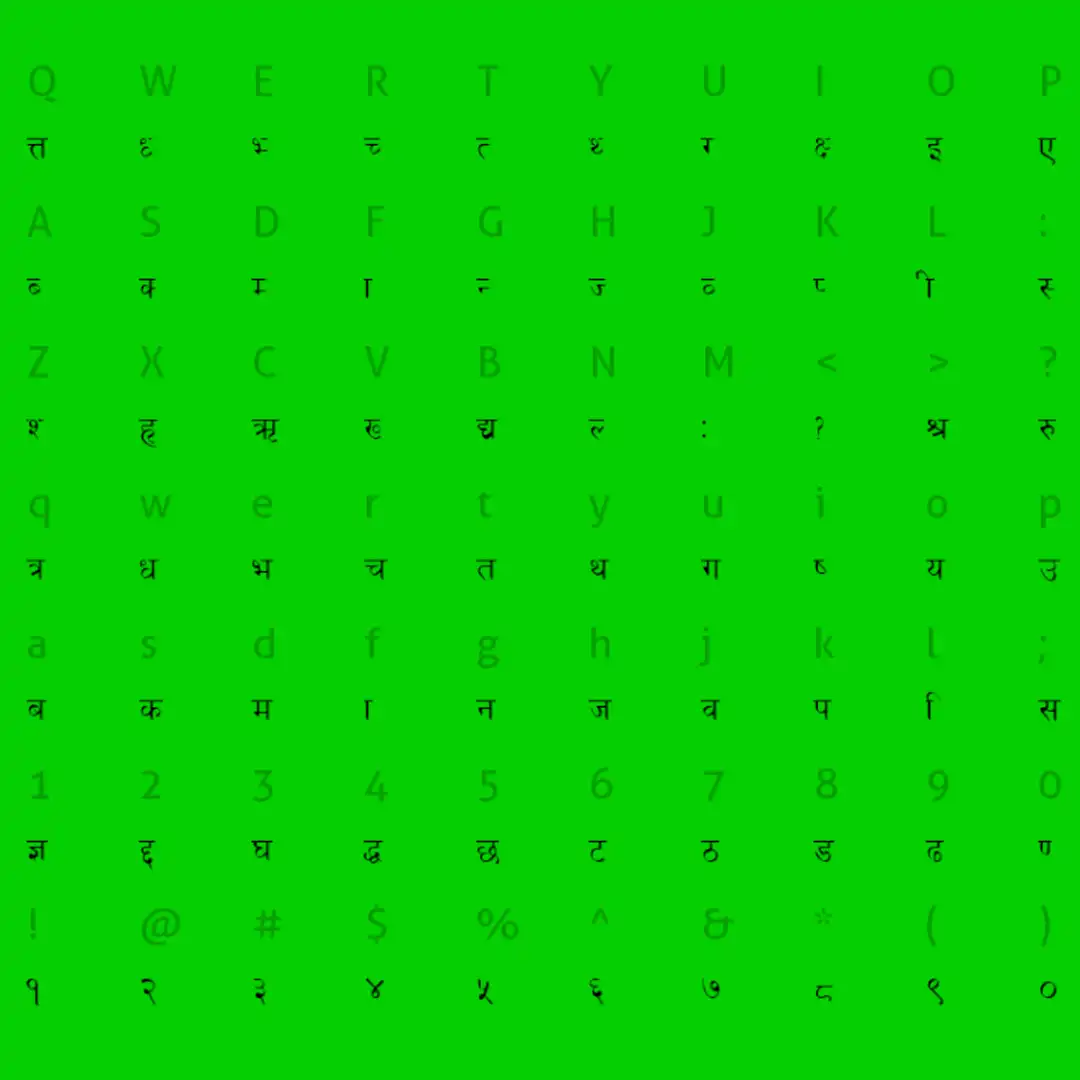
Character map preview

character map of Kantipur Nepali font

Every character and key mapping in the Kantipur font, at a glance.

Legacy font vs. Unicode — why it matters

⚠️ Legacy fonts like Kantipur

Only display correctly on a device that has the exact font installed. Paste the text into a website, WhatsApp, or someone else's computer without Kantipur installed, and it turns into boxes or random symbols.

✅ Unicode Devanagari fonts

Display correctly everywhere — browsers, phones, social media — without installing anything, because the text itself is standard Unicode, not a remapped font.

If you're typing something that needs to display correctly for other people (a social post, a web page, a WhatsApp message), convert it to Unicode first — our free Preeti/Kantipur-to-Unicode converter does this in one paste. If you're designing something locally (posters, print, Photoshop work) where you control the fonts used, Kantipur works exactly as intended.

How to install the Kantipur font

1

Windows

Extract the downloaded ZIP, then double-click the Kantipur font file inside it. Click Install at the top of the preview window — it's ready to use immediately in Word, Photoshop, and anywhere else. If it doesn't show up right away, restart the app (or your PC).

2

Mac

Double-click the font file to open it in Font Book, then click Install Font. It's immediately available in Pages, Keynote, Photoshop, and other apps.

3

Linux

Copy the font file into ~/.fonts (just for you) or /usr/share/fonts (for every user on the machine), then run fc-cache -f -v in a terminal to refresh the font cache.

Ready to get the font? It's part of our free Nepali fonts collection — look for the Kantipur Font card on the download page.

Go to the Font Download Page →
Opens our Nepali Fonts hub, where Kantipur is one of several fonts you can grab for free.

Frequently asked questions

Is Kantipur a Unicode font?

No. Kantipur is a legacy (non-Unicode) Nepali font, in the same family as Preeti and Kanchan. Text typed in it only displays correctly on a device that has the font installed — paste it somewhere else and it can turn into boxes or symbols. For text that needs to display correctly everywhere, use a Unicode font instead, or run your text through a Preeti/Kantipur-to-Unicode converter first.

Why does my Kantipur text show up as boxes or question marks?

Almost always because the font isn't installed on the device you're viewing it on, or the app you're using doesn't support legacy Nepali fonts. Reinstall the font, restart the app, and make sure you're not trying to view it on a device where Kantipur was never installed in the first place.

What's the difference between Kantipur and Preeti fonts?

Visually they're close — both are classic Devanagari fonts with a similar clean, newspaper-style look. The practical difference is mostly about habit and keyboard layout: many typists learn one specific layout and stick with it. If you already know the Preeti layout, see our Preeti font and keyboard layout guide.

Can I use the Kantipur font commercially?

For personal documents, school work, or informal design, it's fine. For anything commercial — books, branding, products for sale — verify the font's license with its original source before publishing, since legacy Nepali fonts circulated online rarely come with clear, traceable licensing. If you need a font with an unambiguous open license, look for a Unicode alternative with published licensing terms instead.

Free Nepali Fonts Download

Free download Nepali fonts: Preeti, Kalimati, Kantipur and more for Windows and Mac

Download nine popular Nepali fonts, including Preeti, Kalimati and Kantipur, and install them on Windows or Mac in under two minutes.

  • 9 fonts
  • Windows & Mac
  • Free for personal use

Nepali fonts are the typefaces used to write the Nepali language in design, documents, blogging and print. They are used in Nepal, and also by Nepali speakers in India and Bhutan. I use these same fonts every day for blogging and graphic design, so this list only has fonts people actually use.

Pick a font below, download the zip file, extract it and install it. If you get stuck, jump to the installation steps.

What are Nepali fonts?

Nepali is written in the Devanagari script, the same script used for Hindi and Sanskrit. Because the letterforms are so close, the text looks similar to Hindi, and you can also use Hindi fonts to display Nepali. If you want that route, see my guide to free Hindi fonts for PC.

A font for Nepali needs the full set of Devanagari characters, including conjuncts and half letters. If you are not sure how those are typed, read how to type Nepali half letters.

Unicode vs legacy fonts: know this before you download

Nepali fonts come in two kinds, and mixing them up is the most common reason text turns into strange symbols.

 Legacy fonts (e.g. Preeti, Kantipur)Unicode fonts (e.g. Kalimati)
How it worksMaps Nepali shapes onto English keys, so the font must be installed to read the textStores real Devanagari characters that any device can read
Best forPrint design, banners, Photoshop, Illustrator, office documentsWebsites, social media, email, mobile, search
TypingNeeds a Preeti-style keyboard layoutWorks with Nepali Unicode keyboards and converters

If you have text in a legacy font and need it on the web, use the English to Nepali Unicode converter to change it into readable Unicode.

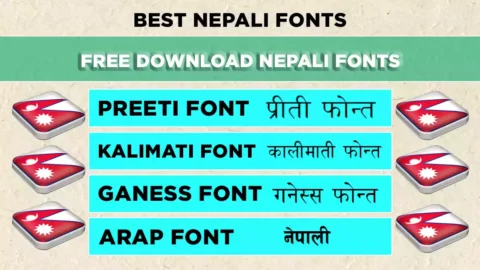
Download Nepali fonts

Each button downloads a zip file. Extract it before installing.

Preeti Nepali font preview

Preeti Legacy

The most widely used Nepali font for offices, print and publishing. Needs the Preeti layout to type. Preeti font with layout.

Download Preeti
Kalimati Nepali font preview

Kalimati Unicode

A clean, readable Unicode font that works on websites and in everyday documents. Kalimati font guide.

Download Kalimati
Ganess Nepali font preview

Ganess

A distinctive style that suits headings and posters. Test a sample line before using it in client work.

Download Ganess
Arap Nepali font preview

Arap

An alternative style for titles and design projects. Type a short test after installing to see how it looks.

Download Arap
Kantipur Nepali font preview

Kantipur Legacy

A newspaper-style font common in print and publishing. Kantipur font guide.

Download Kantipur
Kanchan Nepali font preview

Kanchan

A simple option for documents and layouts when you want something different from Preeti.

Download Kanchan
Kalam Nepali font preview

Kalam Unicode

A handwritten feel that works well for quotes, greetings and social media posts.

Download Kalam
Aakar Nepali font preview

Aakar

A neat, readable face for general text and design work.

Download Aakar
Aakriti Nepali font preview

Aakriti

A clear style for posters, notices and printed material.

Download Aakriti

Looking for a Hindi-style Unicode font? Try Kokila font.

How to install Nepali fonts

First extract the zip file on your computer. Then follow the steps for your system.

Windows

  1. Open the extracted folder.
  2. Double-click the font file (.ttf or .otf).
  3. Click Install.
  4. Restart Word or your design app.

Mac

  1. Open the extracted folder.
  2. Double-click the font file.
  3. Click Install Font in Font Book.
  4. Restart your app.

For screenshots and fixes when a font does not appear, read how to install a Nepali font on Windows 11.

How to type Nepali after installing

Installing a font only changes how text looks. You also need a way to type it:

Which font should you pick?

You want toStart with
Publish on a website or social mediaKalimati or Kalam (Unicode)
Design a banner, poster or print layoutPreeti or Kantipur
Write an office document in the usual stylePreeti or Kalimati
Add a personal, handwritten touchKalam
Try a different lookGaness, Arap, Kanchan, Aakar or Aakriti

Licence and fair use

Personal use only. These fonts are shared here for educational purposes. If you want to use them commercially, ask the font’s creator for permission first.

Frequently asked questions

Are these Nepali fonts free?

Yes, you can download them for free. Use them for personal and educational purposes only. Commercial use needs the creator’s permission.

Do they work on both Windows and Mac?

Yes. Extract the zip file, then double-click the font file to install it on either system.

Why does my Nepali text show strange English letters?

You are probably viewing legacy font text (like Preeti) without the font installed. Install the font, or convert the text with the Unicode converter.

Can I use Hindi fonts for Nepali?

Yes. Both languages use Devanagari, so Hindi fonts display Nepali text well. See free Hindi fonts for PC.

Which font is best for websites?

Use a Unicode font such as Kalimati. Legacy fonts like Preeti will not display correctly on visitors’ devices.

Download Kalimati Font – Free Nepali Unicode TTF/OTF

Kalimati Font Download


Updated October 2026


Need the Kalimati font download for a Nepali office letter, a Lok Sewa form, or a design project? You can download Kalimati Regular for free below. It's the standard Nepali Unicode font used in government offices, newspapers, and schools across Nepal. This guide also shows you how to install it on Windows, Mac, Android and iPhone, how to type with it, and how to fix the problems most other download pages don't mention: boxes, broken letters, and Kalimati not appearing in Word.


Free download

Kalimati Regular – Nepali Unicode Font

  • File: Kalimati Regular.otf (OpenType)
  • Works on: Windows 7/10/11, macOS, Linux, Android (via apps)
  • Price: Free – no sign-up, no "human verification" pop-ups
Download Kalimati Font (Free)

The file downloads directly — your browser will save Kalimati-Regular.otf to your Downloads folder.


Kalimati font download – free Nepali Unicode font sample
Kalimati Regular is the go-to Devanagari Unicode font for Nepali typing.

Kalimati Font at a Glance


Font nameKalimati (Regular)
ScriptDevanagari – Nepali, plus Hindi, Sanskrit and other Devanagari languages
EncodingUnicode (not a legacy font like Preeti)
WeightsRegular only – no official Bold or Italic
File formatOpenType (.otf); a .ttf version also circulates
DesignerSanir Karmacharya
Developed atMadan Puraskar Pustakalaya (MPP), Lalitpur – as part of its Nepali language computing work
CostFree
Best forOffice letters, government forms, reports, websites, social media, print

What Is Kalimati Font?


Kalimati is a free Devanagari Unicode font made for the Nepali language. Sanir Karmacharya designed it at Madan Puraskar Pustakalaya, the Lalitpur-based library that led much of Nepal's early work on Nepali in Unicode. Over the years it has become the default choice for Nepali text in government offices, local bodies, schools, banks and newsrooms.


Because Kalimati is a Unicode font, the letters you type are stored as real Nepali characters. That means:


  • Your text stays readable when you email it, paste it on Facebook, or publish it on a website, even if the reader doesn't have Kalimati installed.
  • Google can search and index it, so it works for Nepali blogs and websites.
  • You can switch the text to another Unicode font (Kokila, Mangal, Nirmala UI) without it turning into gibberish.

This is the key difference from older fonts like Preeti, which only look right on a computer that has that exact font installed.


Kalimati Font Preview


Here's what Nepali text looks like in Kalimati. If you already have the font installed, the lines below will show in it; otherwise your browser uses its default Devanagari font.


नेपाली भाषामा टाइप गर्न कालिमाटी फन्ट सबैभन्दा धेरै प्रयोग गरिन्छ।

अ आ इ ई उ ऊ ऋ ए ऐ ओ औ अं अः

क ख ग घ ङ च छ ज झ ञ ट ठ ड ढ ण त थ द ध न प फ ब भ म य र ल व श ष स ह

क्ष त्र ज्ञ श्र द्ध द्व ह्म

। १ २ ३ ४ ५ ६ ७ ८ ९


How to Download Kalimati Font


  1. Click the Download Kalimati Font button at the top of this page.
  2. Your browser downloads Kalimati-Regular.otf directly — no preview screen, no extra steps.
  3. The file saves to your Downloads folder. Now install it using the steps below.

Safety tip: Many "Kalimati font download" sites send you through ad pages, captchas or .exe "installers". A real font is a single .otf or .ttf file. Never run an .exe file to install a font.


How to Install Kalimati Font


Installing takes under a minute on any device. For screenshots and more detail, see my full guide on how to install Nepali fonts.


On Windows 10 and 11

  1. Open your Downloads folder and find Kalimati-Regular.otf. If it came as a .zip, right-click and choose Extract All first.
  2. Right-click the file and choose Install. On a shared office PC, choose Install for all users (you'll need admin rights).
  3. Close and reopen MS Word, Excel, Photoshop or any app that was already open. Kalimati will now appear in the font list.

On Mac (macOS)

  1. Double-click Kalimati-Regular.otf.
  2. Font Book opens with a preview. Click Install.
  3. Restart Pages, Word, Keynote or your design app.

On Android

Android can already display Nepali Unicode text, so you don't need Kalimati to read Nepali on your phone. To design with Kalimati (posters, status images, thumbnails), load the font inside the app:

  • Download the .otf file to your phone.
  • In apps like PixelLab, open the font menu and use the option to add or import a font, then pick the Kalimati file.
  • For typing, install a Nepali keyboard (for example Gboard with Nepali added). Your text will be Unicode, so it will look fine anywhere you paste it.

On iPhone and iPad

iOS shows Nepali text out of the box. To use Kalimati inside design apps, install it through a font-installer app from the App Store, or import it directly in apps that support custom fonts. Add the Nepali keyboard under Settings → General → Keyboard → Keyboards.


On Linux (Ubuntu and others)

Double-click the file and click Install in the font viewer, or copy it into ~/.local/share/fonts and run fc-cache -f.


How to Type in Kalimati Font


Installing the font is only half the job. To type in Nepali Unicode, you also need a Nepali Unicode keyboard layout. This is where most people get stuck, and most download pages skip it entirely. You have two main layouts to choose from:


Nepali Traditional Unicode

The key positions follow the old typewriter and Preeti layout.

Best for: typists who already know Preeti and want the same finger positions.

Nepali Romanized Unicode

Keys match English sounds: K gives क, M gives म, and so on.

Best for: beginners and anyone who types English every day.


Both layouts produce the same Unicode text, so Kalimati works with either one. Choose whichever feels natural to you.


Set up Nepali typing on Windows

  1. Go to Settings → Time & language → Language & region → Add a language and add Nepali. This gives you Windows' built-in Nepali keyboard.
  2. If you prefer the Romanized layout, install the Nepali Unicode Romanized keyboard released by Madan Puraskar Pustakalaya / Language Technology Kendra.
  3. Press Windows + Space to switch between English and Nepali.
  4. Open Word, choose Kalimati from the font list, and start typing.

Make Kalimati the default font in MS Word

Word often switches Nepali text back to Mangal or Nirmala UI. To stop this, press Ctrl + D to open the Font dialog. Under Complex scripts, set the font to Kalimati. Click Set As Default and choose All documents based on the Normal template.


Kalimati vs Preeti vs Kokila vs Mangal


These are the four Nepali fonts people ask about most. Here's how they compare:


FontTypeWorks when shared?Best use
KalimatiUnicodeYesOffice documents, government forms, web
PreetiLegacy (non-Unicode)Only if the reader has PreetiOlder print and DTP files, typing tests
KokilaUnicodeYesDocuments with Bold/Italic, formal print
MangalUnicodeYesBuilt-in Windows fallback

In short: if you need Nepali text that looks the same everywhere, use Kalimati. If you need a proper bold weight, try Kokila. Use Preeti only when an older file or a typing exam requires it. For headlines and newspaper-style design, Kantipur font is another popular choice.


Kalimati Font Not Working? Common Fixes


Text shows as boxes or English letters

This almost always means the text was typed in Preeti (legacy) and then switched to Kalimati. Changing the font won't fix it. You need to convert the text from Preeti to Unicode first, then apply Kalimati. If the boxes appear only on someone else's computer, the file was probably typed in a legacy font. Retype or convert it to Unicode before sharing.


Half letters and conjuncts break in Photoshop or Illustrator

Adobe apps need their South Asian text engine turned on. In Photoshop, go to Preferences → Type and select Middle Eastern and South Asian. Then, in the Paragraph panel menu, choose Adobe World-Ready Paragraph Composer. Letters like क्ष and श्र will now join correctly.


Kalimati doesn't appear in the font list

  • Restart the app. Most programs only load fonts when they start.
  • Check that you installed the file and didn't just open it. On Windows, look for it in C:WindowsFonts.
  • In Word, scroll to K in the font list. Nepali fonts aren't grouped separately.

Using Kalimati in Canva

Canva lets you upload your own fonts through the Brand Kit, which requires a Canva Pro, Teams or Education plan. After uploading, type your Nepali text with a Unicode keyboard and select Kalimati.


Why This Kalimati Font Download Page Is Different


I looked at the pages that currently rank for this keyword, including government download pages and large font directories. Most of them give you a single link and nothing else. Here's what they usually leave out, and what this guide covers:


  • No installation steps. Government pages just say "click here to download". Here you get steps for Windows, Mac, Android, iPhone and Linux.
  • No credit or background. Font directories often leave the designer blank. Kalimati was made by Sanir Karmacharya at Madan Puraskar Pustakalaya.
  • No typing help. Almost no one explains that you need a Nepali Unicode keyboard, or the difference between the Traditional and Romanized layouts.
  • No troubleshooting. Boxes, broken conjuncts in Photoshop, and Word switching back to Mangal are the questions I get asked most. All of them are answered above.
  • Hidden downloads. Some sites add captchas or "human verification" before the file. This page links straight to the font.

My Experience Using Kalimati


I'm a web developer and designer in Kathmandu, and Kalimati is the Nepali font I install first on every new computer. I use it for Nepali documents for clients, for graphic design, and for my blog posts.

The mistake I see most often is someone typing a full letter in Preeti, emailing it, and the recipient seeing random English characters. Since I switched to Kalimati with the Unicode keyboard, that hasn't happened to me once. The same file opens correctly on a client's laptop, on my phone, and when I paste it into WordPress.

My one complaint is that Kalimati has no true bold. Word's fake bold looks a little heavy on print. For headings, I use Kalimati for the body text and pair it with a bolder Devanagari font such as Kokila Bold.


Frequently Asked Questions


Is Kalimati font free to download?

Yes. Kalimati is free to download and use for typing Nepali in documents, forms and websites. If you plan to bundle the font file inside a commercial product, check the licence notes included with the font first.


Is Kalimati a Unicode font?

Yes. Kalimati is a Nepali Unicode font, which is why it's the standard for government and office work. Preeti is the popular non-Unicode (legacy) font.


Does Windows come with Kalimati pre-installed?

No. Windows includes other Devanagari fonts such as Mangal, Nirmala UI and Kokila, but Kalimati has to be downloaded and installed separately.


Is there a Kalimati Bold font?

There's no official Kalimati Bold. Kalimati comes in a single Regular weight. Files sold or shared as "Kalimati Bold" are usually renamed copies. Use your app's bold button, or use Kokila when you need a real bold.


Can I use Kalimati on my website?

Yes. Because Kalimati is Unicode, Nepali text on your site is readable and searchable even without it. To make the text display in Kalimati for every visitor, host the font file on your server and load it with CSS @font-face.


How do I convert Preeti text to Kalimati?

Paste the Preeti text into a Preeti-to-Unicode converter, copy the result, and apply the Kalimati font. Simply changing the font from Preeti to Kalimati will not work, because the underlying characters are different.


Which keyboard layout should I use with Kalimati?

Use Nepali Traditional Unicode if you already know Preeti typing. Use Nepali Romanized Unicode if you're a beginner. Both produce the same Unicode text.


More Free Nepali Fonts


Ready to type in Nepali?

Download Kalimati, install it in under a minute, and start typing Nepali that looks right everywhere.

Download Kalimati Font

Need help? Follow the Nepali font installation guide.


Preeti Font Download (Free) + Keyboard Layout & Alt Codes

Free Nepali Font · Updated 2026

Preeti Font Download – Free Nepali Font with Keyboard Layout

By Wilson Shrestha · Graphic designer & web developer, Kathmandu · Updated

Download the Preeti font for free, install it in under a minute, and start typing Nepali using the full Preeti keyboard layout, Alt key codes and practice tips below.

100% freeWindows, Mac & LinuxNo sign-upVirus-free TTF file

Preeti is the most popular traditional Nepali font in Nepal. Printing presses, designers, schools and offices have used it for decades to create invitation cards, certificates, banners, notices and office documents. If you have ever received a Nepali file that only showed English letters like “g]kfn”, it was written in Preeti and the font simply was not installed.

I have used Preeti for years in my own graphic design and document work, so this guide covers what people actually need: the font file, installation steps for every device, the complete keyboard layout, Alt codes for tricky characters and how to convert Preeti text to Unicode.

Preeti Font at a Glance

Font namePreeti
ScriptDevanagari (Nepali)
StyleTraditional, print-friendly
File typeTrueType (.ttf)
EncodingNon-Unicode (ASCII-mapped)
Works onWindows, macOS, Linux
Best forPrint, invitations, certificates, design
PriceFree

Download Preeti Font for Free

Click the button below to download the Preeti font file. It is a standard TrueType font that works in MS Word, Excel, PowerPoint, Photoshop, Illustrator, CorelDRAW, Canva (desktop upload) and most other software.

⬇ Download Preeti Font (.zip)

Tip: Download fonts only from trusted sites. A real font file ends in .ttf or .otf. Never run an .exe file that claims to be a font.

How to Install Preeti Font (Windows, Mac & Android)

Windows 10 / 11
  1. Download the Preeti .ttf file.
  2. Right-click it and choose Install (or Install for all users).
  3. Close and reopen Word or Photoshop.
  4. Select Preeti from the font list.
macOS
  1. Double-click the .ttf file.
  2. Font Book opens. Click Install Font.
  3. Restart Pages, Word or your design app.
  4. Choose Preeti and type.
Android / iPhone
  1. Phones cannot install Preeti as a system font.
  2. Use apps that accept custom fonts (e.g. PixelLab) and import the .ttf.
  3. For chatting and social media, type in Nepali Unicode instead.
Text still showing English letters? The font is not installed on that computer, or the app was opened before installation. Install the font and restart the app.

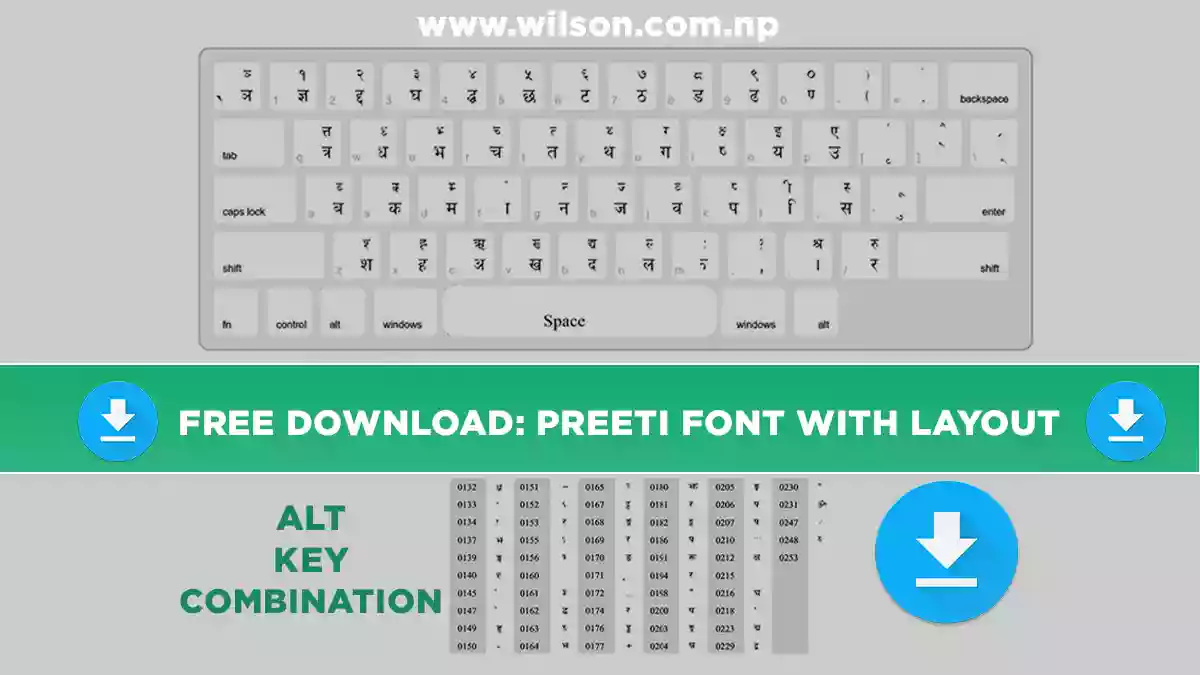
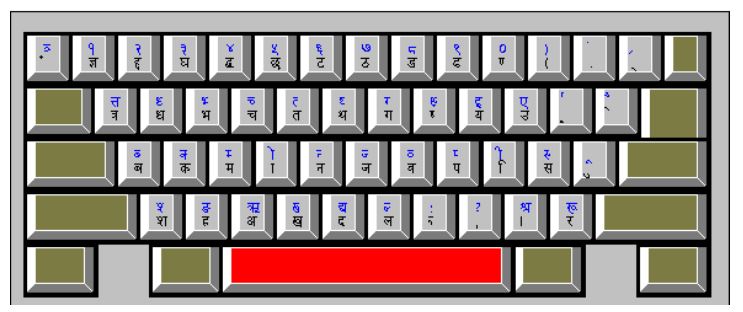
Preeti Font Keyboard Layout

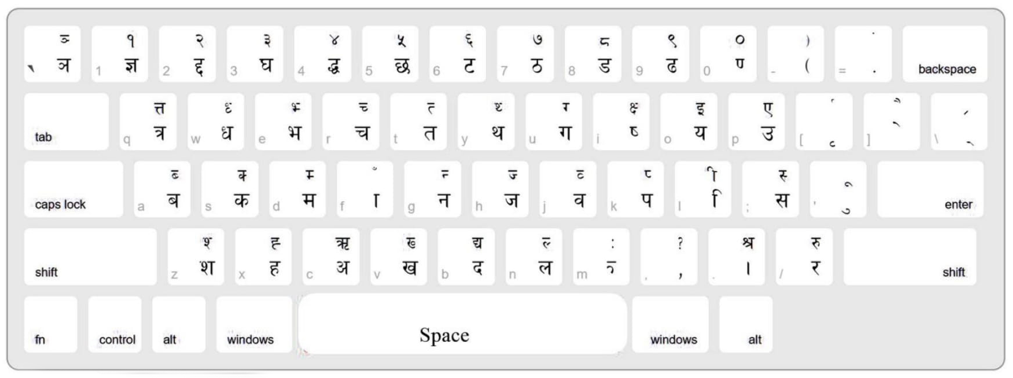
Preeti places Nepali letters on a normal English keyboard. The lower character on each key appears when you press the key alone. The upper character appears when you hold Shift.

Preeti font keyboard layout showing Nepali letters on each English key
Preeti keyboard layout. Click the image to open the full-size version for printing.

Preeti Key Chart: Which Key Types Which Letter

Here is the same layout as searchable text, so you can quickly find any letter.

Consonants and vowels (no Shift)

KeyNepaliKeyNepaliKeyNepali
aबsकdम
fाgनhज
jवkपlि
;सqत्रwध
eभrचtत
yथuगiष
oयpउzश
xहcअvख
bदnल/र
1ज्ञ2द्द3घ
4द्ध5छ6ट
7ठ8ड9ढ
0ण.।,,

Useful Shift combinations

KeysNepaliKeysNepaliKeysNepali
Shift+Iक्षShift+Qत्तShift+.श्र
Shift+OइShift+PएShift+Cऋ
Shift+LीShift+MःShift+/रु
Shift+Bद्यShift+1…0१ … ०Shift+;स्
Half letters: hold Shift with a consonant key to get its half form, e.g. Shift+S = क्, Shift+G = न्, Shift+K = प्.

Practice examples

Type thisYou get
g]kfnनेपाल
gd:t]नमस्ते
sfdकाम

Preeti Alt Key Codes for Special Characters

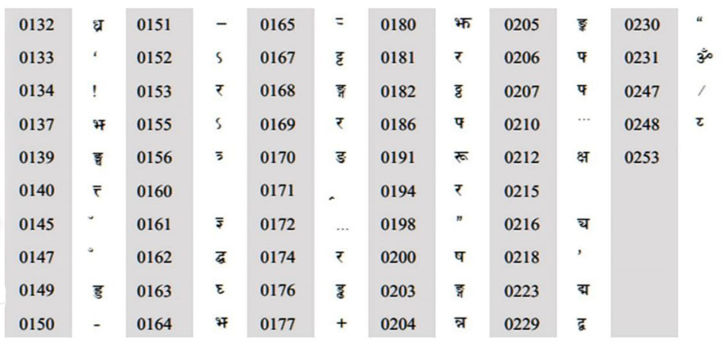
Some characters are not on the keyboard. To type them, hold Alt and type the 4-digit code on the numeric keypad (Num Lock on). For example, Alt + 0231 types ॐ.

Preeti font Alt key code chart for special Nepali characters
Full Preeti Alt code chart. Codes only work with the numeric keypad, not the top number row.
Using a laptop without a number pad? Turn on the on-screen keyboard (Windows: Win+Ctrl+O), enable its numeric keypad in Options, and use those keys with Alt.

Preeti vs Unicode: Which One Should You Use?

This is the most common source of confusion. Preeti is a non-Unicode font: it only changes how English characters look. Unicode fonts like Kalimati or Mangal store real Nepali characters that display correctly everywhere.

🖨️ Use Preeti for

  • Printing press and offset jobs
  • Wedding cards, certificates, banners
  • Photoshop / CorelDRAW design work
  • Editing old Preeti documents

🌐 Use Unicode for

  • Websites, blogs and SEO
  • Facebook, Messenger, Viber, email
  • Online government forms
  • Files you share with others

How to Convert Preeti to Unicode (and Back)

If you need to post Preeti text online, or a client sends Unicode text that must go into a Preeti design, use a converter. I built a free one that works in your browser:

  1. Copy your Preeti text (it will look like English letters).
  2. Open the Preeti to Unicode converter and paste it in.
  3. Copy the Unicode result and paste it anywhere: Facebook, Word, or your website.

How to Learn Preeti Typing Fast

  • Print the layout above and keep it next to your keyboard for the first week.
  • Learn the home row first: a s d f g h j k l ; give you ब क म ा न ज व प ि स.
  • Practise 15 minutes daily with Typeshala, a free typing tutor for Nepali and English.
  • Type real words: your name, address and common words build speed faster than random drills.

Frequently Asked Questions

Is Preeti font free to download?

Yes. Preeti is free to download and use for personal and everyday work such as documents, invitation cards and design projects.

Why does my Preeti text show English letters?

The Preeti font is not installed on that device, or the text is being viewed somewhere that only supports Unicode (like Facebook or a website). Install the font, or convert the text to Unicode.

Can I use Preeti font on my phone?

Not as a system font. You can import the .ttf into design apps that support custom fonts. For messaging and social media, type in Nepali Unicode instead.

How do I type ॐ, क्ष and ज्ञ in Preeti?

Press Alt + 0231 (numeric keypad) for ॐ, Shift + I for क्ष, and the 1 key for ज्ञ.

Is Preeti the same as Kalimati?

No. Preeti is a non-Unicode font mainly used for print and design. Kalimati is a Unicode font used for websites, government online forms and sharing text digitally.

Does Preeti work in MS Word and Photoshop?

Yes. After installing the font, restart the program and choose Preeti from the font list. It works in Word, Excel, PowerPoint, Photoshop, Illustrator and CorelDRAW.

Ready to Type in Nepali?

Download the Preeti font, keep the layout handy and practise with Typeshala. You will be typing confidently within a week.

⬇ Download Preeti Font Free
W

Wilson Shrestha is a graphic designer and web developer from Kathmandu, Nepal. He uses Nepali fonts daily in print, branding and web projects, and builds free tools for Nepali typists.