Select Page

Summer Love Book Summary & REVIEW NEPALI NOVEL

Cover of Summer Love (समर लभ), a Nepali novel by Subin Bhattarai

Summer Love Book Review: Summary, Ending & Essay (Subin Bhattarai)

An easy, emotional college love story that most Nepali readers finish in one or two sittings. It is held back a little by a borrowed structure and an ending that almost needs the sequel.

4 / 5 my rating

Nepali title
समर लभ
Author
Subin Bhattarai
Publisher
FinePrint, first published at the end of 2012
Pages
247
ISBN
9789937856386
Genre
Romance, college love story
English edition
Translated by Pratima Sharma
Sequel
Saaya (2014)
Adaptations
Film (2019) and stage play (2026)
In this article
  1. Summer Love book review
  2. Full story summary
  3. Ending explained
  4. Main characters
  5. Themes
  6. Book review essay in English
  7. समर लभ सारांश (नेपालीमा)
  8. About Subin Bhattarai
  9. Film, play and sequel
  10. FAQs

Summer Love (समर लभ) is the Nepali novel that made Subin Bhattarai a household name among young readers. It came out from FinePrint at the end of 2012, sold well over 20,000 copies and became one of the best-selling Nepali books of its year. More than a decade later, people still search for it, still argue about Saya, and still ask for "part 2".

In this post I share my honest Summer Love book review in English, a full summary of the story, the ending explained, the main characters and themes, a short review essay for students, and a Nepali summary for readers who prefer नेपाली.

Looking for Nancy Thayer's 2022 novel with the same name? This page is about Subin Bhattarai's Nepali novel.

Summer Love book review (spoiler-free)

Summer Love is the love story of Atit Sharma and Saya Shakya, two Master's students of Environmental Science at Tribhuvan University in Kirtipur. It starts as a sweet campus romance and slowly becomes a story about distance, family and caste. The book is not trying to be deep literature. It is trying to make you feel something, and for most readers it does.

What I liked

  • Campus life feels real. The entrance result on the notice board, crowded buses to Kirtipur, canteen gossip and boring classes. If you studied at TU, you will recognise your own college days.
  • Simple, modern language. It is written the way young Nepali people actually talk, English words included. A great first novel for someone new to Nepali books.
  • Honest about intercaste marriage. Atit is a Brahmin boy from the east, Saya is a Newar girl from Kathmandu. There is no loud villain, only a quiet "no" from a father. That feels very Nepali.
  • A modern long-distance struggle. Time zones, video calls, scholarships abroad. Many Nepali couples live this exact story today.
  • Small humour that turns sad. Atit cannot handle two glasses of alcohol. It is a running joke early on and a painful detail later.

What didn't work for me

  • The structure feels borrowed. A stranger asks the author to write his story. Readers of Chetan Bhagat will know this opening, and it hints at a sad ending too early.
  • Saya stays a mystery. We only hear Atit's side, so her sudden silence is never fully explained in this book.
  • The middle drags a little. Some romantic episodes go on longer than needed.
  • The open ending. Some readers love it. Many felt it was incomplete until the sequel came out two years later.
  • Mature content. Drinking, smoking and a physical relationship. Better for older teens and adults.

Who should read Summer Love?

Read it if you are a college student, if you are in (or survived) a long-distance relationship, or if you enjoyed love stories like Chetan Bhagat's 2 States, which is also about two families from different backgrounds. Skip it if you want slow, literary Nepali fiction with politics and history. This book stays inside the love story.

Summer Love summary: the full story

Spoilers from here on. The story moves across Nepal and abroad, so I have followed it place by place.

  1. On a cruise in Norway


    The stranger on the ship

    The author, Subin Bhattarai himself, is travelling on a cruise ship when he notices a South Asian man sitting alone. The man does not return his smile at first. After a while they talk and the author learns he is Nepali, and his name is Atit Sharma. When Atit finds out he is talking to a writer, he asks, "Will you write my story?" The author has heard many stories that were not worth writing, so he is not keen. But Atit convinces him, and over dinner that night he begins.

  2. Kirtipur, Tribhuvan University


    The name at the top of the list

    A few years earlier, Atit goes to the Central Department of Environmental Science to check the Master's entrance results. His own name is somewhere in the middle. At the top is a girl called Saya Shakya. The name alone makes him curious. He imagines what she looks like and tries different tricks to find her, and when he finally does, she is better than anything he had imagined.

  3. Kathmandu


    From classmates to lovers

    Atit and Saya find out they take the same route to and from the university, so they start travelling together. Slowly they become close. One day Atit proposes. Saya says she will answer later, and Atit cannot sleep that night. Then his phone rings. It is Saya, and she says yes.

    They keep the relationship secret from friends and family. Saya helps Atit with his studies, they visit each other's rooms, and the romance deepens. As university ends, Saya wins a scholarship to study in Norway. Atit does not get one, so he accepts a job offer in Dhangadhi. They agree to focus on their careers for two years and then plan their future together.

  4. Saya's home, Kathmandu


    The farewell party

    Before leaving, Saya invites Atit and their friends to a farewell party at her house. Everyone drinks and celebrates. Atit, who is no drinker, throws up after just two glasses, and Saya cleans up after him. Soon it is time to say goodbye, and she promises they will stay in touch.

  5. Norway and Dhangadhi


    Love across time zones

    Atit moves to Dhangadhi and Saya flies to Norway. They talk every day on social media, but different time zones and busy lives make it hard. They feel almost addicted to each other and miss each other badly. A few months later, Saya suddenly decides to take ten days off from university and come home. The two of them make a bold plan: they will get married secretly and convince their families in two years, because both families would oppose an intercaste marriage.

  6. New Delhi to Dhangadhi


    A secret wedding

    So that her family won't know she is back, Saya books her flight to New Delhi instead of Kathmandu. Atit takes two days off and goes to pick her up, and they travel to Dhangadhi together. Their close friends come from Kathmandu for the wedding, and Atit and Saya marry in a temple. Everything happens in a hurry. At the celebration that night Atit drinks again, and this time he vomits on his friend.

  7. Biratnagar


    Making it official

    They try to register the marriage in Dhangadhi but cannot, because Atit's permanent address is in Biratnagar. When Atit asks for leave again, his boss has already heard about the wedding from colleagues. He smiles, offers the office minibus for the trip, and makes Atit promise that the whole office will celebrate with the couple later. In Biratnagar they register the marriage and become an officially married couple. Their friends ride the minibus back to Kathmandu, while Atit and Saya return to Dhangadhi, celebrate with his colleagues, and then make the emotional trip back to New Delhi for Saya's flight.

  8. Kathmandu


    Meeting Saya's father

    Back at work, Atit is happy and they keep talking online. Then Saya tells her father about Atit, and her father wants to meet him. Atit is nervous, but Saya pushes him to go soon. In Kathmandu, her father talks politely but makes it clear, without saying it directly, that the family does not support an intercaste relationship. Atit leaves feeling humiliated and angry, and he argues with Saya. She is heartbroken too. She tells him her family will never accept him and that he should find someone else. After that she stops answering. Her number doesn't reach and she disappears from social media.

  9. Dhangadhi


    Silence, alcohol and Sushmita

    Broken by Saya's words, Atit starts drinking to numb the pain. The man who once could not handle two glasses now cannot sleep without alcohol. Sushmita, the receptionist at his office who lives near his room, sees what is happening and starts looking after him. Atit tells her everything, and over time they become very close, even physically. Still, Atit cannot stop thinking about Saya. When they finally chat again, she has no answers to his questions and goes silent. In desperation Atit burns her memories in front of her on a video call. Nothing moves her.

  10. Norway


    Going to find her

    A year passes and Atit still cannot let go, so he decides to go to Norway and get his answer face to face. He cannot get into Saya's university, but finds another one that can get him a visa. When he tells Saya, she says he can come if he wants, but he should not expect any help from her. Atit tells his boss the whole story. The boss understands and helps a little with money, and his friends chip in too.

    In Norway, Atit searches for Saya with the help of other Nepalis. His money runs out fast and he takes whatever part-time work he can find. Finally, a Nepali friend finds Saya's address. What happens when he knocks on that door is the ending of the book.

Summer Love ending explained

Show the ending (major spoiler)

Atit meets Saya after a long time, full of mixed emotions and questions. She does not give him the answers he came for. She only tells him that she cannot go against her family. Atit tries everything to change her mind, but Saya does not move. He realises he has lost her for good, and the story comes back to the cruise ship: this is the heartbroken man the author met sitting alone.

The book never fully explains why Saya changed so suddenly. Was it only her father? Was there something she could not say? That silence is the point. It reflects how many Nepali couples of different castes are separated not by a fight, but by what their families quietly will not accept.

If you want the full answer, read the sequel Saaya, where Saya, Atit and Sushmita each tell their side and the reason behind Saya's decision is revealed.

Main characters

Atit Sharma
The hero, who tells his story to the author. A Brahmin young man with his permanent home in Biratnagar, emotional and honest, and hopeless with alcohol. After university he works in Dhangadhi.
Saya Shakya
The entrance topper and a Newar girl from Kathmandu. Smart, ambitious and caring, she wins a scholarship to Norway and ends up caught between the man she married and the family she loves.
Sushmita
The receptionist at Atit's office and his neighbour in Dhangadhi. She looks after him when he falls apart and becomes close to him.
The author
Subin Bhattarai appears as himself, the writer who meets Atit on the cruise ship and agrees to write his story.
Saya's father
He never shouts, but his quiet refusal of an intercaste relationship changes everything.
Atit's boss
A kind boss who lends the office minibus for the marriage registration and later helps Atit go to Norway.

Themes of Summer Love

Intercaste love and family approval

The biggest wall in the story is not distance but caste. Atit and Saya are educated and independent, yet they still marry in secret because they know their families will say no. The novel shows how strong that pressure still is in Nepali society, even for young people with Master's degrees.

First love and college nostalgia

The first half is pure nostalgia: entrance results, shared bus rides, notes, late-night phone calls. It is why so many readers say the book feels like their own college story.

Distance, ambition and going abroad

Saya goes to Norway for her future and Atit stays behind. Summer Love captures something very common in Nepal: a relationship tested by one partner leaving the country.

Silence and unanswered questions

Saya's silence drives the second half. Atit's questions are never answered in this book, which is exactly why the story stays in your head after the last page.

Summer Love book review essay in English

Students often need a short review for an assignment. Here is a simple essay of about 320 words you can use as a model. Please write it in your own words for submission.

About 320 words

Book Review: Summer Love by Subin Bhattarai

Summer Love is a Nepali romantic novel written by Subin Bhattarai and published by FinePrint in 2012. It is the author's first novel and one of the best-selling Nepali books of recent years. The novel tells the love story of Atit Sharma and Saya Shakya, two Master's students of Environmental Science at Tribhuvan University, Kirtipur.

The story begins on a cruise ship, where the author meets Atit, who asks him to write his story. Atit first notices Saya's name at the top of the entrance exam results and slowly falls in love with her. After their studies, Saya goes to Norway on a scholarship and Atit takes a job in Dhangadhi. Unable to stay apart, they marry secretly during Saya's short visit to Nepal. However, when Saya's father indirectly refuses to accept an intercaste relationship, Saya distances herself from Atit. Heartbroken, Atit follows her to Norway, only to be told that she cannot go against her family.

The main theme of the novel is the conflict between love and family expectations, especially in the context of intercaste marriage in Nepali society. It also shows the pain of long-distance relationships and the growing trend of young Nepalis going abroad for study and work.

The language of the novel is simple and conversational, which makes it easy and enjoyable to read. The campus scenes are realistic, and many readers can connect them with their own college life. However, the story is told only from Atit's point of view, so Saya's reasons remain unclear. The open ending may also leave readers unsatisfied until they read the sequel, Saaya.

In conclusion, Summer Love is a touching and relatable novel about first love, distance and social barriers. Although it is not a complex literary work, it succeeds in making readers laugh, feel and think. I recommend it to young readers and to anyone who enjoys emotional love stories.

समर लभ उपन्यासको सारांश (नेपालीमा)

सुबिन भट्टराईको उपन्यास ‘समर लभ’ एउटा क्रुज जहाजबाट सुरु हुन्छ, जहाँ लेखकको भेट अतीत शर्मा नामका एक नेपाली युवकसँग हुन्छ। अतीतले लेखकलाई आफ्नो प्रेमकथा लेखिदिन आग्रह गर्छन्, र कथा विगततर्फ फर्किन्छ।

त्रिभुवन विश्वविद्यालय, कीर्तिपुरस्थित केन्द्रीय वातावरण विज्ञान विभागमा स्नातकोत्तरको प्रवेश परीक्षाको नतिजा हेर्न पुगेका अतीतले सूचीको सबैभन्दा माथि ‘साया शाक्य’ को नाम देख्छन्। त्यो नामले नै उनलाई आकर्षित गर्छ। एउटै बाटोमा आउजाउ, कक्षाका गफ र पढाइमा साथ दिँदै दुवैबीच बिस्तारै प्रेम बस्छ। अतीतले प्रेम प्रस्ताव राख्छन् र सायाले त्यही रात फोन गरेर ‘हुन्छ’ भन्छिन्।

पढाइ सकिएपछि सायालाई नर्वेमा छात्रवृत्ति मिल्छ भने अतीत धनगढीमा जागिर खान जान्छन्। टाढा भए पनि दुवैको माया घट्दैन। साया दस दिनका लागि गोप्य रूपमा नयाँ दिल्ली हुँदै फर्किन्छिन्। परिवारलाई थाहै नदिई दुवैले धनगढीको मन्दिरमा साथीहरूको उपस्थितिमा विवाह गर्छन्, अनि विराटनगर गएर विवाह दर्ता पनि गर्छन्।

तर जब अतीत सायाका बुबालाई भेट्न काठमाडौं पुग्छन्, बुबाले अन्तरजातीय सम्बन्ध स्वीकार्न नसकिने संकेत दिन्छन्। त्यसपछि साया अतीतसँग टाढिन थाल्छिन् र बोल्न छाड्छिन्। पीडामा डुबेका अतीत रक्सीको सहारा लिन थाल्छन्, र अफिसकी रिसेप्सनिस्ट सुस्मिता उनको नजिक आउँछिन्।

एक वर्षपछि जवाफ खोज्दै अतीत नर्वे पुग्छन्। धेरै संघर्षपछि सायालाई भेट्दा उनी केवल यति भन्छिन्, उनी परिवारको विरुद्ध जान सक्दिनन्। अतीतका प्रश्नहरू अनुत्तरित नै रहन्छन्। सायाले किन यस्तो निर्णय गरिन् भन्ने रहस्य यसको दोस्रो भाग ‘साया’ मा खुल्छ।

About the author, Subin Bhattarai

Subin Bhattarai was born in 1982 in Khotang, eastern Nepal, and grew up in Kathmandu. He completed his Master's in Environmental Science at Tribhuvan University in 2005, the same department where Atit and Saya meet, which explains why the campus scenes feel so real. His first book was the short story collection Kathaki Patra (2011). Summer Love was his second book and first novel. He has also written for Kantipur Saptahik, and his other books include Saaya, Monsoon, Priya Sufi and Ijoriya.

Summer Love film, stage play and sequel

Summer Love movie (2019)

The novel was made into a Nepali film, Summer Love, directed by Muskan Dhakal and released on 8 February 2019, with Ashish Piya and Rewati Chetri in the lead roles.

Summer Love stage play (2026)

In 2026 the story also reached the theatre in a production directed by Samrat Bhujel, with Arpan Thapa playing Subin Bhattarai. The Kathmandu Post's review praised how faithful and nostalgic the opening is, but felt the play loses its grip in the middle. It also made an interesting point: seen on stage today, Atit's refusal to let Saya go can look less like devotion and more like obsession.

Saaya, the sequel (2014)

Readers waited almost two years for "part 2". Saaya came out in September 2014 and tells the story from the other side, finally explaining why Saya left. If Summer Love left you with questions, read my Saya book summary next.

Where to buy or read Summer Love

Both the original Nepali edition and the English translation by Pratima Sharma are sold by Nepali bookshops and online stores such as Thuprai. You can also find it on Goodreads to see what other readers think. If you prefer listening, check my list of free Nepali audiobooks.

Many of you have asked me in the comments for a free Summer Love PDF. There is no official free PDF of this book. Buying a copy is the best way to support Subin Bhattarai and other Nepali writers, and the paperback is small enough to carry anywhere.

Summer Love FAQs

Is Summer Love a true story?

The novel is written as if Atit told his real story to the author on a cruise ship, and that is why so many readers ask. The author studied in the same TU department as his characters, which makes it feel real, but it is best read as a novel.

Does Summer Love have a part 2?

Yes. The sequel is Saaya, published by FinePrint in September 2014. It continues the story and explains why Saya left Atit.

How does Summer Love end?

Atit goes to Norway and finally meets Saya, but she tells him she cannot go against her family. He realises he has lost her, and the story ends on an open, sad note.

Why did Saya leave Atit?

In Summer Love she only says that her family will not accept him because of their different castes. The full reason is revealed in the sequel, Saaya.

Is Summer Love available in English?

Yes. FinePrint published an English translation by Pratima Sharma, so non-Nepali readers can enjoy it too.

Is there a Summer Love movie?

Yes. A Nepali film directed by Muskan Dhakal was released in February 2019, and a stage adaptation was performed in Kathmandu in 2026.

How many pages does Summer Love have?

The Nepali edition has 247 pages. Most readers finish it in a day or two.

Final verdict

4 / 5 my rating

Summer Love is not perfect. The structure is familiar, Saya deserved more of a voice, and the ending needs a sequel. But it does what a good love story should: it makes you smile at the start, hurts in the middle, and leaves you thinking about it days later. For a simple, relatable Nepali romance, it is still one of the best places to start.

Have you read it? Tell me in the comments whose side you were on, Atit's or Saya's.
More Nepali book summaries

Free Nepali Audio Books

Nepali Audio books free download

You can access Nepali Audiobooks here, which are one of Nepal’s most popular books. There are numerous reasons to read books, however, these books can also be listened to. I have listed the most popular Nepali audiobooks which are popular in the Nepali market. Hope you will like it and if you also want audiobooks you want then you can comment down below the name book you want to listen to.

चिना हराएको मान्छे / China Harayeko Manchhe

Author: Hari Bansha Acharya
Language: Nepali language
Publisher: FinePrint
Publication date: April 2013
Number of Pages: 294 Pages
ISBN: 9937866642

This autobiography portrays the author’s childhood experiences, goals, and obstacles during his adolescent years.

कर्नाली ब्लुज / Karnali Blues

Author: Buddhi Sagar
Language: Nepali language
Publisher: FinePrint
Pages: 400
ISBN: 9789937827935
The tale opens with the birth of Brishabahadur, the narrative’s narrator. Brishabahadur describes his father’s difficulties. There are eleven days in the novel. During those eleven days, Brishabahadur is caring for his ailing father. Brishabahadur reflects on his father’s past.

समर लभ / Summer Love

Author: Subin Bhattarai
Language: Nepali language
Publisher: FinePrint
Pages: 247
ISBN: 9789937856386
A heart-touching romantic love story and one of the most selling Nepali books. A romantic intercaste love Story of Saya and Atit.

साया / Saya

Author: Subin Bhattarai
Language: Nepali language
Publisher: FinePrint
Pages: 242
ISBN: 9789937887779
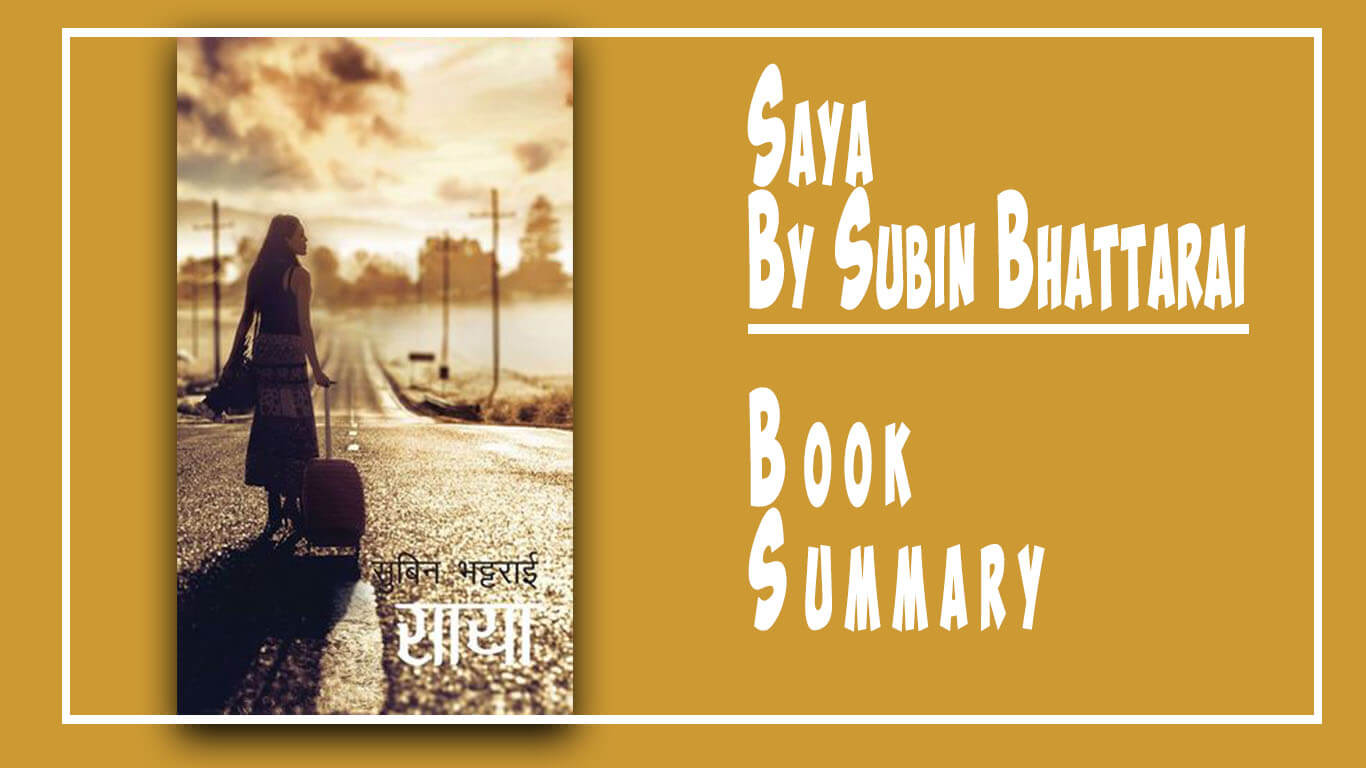
It is the sequel of summer love. It is based on point of view of the narrator, Atit, Saya, and Susmita. According to the story, the narrator takes the responsibility to mend the things between Atit and Saya. The novel starts with the narrator coming in contact with Saya to know her story. 

By evaluating the Nepali Book Market I recognized that Nepali people like more Love story Novels and Biography. The readers are getting more excited about books nowadays because It is getting easier to get information about the books and it also been easier to get the books with some online books store available which deliver books to home very conveniently.

Typeshala Download for Windows 10/11 – Free Nepali Typing

Free download · Windows · Works offline

Typeshala Free Download for Windows – Nepali & English Typing Tutor

Typeshala is a free, offline typing tutor that teaches Nepali (Preeti layout) and English touch typing on Windows. Download it below, install it in a few minutes, then follow the step-by-step guide to go from hunting for keys to typing Nepali without looking.

Wilson ShresthaBy Wilson Shrestha Taught 100+ students Updated 12 min read
Typeshala Nepali and English typing tutor for Windows PC

Typeshala for Windows

Nepali & English typing tutor · Free

  • FileTypeshala.zip
  • Size15.1 MB
  • Works onWindows XP to 11
  • PriceFree, no sign-up
  • InternetOnly to download
  • LanguagesNepali & English
Download TypeshalaZIP file · 15.1 MB · Windows No Windows PC? Practise online in your browser →
You can check any download for free on VirusTotal before opening it. Windows may show a SmartScreen warning for older programs like Typeshala. See the fixes below.
On this page

What Is Typeshala?

Typeshala (टाइपशाला, "typing school") is a Windows typing tutor with two modes: Nepali and English. It teaches touch typing, which means typing without looking at the keys, through guided lessons, a free-typing mode and the Ramayan typing game.

Nepali computer institutes and schools have used it for well over a decade because it does one job well. It teaches the Nepali Preeti keyboard layout, which many offices still use, and it runs on almost any Windows PC without internet.

Office and government work

Many government, banking and administrative jobs in Nepal expect you to type in Nepali.

Faster everyday writing

Write documents, emails and social posts in Nepali directly, without a converter.

Learn by playing

The Ramayan game turns speed drills into a challenge, so daily practice doesn't feel like a chore.

Is Typeshala free?

Yes. Typeshala is free to download and use, and you don't need an account. Nepali training institutes have shared it freely for years; this page keeps a copy so you can download it from one place.

Typeshala System Requirements

Typeshala is a lightweight program, so almost any Windows PC can run it.

Operating system
Windows XP, Vista, 7, 8, 10 and 11
Processor
Pentium 4 or equivalent
Memory (RAM)
512 MB or more
Storage
About 100 MB free space
Display
Any standard screen
Input
A physical keyboard (best for practice)

Using a Mac, Chromebook or phone? Typeshala only runs on Windows. Use the free online version instead.

How to Download and Install Typeshala on Windows 10/11

The whole process takes a few minutes, and you only need internet for the download.

  1. Download the ZIP file

    Click Download Typeshala at the top of this page. Your browser saves Typeshala.zip (15.1 MB) to your Downloads folder.

  2. Extract the ZIP

    Right-click Typeshala.zip, choose Extract All…, then click Extract. Don't run the program from inside the ZIP, or it may not work properly.

  3. Run Typeshala as administrator

    Open the extracted folder, right-click Typeshala.exe and choose Run as administrator. Click Yes when Windows asks for permission.

  4. Finish setup and open Typeshala

    If a setup window opens, accept the terms and finish the installation. Then open Typeshala from its desktop shortcut or from the extracted folder.

Video: installing Typeshala

The video only loads when you press play, so it doesn't slow the page down.

Typeshala Not Working on Windows 10 or 11? Try These Fixes

Typeshala was built for older versions of Windows, so newer PCs sometimes need a setting or two changed. Work through these fixes in order.

Typeshala won't open or closes straight away

  1. Right-click Typeshala.exe (or its desktop shortcut) and choose Properties.
  2. Open the Compatibility tab.
  3. Tick Run this program in compatibility mode for and choose Windows XP (Service Pack 3).
  4. Tick Run this program as an administrator.
  5. Click Apply, then OK, and open Typeshala again. If it still fails, repeat with Windows 7.

"Windows protected your PC" message

Windows SmartScreen shows this warning for many older programs from publishers it doesn't recognise. If you downloaded the file from this page, click More info, then Run anyway. If you're unsure, check the file on VirusTotal first.

Your antivirus blocks or deletes the file

Some antivirus tools flag old programs like Typeshala by mistake. Upload Typeshala.zip to VirusTotal to check it. Only restore it from quarantine if the scan is clean, and never switch your antivirus off completely.

Nepali letters show as boxes or English letters

Typeshala's Nepali lessons use the Preeti font. If you see boxes or random English letters, install it from our Preeti font download guide, then restart Typeshala.

The window is tiny or blurry on a high-resolution screen

Open Properties → Compatibility → Change high DPI settings, tick Override high DPI scaling behavior, choose System and click OK.

Still stuck? Follow the full Typeshala not opening on Windows 11 guide. If that doesn't help, send me a message with your Windows version and a screenshot of the error, and I'll help you get it running.

How to Use Typeshala: A Step-by-Step Guide

I've taught Nepali typing to more than 100 students with Typeshala, and this is the order I recommend. It works for complete beginners and for people who already type English but not Nepali.

Step 1

Choose Nepali or English mode

Typeshala asks you to pick a language when it starts. If you've never touch-typed, start with English for a few days to learn where your fingers go, then switch to Nepali. If you already type English without looking, go straight to Nepali.

Step 2

Follow the lessons in order

The lessons move from the home row to the top row and the bottom row, then on to numbers, symbols and full sentences. Don't skip ahead: each lesson builds on the keys from the one before.

Step 3

Watch the on-screen keyboard, not your hands

An on-screen keyboard highlights the next key and the finger to use. Keep your eyes on the screen and follow it. Using the wrong finger now creates habits that are hard to fix later.

Typeshala Nepali typing lesson with the on-screen keyboard layout
Typeshala's on-screen keyboard shows which key to press next.
Step 4

Practise with free-hand typing

Once the lessons feel easy, switch to free-hand mode and type any text you like, such as a Nepali newspaper article, a government notice or an English email. Real text prepares you for real work.

Step 5

Play the Ramayan typing game

The Ramayan game is Typeshala's best-known feature: you type characters and words quickly to advance in the game. Play for about 10 minutes after each lesson to build speed without it feeling like a drill.

Step 6

Check your speed and accuracy

Typeshala shows your speed in words per minute (WPM) and your accuracy after each exercise. Use these targets to measure your progress:

Practice periodSpeed goalAccuracy goal
Week 110–20 WPM80% or higher
Week 220–30 WPM85% or higher
Weeks 3–430–40 WPM90% or higher

Accuracy comes first. If you fall below the accuracy goal, slow down until you're back above it.

Step 7

Keep a 15–30 minute daily routine

Short daily sessions work better than long weekly ones. A simple plan is 5 minutes of home-row warm-up, 15 minutes of lessons and 10 minutes of the Ramayan game.

Typeshala Nepali Keyboard Layout (Preeti)

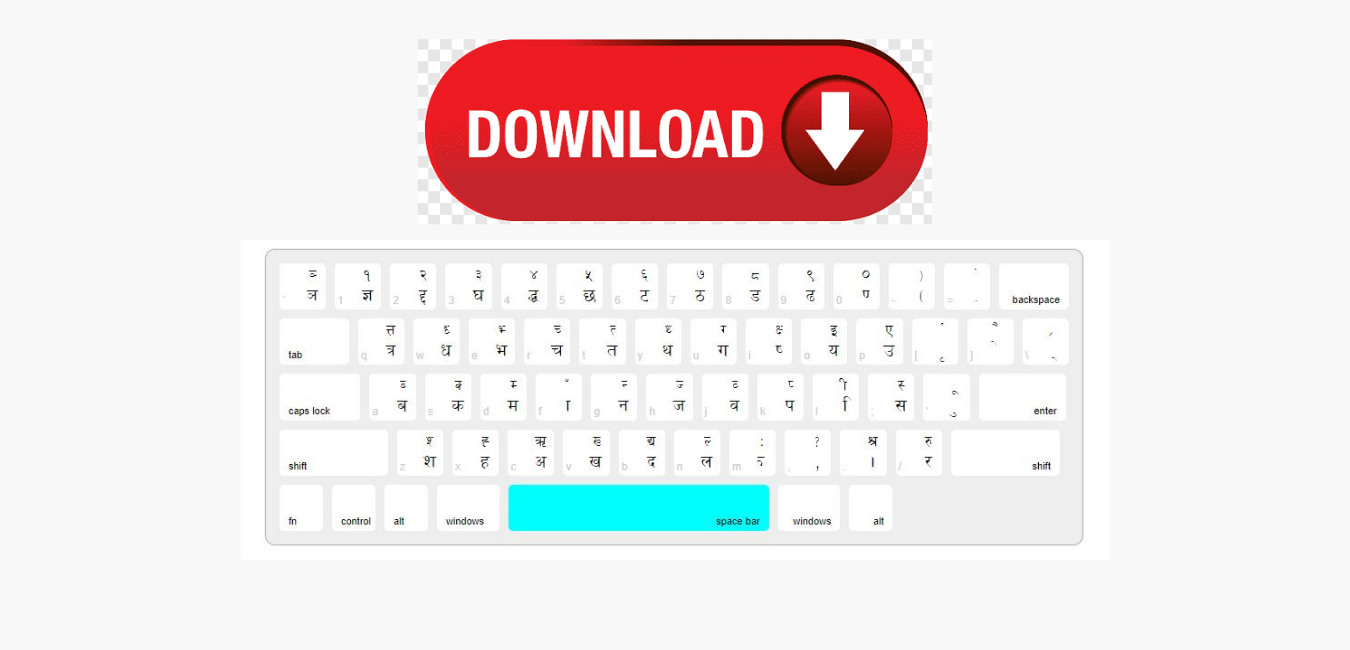
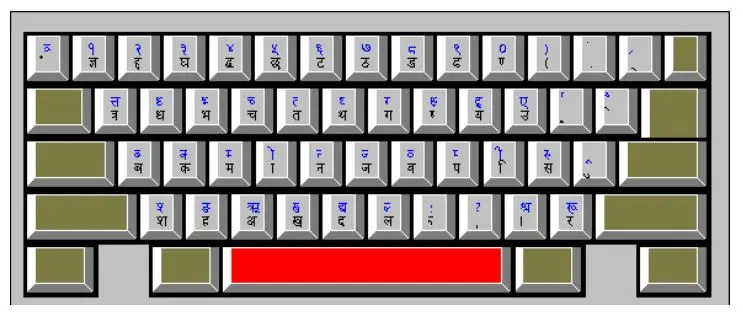
Typeshala's Nepali mode uses the Preeti layout, a typewriter-style layout where each English key types a Nepali character. Learn the home row first. Your fingers rest there and return to it after every keystroke.

Preeti layout, lowercase keys. Highlighted keys are where your eight fingers rest; F and J have small bumps so your index fingers can find them without looking. Hold Shift for the second character on each key.

Home row keys

  • Aबba
  • Sकka
  • Dमma
  • Fाaa sign
  • Gनna
  • Hजja
  • Jवwa
  • Kपpa
  • Lिi sign
  • ;सsa
  • 'ुu sign

Preeti vs Unicode: which should you learn?

Preeti is a legacy font. Text typed in Preeti only looks Nepali on computers that have the font installed, so it often breaks when you email it or post it online. Unicode Nepali works everywhere, including websites, email, Facebook and phones.

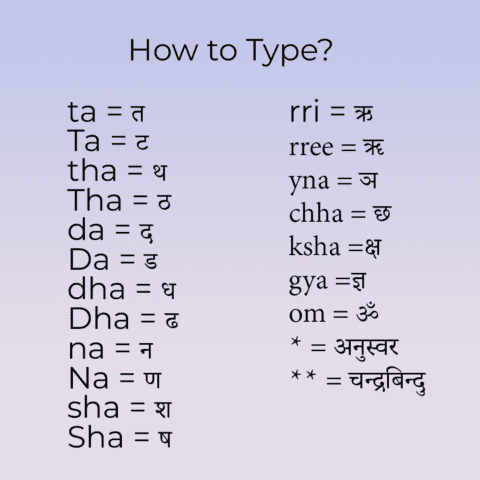
The practical path is to learn the layout with Typeshala, then type in Unicode for everyday use. The Nepali Unicode Traditional layout keeps the same typewriter-style key positions for most characters, so your muscle memory carries over. The Romanized layout is different: it maps sounds to English letters (for example, K types क), so it's a separate skill. To turn old Preeti documents into Unicode, use the Nepali Unicode converter.

Typeshala Features

Typeshala keeps things simple. These are the tools you'll use most.

Nepali and English modes

Pick a language on the start screen. Both modes use the same lessons and tools.

Step-by-step lessons

Guided lessons take you from the home row to full sentences, at any age.

On-screen keyboard guide

Shows the next key and which finger to use, so you never need to look down.

Free-hand typing

Practise with any text you choose, from news articles to office letters.

Ramayan typing game

The classic speed game many Nepali learners remember from computer class.

Speed and accuracy results

See your WPM and accuracy after every exercise to track progress.

7 Tips to Learn Nepali Typing Faster

  1. Practise every day15–30 minutes daily works far better than two hours once a week.
  2. Never look at the keyboardIf you keep glancing down, lay a light cloth over your hands until the habit stops.
  3. Get accurate before you get fastType slowly and correctly. Speed follows once your fingers know the keys.
  4. Use all ten fingersReturn to the home row (ब क म ा and व प ि स) after every key.
  5. Drill the vowel signs separatelySigns like ा, ि and ु appear in almost every Nepali word, so practise them on their own.
  6. Keep a layout chart nearby for the first weekGlance at a printed chart instead of the keys, then put it away in week two.
  7. Type real Nepali textUse free-hand mode with a newspaper article or an office notice to prepare for real work.

Typeshala Pros and Cons

Typeshala is best for beginners who need Nepali typing for school, office or government work. Experienced typists who want detailed analytics may prefer a modern web tool.

Pros

  • Free, with no account needed
  • Works fully offline
  • Teaches both Nepali (Preeti) and English
  • Structured lessons suited to beginners
  • The Ramayan game makes practice fun

Cons

  • Windows only
  • Dated design
  • May need compatibility settings on Windows 10/11
  • Teaches Preeti rather than Unicode directly
  • Limited statistics for advanced typists

Typeshala vs Other Typing Tutors

Here's how the Typeshala download compares with the free online version on this site and two popular English typing tutors.

FeatureTypeshala (download)Typeshala OnlineTypingMasterKeybr
PlatformWindows PCAny browser, any deviceWindows PCAny browser
Works offlineYesNoYesNo
Nepali (Preeti) lessonsYesYes (Preeti & Traditional)NoNo
English lessonsYesYesYesYes
PriceFreeFreeFree version + paid ProFree
Standout featureRamayan typing gameLive WPM test and custom textStructured English courseLessons that adapt to your weak keys
Best forNepali beginners on a PCPhones, Macs and quick testsEnglish typing on WindowsEnglish speed training

Swipe the table to compare all four →

Verdict: To learn Nepali typing on a Windows PC without internet, Typeshala is still the most practical free choice. On a phone, Mac or Chromebook, use Typeshala Online. For extra English speed training, Keybr is a good addition. If Typeshala won't run on your PC at all, try these Typeshala alternatives for Windows 11.

No download needed

Practise Typeshala Online

Want to try before you install, or practise on a phone or Mac? The free online Typeshala runs in any modern browser.

  • Preeti and Nepali Traditional layouts
  • Live WPM and accuracy test
  • Nepali, English and numbers modes
  • 8 lessons, Easy to Expert, row by row
  • Custom text: paste anything to practise
  • Works on phones, tablets, Macs and PCs
Start online typing practice → It works well alongside the download above: use the app for lessons and the Ramayan game, and the online tool for quick speed tests.

What Instructors and Students Say

I have been using Typeshala for more than 10 years of my working career. I used it to teach my students Nepali typing. There has been no issue with this software while working with it. It is user-friendly and easy for new learners.

Suraj Raj ShresthaComputer Engineer and Instructor, Blueprint Technologies Pvt. Ltd.

I did what my teacher Suraj Raj Shrestha told me, and I am doing well in Nepali and English typing. I think it is the best software to start your typing journey. Highly recommended to beginners.

Gunjan ShresthaComputer student

Disclosure: Suraj is my colleague at Blueprint Technologies, and Gunjan is one of his students.

Typeshala FAQs

Is Typeshala free to download?

Yes. Typeshala is completely free to download and use, and you don't need to create an account.

Does Typeshala work on Windows 10 and Windows 11?

Yes. On Windows 10 and 11, run Typeshala as administrator. If it still won't open, set compatibility mode to Windows XP (Service Pack 3), as shown in the fixes section above.

Can I use Typeshala without internet?

Yes. You only need internet to download the 15.1 MB ZIP file. After that, Typeshala works fully offline.

Is Typeshala available for Mac, Android or iPhone?

No. Typeshala is a Windows program. On a Mac, Chromebook or phone, use the free online Typeshala in your browser instead.

Is the Typeshala download safe?

You can scan Typeshala.zip for free on VirusTotal before opening it. Windows may show a SmartScreen warning for older programs like Typeshala; the warning alone doesn't mean a file is harmful.

Does Typeshala teach Preeti or Unicode typing?

Typeshala teaches the Preeti layout. The Nepali Unicode Traditional layout keeps the same key positions for most characters, so what you learn carries over to Unicode typing.

How long does it take to learn Nepali typing with Typeshala?

With 15–30 minutes of practice a day, a realistic goal is about 30 words per minute in three to four weeks. Focus on accuracy first; speed follows.

What is the difference between Nepali Typeshala and English Typeshala?

They're the same program. Typeshala has a Nepali mode for the Preeti layout and an English mode for the standard QWERTY layout, and you choose one when it starts.

Wilson Shrestha
Written by

Wilson Shrestha

I learned Nepali typing on Typeshala and later taught it to more than 100 students as an instructor at a typing institute in Nepal. Today I'm a web developer at Blueprint Technologies Pvt. Ltd. in Kathmandu, and Typeshala is still the first tool I recommend to anyone learning Nepali typing.

Activate and Deactivate Ncell Services

Activate and deactivate ncell services, all short codes

Voice pack for Nepal and India for same price

PacksMinutes
Rs.25 – 1 day10
Rs.145 – 7 days65

To Activate *17118*7#

ServicesCodes
Check BalanceDial *101# or *901#
Check Mobile Number*103# or *903#
Check SIM Owner*9966#
Call Forward Activate**21*+977980XXXXXXX#
Call Forward Unable to answer**61*+977980XXXXXXX#
Mobile phone is switched off or when you are not in the network coverage area**62*+977980XXXXXXX#
Call Forward if Number is busy**67*+977980XXXXXXX#
Call Forward Cancel##002#
Call Waiting Activate*43#
Call Waiting Cancel#43#
Balance Transfer*17122*98XXXXXXXX*Amount#
Ncell caller tunes /PRBTDail *17117# or Call 17117
FNF Activate*17131#
Recharge from Recharge card*102*recharge PIN*mobile number# or *902*rechargecardNo#
Mobile Data Pack Subscription*123# or *17123#
My five activationDial 5599 or *5599# and then press “1”
Ncell Loan or Ncell Sapati*9988#
Activate International Roaming*12127#
Ncell Voice Pack*17118# or call 17118

Activate and Deactivate Smart Cell Services

Activate and Deactivate Smart Cell Services

activate and deactivate smart cell services nepal sim

Easy, all in one Activate and Deactivate smart cell services shortcode. Smart cell is Nepal’s 3rd most used telecom provider in Nepal. It’s known for reasonable data pack services and unlimited voice pack offer. Services listed below are the most popular services list with their shortcodes.

Smart Easy Loan: *129*40#

Activation Code / Short Codes list

SERVICEUSSD CODES
check balance in Smart Cell*123#
know your own Mobile number*134#
Balance transfer in smart to smart*131*Mobile number*Rs.*123456#
recharge smart number*122*Pin#
recharge for other Smart numbers*120*PIN*Mobile number#
purchase DATA PACK*141*3#
purchase VOICE PACK*141*1#
purchase SMS PACK*141*2#
activate IVR SERVICE*141#
call CUSTOMER CARE Number4242
Check- Date & Time*124#
Call Me Back Request*151*Mobile Number#
Credit Me Request*152*Mobile number*Amount#
take Loan in Smart cell*129*40#
Language Selection*126#
activate – MISSED CALL ALERT*172#
activate – MISSED CALL ALERT (SMS) Send ‘SUB’ to 4270
deactivate – MISSED CALL ALERT (SMS)Send ‘UNSUB’ to 4270

Data Pack list for Smart Cell

[table id=2 /]

SMS Pack Services Activate and Deactivate

[table id=3 /]

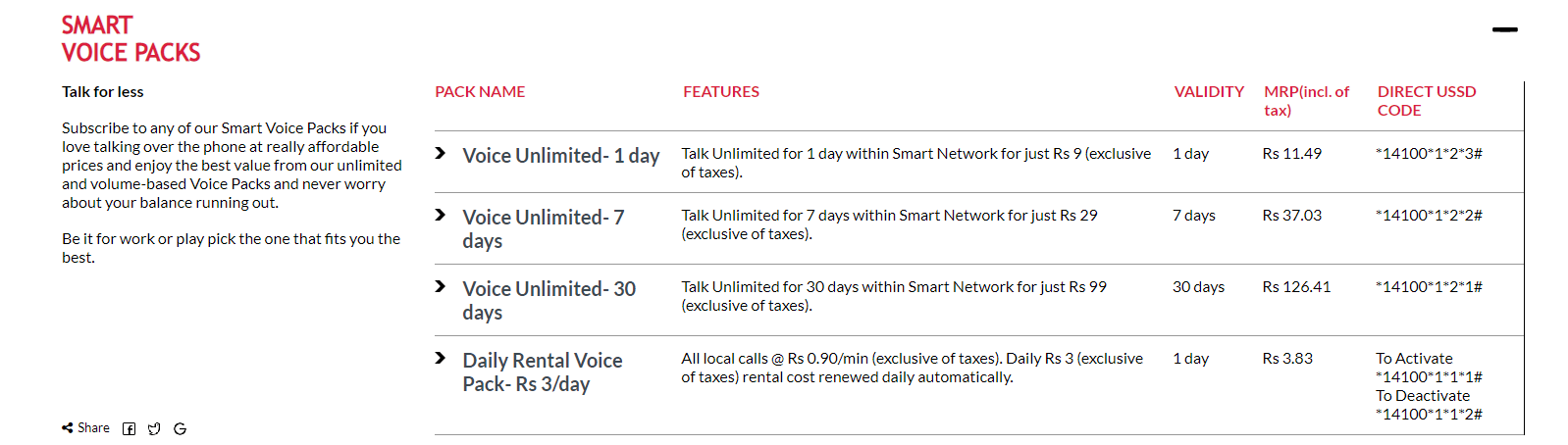
SmartCell Voice Pack List

smartcell voice pack list for mobile sim in nepal
How to recharge smart cell?

Smartcell is a prominent telecommunications company that offers a range of services to customers in Nepal. As one of the top mobile network providers in the country, Smartcell prides itself on offering exceptional customer service and a variety of affordable service packages.

If you are a Smartcell customer and are wondering how to recharge your account, you have come to the right place. In this article, we will provide a comprehensive guide on how to recharge your Smartcell SIM card in Nepal, including the various methods available to you and the steps to follow.

The first step in recharging your Smartcell SIM card is to purchase a recharge voucher. These vouchers are widely available from local shops and street vendors, as well as from official Smartcell outlets. Make sure you purchase the voucher that corresponds to the amount you wish to recharge.

Once you have your voucher, you can proceed with the recharge process. There are several ways to recharge your Smartcell SIM card, including via the Smartcell website, the Smartcell app, or by dialing a specific shortcode on your phone.

To recharge your Smartcell account via the Smartcell website, follow these simple steps:

  1. Visit the Smartcell website and log in to your account.
  2. Click on the “Recharge” option in the main menu.
  3. Enter the recharge voucher code in the space provided.
  4. Click “Submit” to complete the recharge process.

Alternatively, you can also recharge your Smartcell SIM card using the Smartcell app. Here are the steps to follow:

  1. Download and install the Smartcell app on your smartphone.
  2. Open the app and log in to your account.
  3. Click on the “Recharge” option in the main menu.
  4. Enter the recharge voucher code in the space provided.
  5. Click “Submit” to complete the recharge process.

Finally, you can also recharge your Smartcell SIM card by dialing a specific shortcode on your phone. Here is how to do it:

  1. Dial 122<voucher code># from your Smartcell phone.
  2. Press “Call” to initiate the recharge process.
  3. Wait for a confirmation message to confirm that the recharge was successful.

In conclusion, recharging your Smartcell SIM card in Nepal is a straightforward process that can be completed using a variety of methods. By following the simple steps outlined in this article, you can easily recharge your account and continue enjoying the various services offered by Smartcell, including unlimited data packs, SMS packs, voice packs, and more.

Unlimited Data Pack .

Right now Smart Cel only has an “Unlimited Night Data Pack”

To Activate: Dail *14100*3*4*1#

Validity: 11 PM-6 AM (1 Night) 

Price: Rs.19 

Smart cell activate unlimited talk time for 30 days
Smart Cell 4X Bonus and 7% discount
smart cell call india packs services