
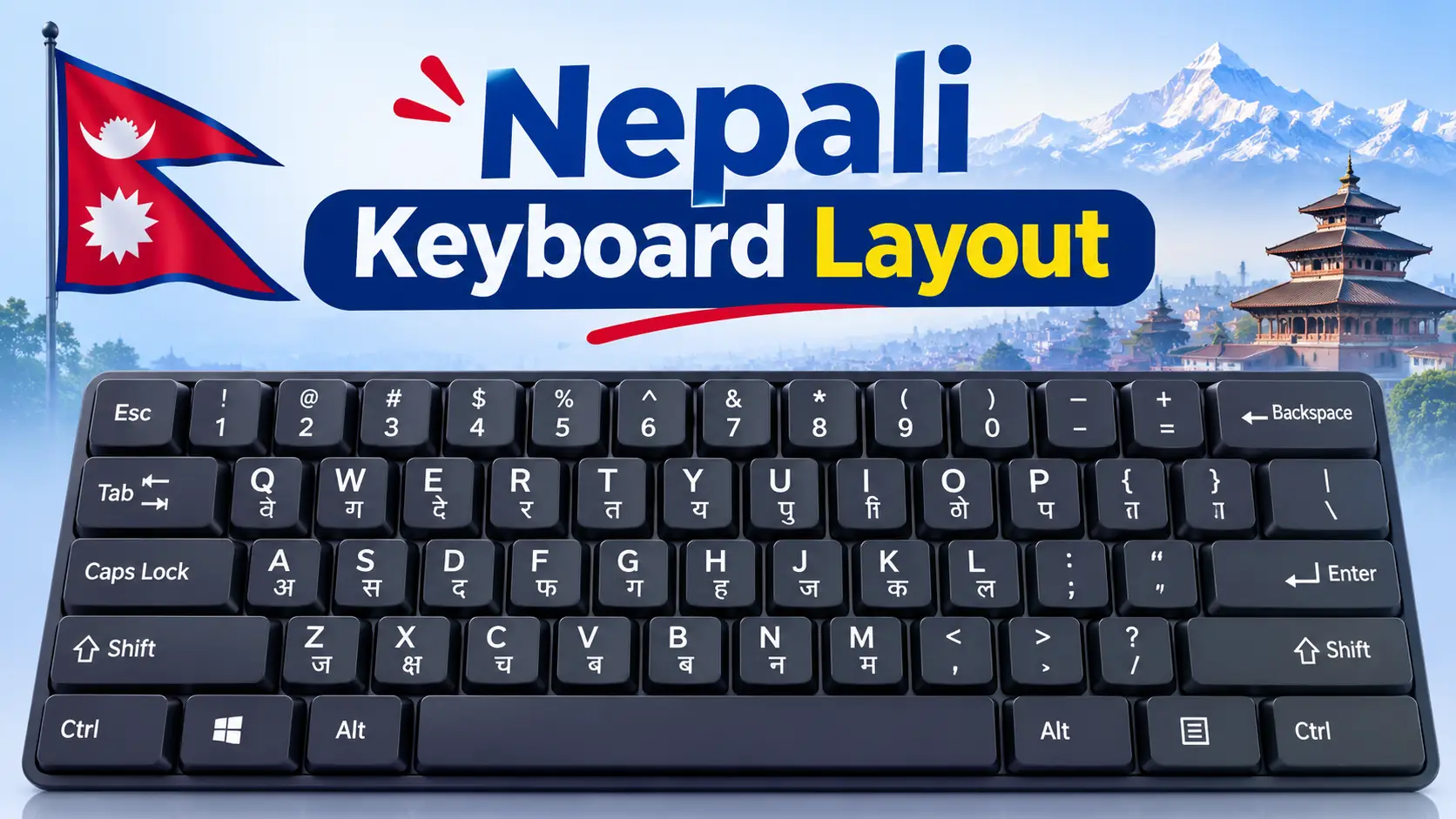
Nepali Keyboard Layout: Romanized, Traditional & Preeti Key Charts (2026)
There is no single “Nepali keyboard layout.” There are three you will run into, and they put the same letters on completely different keys. Press K on one and you get क. Press it on another and you get प. This guide gives you the key chart for each one, explains which layout fits your work (office, Lok Sewa, school or chatting), and shows how to set it up on Windows, Mac and mobile.
Quick answer
The three main Nepali keyboard layouts are Nepali Romanized (keys follow English sounds, so k = क and s = स), Nepali Traditional (the typewriter arrangement, built into Windows as the “Nepali” keyboard) and Preeti (a font-based layout used in older government and press work). Romanized and Traditional both type real Unicode text. Preeti does not, unless you run it through a converter.
In this guide
- The 3 Nepali keyboard layouts compared
- Nepali Romanized keyboard layout (full chart)
- Nepali Traditional keyboard layout
- Preeti layout: why it is different
- Romanized layout vs “type namaste, get नमस्ते”
- Which layout should you learn?
- How to add a Nepali keyboard (Windows, Mac, mobile)
- How to type conjuncts and half letters
- Common problems and fixes
- FAQs
The 3 Nepali Keyboard Layouts Compared
Every Nepali layout solves the same problem: Devanagari has far more characters than an English keyboard has keys. Each layout makes different trade-offs. Here is how they compare.
| Feature | Nepali Romanized | Nepali Traditional | Preeti |
|---|---|---|---|
| How keys are arranged | By English sound (k = क, m = म) | Typewriter positions (k = प, s = क) | Typewriter positions, close to Traditional |
| Output | Unicode | Unicode | Legacy font (English letters drawn as Nepali) |
| Works on websites, Facebook, Google | Yes | Yes | No, text turns into English letters |
| Easy for beginners | Easiest | Hard at first | Hard at first |
| Built into Windows | No, install the MPP driver or Keyman | Yes (“Nepali” keyboard) | No, needs the Preeti font |
| Best for | Students, freelancers, diaspora, casual use | Office staff, fast typists, ex-Preeti users | Old office files, some typing exams |
The short version: if you already know Preeti from school or an office, Traditional will feel familiar because many keys sit in similar places. If you have never typed Nepali before, Romanized is faster to learn.
Nepali Romanized Keyboard Layout (Full Key Chart)
The Romanized layout was designed by Madan Puraskar Pustakalaya (MPP) in Kathmandu so that people used to an English keyboard could type Nepali without memorising random positions. Most letters sit on the English key with the closest sound. Lowercase usually gives the plain letter and Shift gives the aspirated one: t = त, Shift+T = थ; d = द, Shift+D = ध; k = क, Shift+K = ख.
In the chart, the small grey character is the key you press, the large black character is what you get, and the red character is what you get with Shift.
Nepali keyboard layout with Devanagari characters
१
!2
२
@3
३
#4
४
$5
५
%6
६
^7
७
&8
८
*9
९
(0
०
)=
ZWJ
ZWNJ
ट
ठw
ौ
औe
े
ैr
र
ृt
त
थy
य
ञu
ु
ूi
ि
ीo
ो
ओp
प
फ[
इ
ई]
ए
ऐ\
ॐ
ः
ा
आs
स
शd
द
धf
उ
ऊg
ग
घh
ह
अj
ज
झk
क
खl
ल
॥
ष
ऋx
ड
ढc
च
छv
व
ँb
ब
भn
न
णm
म
ं,
,
ङ.
।
./
्
?
Nepali Romanized (MPP) layout. Grey = key, black = normal, red = Shift. The orange key (/) is the halanta. Also: ` gives the nukta (Shift gives ऽ), Shift+= gives ZWNJ, and ; ‘ – keep their English symbols. Checked against the source file of the Keyman “Nepali Romanized” keyboard, which reproduces the MPP layout.
Romanized keys you will get wrong at first
Most of the layout is guessable. These are the keys that trip people up:
| Key | Gives | Why it is confusing |
|---|---|---|
| q / Shift+Q | ट / ठ | Retroflex t has no English key, so it sits on q |
| x / Shift+X | ड / ढ | Retroflex d sits on x, not on d |
| c / Shift+C | च / छ | Lowercase c is च; छ needs Shift |
| z / Shift+Z | ष / ऋ | Neither sounds like z |
| f / Shift+F | उ / ऊ | The full u vowels live on f; u gives only the matra ु |
| [ and ] | इ / ए | Full i and e vowels; Shift gives ई / ऐ |
| Shift+H | अ | The full a vowel is on h; Shift+A gives आ |
| / | ् (halanta) | You need it for every half letter |
| Shift+, (comma) | ङ | Hidden on the comma key |
| Shift+M / Shift+V | ं / ँ | Shirbindu and chandrabindu |
Typing real words on the Romanized layout
A layout types one character per key, so you build words letter by letter and add the halanta (/) where two consonants join. One rule surprises almost everyone: do not type a for the inherent vowel. Every consonant already carries it, and the a key adds the ा matra. So nms gives नमस, while nams gives नामस.
| Word | Keys to press | Breakdown |
|---|---|---|
| नमस्ते | nms/te | न म स ् त े |
| धन्यवाद | Dn/yvad | ध न ् य व ा द |
| नेपाल | nepal | न े प ा ल |
| क्षमा | k/zma | क ् ष म ा |
| ज्ञान | j/Yan | ज ् ञ ा न |
| श्री | S/rI | श ् र ी |
Nepali Traditional Keyboard Layout
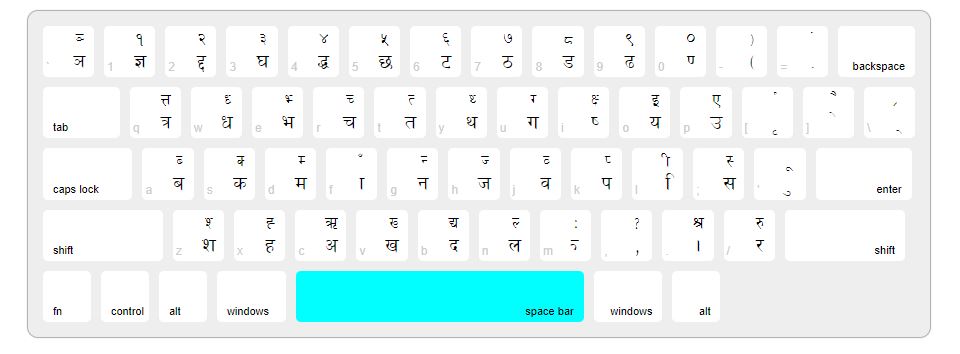
The Traditional layout follows the old Nepali typewriter, which is why it feels random to new learners: A gives ब, S gives क, and the matra ा sits on F. Its advantage is speed. Common letters sit on the home row, and it is the layout Windows installs when you add the plain “Nepali” keyboard (driver file kbdnepr.dll).
These are the unshifted letter keys. On most consonant keys, Shift gives the half form, for example Shift+S gives क्.
| Row | Key → Nepali letter (unshifted) | |||||||||||
|---|---|---|---|---|---|---|---|---|---|---|---|---|
| Top | Q त्र | W ध | E भ | R च | T त | Y थ | U ग | I ष | O य | P उ | [ ृ | ] े |
| Home | A ब | S क | D म | F ा | G न | H ज | J व | K प | L ि | ; स | ‘ ु | |
| Bottom | Z श | X ह | C अ | V ख | B द | N ल | . । | / र | ||||
A few Shift values worth memorising: Shift+I = क्ष, Shift+O = इ, Shift+P = ए, Shift+F = ँ, Shift+L = ी, Shift+’ = ू, Shift+] = ै, Shift+C = ऋ and Shift+/ = रू. The number row also carries letters on this layout: keys 1 to 0 hold ज्ञ, घ, ङ, झ, छ, ट, ठ, ड, ढ and ण alongside the digits १ to ०. The exact Shift and AltGr levels differ slightly between Windows versions and third-party drivers, so check your own machine before you print a chart.
See your exact layout in 10 seconds
On Windows, switch to the Nepali keyboard, press Win + R, type osk and press Enter. The On-Screen Keyboard shows the Nepali character on every key. Click Shift to see the second layer. This is the most reliable chart you can get, because it shows the driver actually installed on your PC.
Preeti Layout: Why It Is Different
Preeti looks like a keyboard layout, but it is really a font. When you type “s” in Preeti, the computer stores the English letter s and the font simply draws क. That is why Preeti text turns into gibberish the moment you paste it into Facebook, Gmail, Google Docs or any website that does not have the Preeti font.
- Need the Preeti key map? See our Preeti font download with keyboard layout and Alt codes.
- Have old Preeti files? Convert them with the Preeti to Unicode converter so they work everywhere.
- Already fast in Preeti? Switch to the Traditional Unicode layout. Many keys are in similar positions, so you keep most of your muscle memory and get Unicode output.
Romanized Layout vs “Type namaste, Get नमस्ते”
This is the most common mix-up around Nepali typing. People say “Romanized” for two very different things:
Romanized keyboard layout
- One key = one Nepali character
- You add the halanta yourself: nms/te
- Works offline, in every app
- Precise, no guessing
Transliteration tool
- You type whole words in English
- “namaste” becomes नमस्ते automatically
- Examples: Google Input Tools, Gboard, online converters
- Fast for chatting, but sometimes picks the wrong spelling
If you only need a few sentences, a transliteration tool such as our English to Nepali Unicode type converter is quicker. If you write Nepali every day, a proper layout gives you control over every letter and does not depend on word suggestions.
Which Nepali Keyboard Layout Should You Learn?
Start at the top and stop at the first line that fits you.
For exam prep, pair your layout with daily drills in Online Typeshala and read the Typeshala for Lok Sewa typing test guide. Starting from zero? Our touch typing for beginners guide covers finger positions that work for both English and Nepali.
How to Add a Nepali Keyboard on Windows, Mac and Mobile
Windows 11 and 10 (Traditional layout, built in)
Open language settings
Go to Start → Settings → Time & language → Language & region.
Add Nepali
Under Preferred languages, select Add a language, search for Nepali and install it. You can skip the display language pack if you only want to type.
Check the keyboard
Click the three dots next to Nepali → Language options. Under Keyboards you should see Nepali. If it is missing, use Add a keyboard.
Switch while typing
Press Win + Space (or Alt + Shift) to switch between English and Nepali. The taskbar shows which one is active.
Windows (Romanized layout)
Windows does not include the MPP Romanized layout by default. You have two clean options: install the “Nepali Unicode Romanized” keyboard driver distributed by MPP, or install the free Keyman Nepali Romanized keyboard, which uses the same layout and also runs on Mac, Linux, Android and iPhone. Screenshots of the full setup are in our guide on how to type Nepali in a laptop.
Mac
Open System Settings → Keyboard → Input Sources → Edit → +, then search for Nepali or Devanagari and add the source you want. If you need the exact MPP Romanized arrangement on a Mac, Keyman is the simplest way to get it.
Android and iPhone
- Gboard: add Nepali under Gboard settings → Languages. Pick the Devanagari keyboard, or the transliteration option if you want to type in English letters.
- Hamro Nepali Keyboard: offers transliteration, an MPP-based Romanized layout and the Traditional layout in one app, handy if you want the same layout on phone and laptop.
- Keyman: gives you the Romanized layout on mobile, with long-press menus for extra letters.
How to Type Conjuncts and Half Letters
All Unicode layouts build conjuncts the same way: consonant + halanta + consonant, and the font joins them. Here are the ones people look for most, using the Romanized layout:
| Conjunct | Romanized keys | How it is built |
|---|---|---|
| क्ष | k/z | क + ् + ष |
| त्र | t/r | त + ् + र |
| ज्ञ | j/Y | ज + ् + ञ |
| श्र | S/r | श + ् + र |
| द्ध | d/D | द + ् + ध |
| Eyelash ra (as in गर्यो) | r/= | र + ् + ZWJ (the = key), then the next letter |
For a deeper walkthrough, including Preeti and mobile methods, see how to type Nepali half letters (आधा अक्षर).
Common Nepali Keyboard Problems and Fixes
| Problem | Likely cause | Fix |
|---|---|---|
| Letters show as boxes | No Unicode Nepali font | Install a Unicode font such as Kalimati or Mangal |
| Text turns into English letters when pasted | It was typed in Preeti | Retype in a Unicode layout or convert it |
| Wrong letter on every key | Wrong layout active (Romanized vs Traditional) | Check the taskbar and the keyboard list in Language options |
| Half letters do not join | App or font does not shape Devanagari well | Try Word, Google Docs or a browser with a Unicode font |
| Keyboard switches by itself | Alt + Shift pressed by accident | Change or turn off the hotkey in Advanced keyboard settings |
| Cannot add Nepali as a display language | Windows 11 Home Single Language edition | You only need the keyboard, not the display language; Keyman also works |
Font help: download Kalimati font and follow our guide to install a Nepali font on Windows 11.
Practical tip: learn one layout, not three
A common reason learners stay slow is keeping a Preeti chart, a Traditional chart and a Romanized chart on the desk and mixing all three. Pick one layout, print only its chart, keep it under your monitor for two weeks, and open the osk On-Screen Keyboard when you get stuck instead of guessing.
Frequently Asked Questions
What is the standard Nepali keyboard layout?
For Unicode typing, the two standard layouts are Nepali Traditional (the typewriter-style arrangement built into Windows as the Nepali keyboard) and Nepali Romanized by Madan Puraskar Pustakalaya. Preeti is still common in older offices, but it is a font, not a Unicode layout.
Which Nepali keyboard layout is easiest to learn?
Nepali Romanized is the easiest for most people because letters sit on the English key with a similar sound, for example k for क, m for म and s for स.
Is Preeti a Unicode keyboard layout?
No. Preeti is a legacy font. It stores English letters and only displays them as Nepali when the Preeti font is installed, so the text breaks on websites and phones. Convert it to Unicode before sharing.
Which keyboard layout is used in Lok Sewa typing tests?
It depends on the exam. Many typing tests have used Preeti or the Traditional arrangement rather than Romanized. Always check the layout named in your exam notice and practise that one.
How do I see the Nepali keyboard layout on my computer?
Switch to the Nepali keyboard, press Win + R, type osk and press Enter. The Windows On-Screen Keyboard shows the Nepali character on each key, and clicking Shift shows the second layer.
How do I type halanta on the Nepali Romanized keyboard?
Press the forward slash key (/). For example, typing nms/te gives नमस्ते and k/z gives क्ष.
Can I use the same Nepali layout on my phone and laptop?
Yes. Keyman offers the Nepali Romanized layout on Windows, Mac, Linux, Android and iPhone, and Hamro Nepali Keyboard offers both Romanized and Traditional layouts on mobile.
Final Word
Choose your Nepali keyboard layout by what you need it for. New and want results fast? Go with Romanized. Preparing for a typing test or coming from Preeti? Learn Traditional. Whichever you pick, stick to Unicode output so your Nepali text works in every app. Then practise with the Typeshala lesson guide and 30-day plan, or compare approaches in Devanagari typing methods: InScript vs phonetic.
Sources: Keyman: Nepali Romanized (MPP), Keyman: Devanagari Typewriter (SIL), kbdlayout.info: Windows Nepali layout, Hamro Patro: Nepali Keyboard. Last checked November 2026.