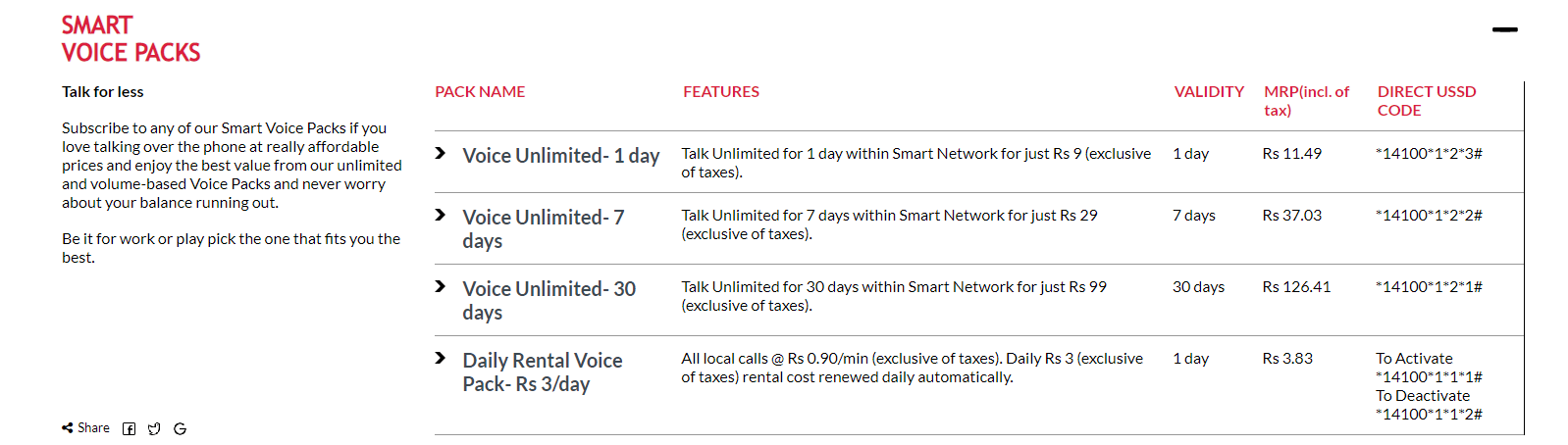
Easy, all in one Activate and Deactivate smart cell services shortcode. Smart cell is Nepal’s 3rd most used telecom provider in Nepal. It’s known for reasonable data pack services and unlimited voice pack offer. Services listed below are the most popular services list with their shortcodes.
Smartcell is a prominent telecommunications company that offers a range of services to customers in Nepal. As one of the top mobile network providers in the country, Smartcell prides itself on offering exceptional customer service and a variety of affordable service packages.
If you are a Smartcell customer and are wondering how to recharge your account, you have come to the right place. In this article, we will provide a comprehensive guide on how to recharge your Smartcell SIM card in Nepal, including the various methods available to you and the steps to follow.
The first step in recharging your Smartcell SIM card is to purchase a recharge voucher. These vouchers are widely available from local shops and street vendors, as well as from official Smartcell outlets. Make sure you purchase the voucher that corresponds to the amount you wish to recharge.
Once you have your voucher, you can proceed with the recharge process. There are several ways to recharge your Smartcell SIM card, including via the Smartcell website, the Smartcell app, or by dialing a specific shortcode on your phone.
To recharge your Smartcell account via the Smartcell website, follow these simple steps:
Visit the Smartcell website and log in to your account.
Click on the “Recharge” option in the main menu.
Enter the recharge voucher code in the space provided.
Click “Submit” to complete the recharge process.
Alternatively, you can also recharge your Smartcell SIM card using the Smartcell app. Here are the steps to follow:
Download and install the Smartcell app on your smartphone.
Open the app and log in to your account.
Click on the “Recharge” option in the main menu.
Enter the recharge voucher code in the space provided.
Click “Submit” to complete the recharge process.
Finally, you can also recharge your Smartcell SIM card by dialing a specific shortcode on your phone. Here is how to do it:
Dial 122<voucher code># from your Smartcell phone.
Press “Call” to initiate the recharge process.
Wait for a confirmation message to confirm that the recharge was successful.
In conclusion, recharging your Smartcell SIM card in Nepal is a straightforward process that can be completed using a variety of methods. By following the simple steps outlined in this article, you can easily recharge your account and continue enjoying the various services offered by Smartcell, including unlimited data packs, SMS packs, voice packs, and more.
Unlimited Data Pack .
Right now Smart Cel only has an “Unlimited Night Data Pack”
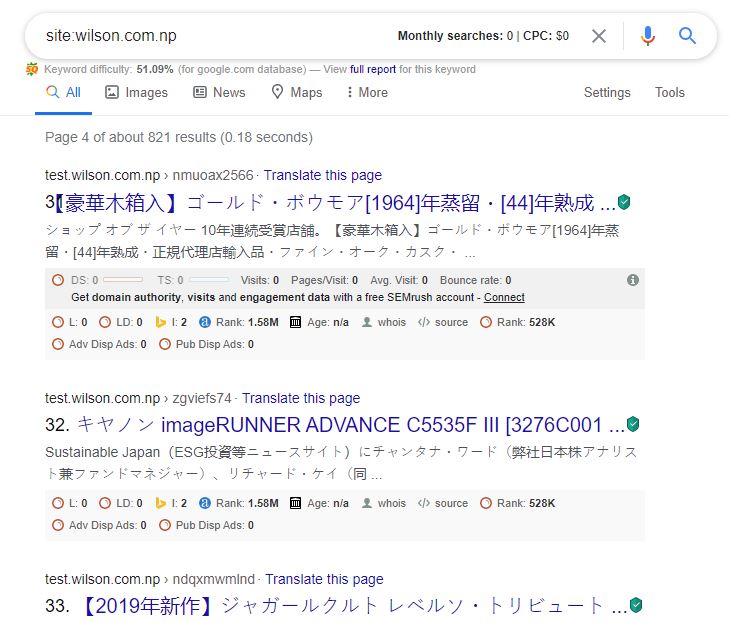
URL injection occurs when a hacker gets hacked into your site and create or inject a new random blank pages URL. These pages often contain redirection code that redirects your site to another third party site like porn, business sites, etc.
These injections can happen due to:
An unsecured server file directory in Cpanel
WordPress Nulled or Cracked Themes and Plug-ins
What happens when URL injection happens to your site?
Random URL will be index in Google Search Engine (Which will have an effect on SEO and Adsense will get deactivate from your site.)
Lots of Bot Traffic will visit your site. It will have an effect on Google Analytics report. (Unreal Bounce Rate, Unreal Page Views, Lots of 404 page redirection, etc.) It is also known as a DDoS attack.
How to Fix Url Injection?
2 Simple Steps to fix this:
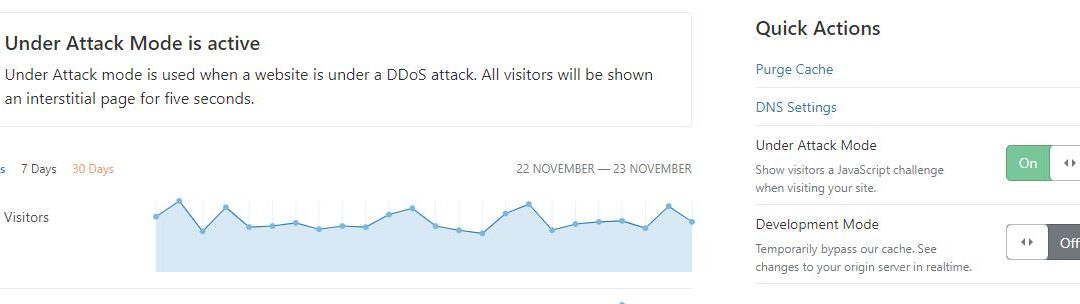
Create a Cloudflare account and register your site to Cloudflare.
Enable Under attack Mode.
Then Just need to wait for a few days, the bot traffic will be blocked from your site.
Then Go to Google Search Console and remove unwanted random URL created by URL injection.
How to Activate and Deactivate NTC Services (2026): Stop Unwanted Balance Deduction
Last updated: 27 September 2026 · Codes checked against Nepal Telecom's official Useful Short Codes page. Covers Namaste prepaid and postpaid mobile, plus landline and NT Fiber support.
Stop Namaste Credit (loan): dial *1477# and choose deactivate.
Still losing money? Call 1498 (free) and ask which value-added services are active on your number.
Most people land on this page for one reason: money is leaving their NTC balance and they don't know why. Readers in the comments below have described the same pattern for years — a game or entertainment pack subscribed by one accidental tap, a caller tune from a festival offer, or data that kept running on pay-as-you-go after a pack ran out.
This guide is organised around fixing that. First, the causes of automatic balance deduction and how to check each one. Then every NTC service that can be switched on or off, with the activate and deactivate code side by side. If you only need a code for checking balance, recharging or transferring, our full NTC USSD codes list has all of them in one place.
Why Is My NTC Balance Deducting Automatically?
Nepal Telecom does not remove balance at random. Every deduction comes from something active on your line. These are the usual culprits, roughly in order of how often they cause the problem:
Pay-as-you-go (PAYG) data. When a data pack runs out, mobile data used to continue at the standard per-MB rate straight from your main balance. This is the single biggest cause, and since April 2026 you can switch it off (next section).
Third-party value-added services (VAS). Game, puzzle and entertainment packs such as Telenet Games renew daily or weekly until you cancel them.
Caller Ring Back Tone (CRBT). A caller tune has a recurring subscription fee, separate from the song itself.
Missed Call Alert (MCA). A small recurring charge that is easy to forget about.
Namaste Credit repayment. If you borrowed balance, the loan and its fee are taken from your next recharge — which looks like missing money if you forgot you borrowed.
Recurring data packs. Some packs renew automatically at the end of their validity. Check your active packs in the Nepal Telecom app, or ask 1498 to cancel the renewal.
Check before you cancel
Dial *400# for your main balance and *1415*55# for remaining data and validity. If you have a data pack left and balance is still dropping, the cause is a VAS or caller tune rather than PAYG.
How to Turn Off PAYG Data on NTC (New in 2026)
In April 2026, Nepal Telecom added an option to disable pay-as-you-go data. With PAYG off, your mobile data simply stops when a pack ends instead of drawing from your main balance.
Dial *444# from your NTC SIM.
Choose option 4 (PAYG).
Select Disable. You should receive a confirmation that PAYG data is disabled.
To turn it back on, repeat the same steps and choose Enable. NTC has also started sending a notification once you've used about 90% of a data pack, so keep an eye out for that message.
When to keep PAYG on
If you rely on data for something that can't stop mid-way — a ride-hailing app while travelling, or a payment in progress — PAYG gives you a buffer. For most people who buy packs regularly, turning it off is the safer default.
All NTC Services: Activate and Deactivate Codes
Every service you can switch on or off yourself, with both directions side by side. Official means the code is listed on Nepal Telecom's own short-code page. Reported means it is in use and covered by Nepali telecom news sites but not yet on that page. Unconfirmed means it comes from older guides and may have changed — if one fails, call 1498.
NTC activate / deactivate codes (2026)
Service
Activate
Deactivate
Status
PAYG data
*444# → 4 → Enable
*444# → 4 → Disable
Reported
Data & voice packs
*1415#
Pack ends at validity
Official
Add-on packages
*1442#
Pack ends at validity
Official
Caller tune (CRBT)
SMS SUB to 1455
SMS UNSUB to 1455
Official
Missed Call Alert (MCA)
*1400*1# or SMS SUB to 1400
*1400*2# or SMS UNSUB to 1400
Official
Namaste Credit (loan)
*1477# → Activate
*1477# → Deactivate
Official
Telenet Games & Entertainment
—
SMS UNSUB GAMES to 1422
Unconfirmed
Friends & Family (FNF)
SMS FNFSUB98XXXXXXXX to 1415
SMS FNFDEL*98XXXXXXXX to 1415
Activate: Official Remove: Unconfirmed
Add another FNF number
SMS FNFADD98XXXXXXXX to 1415
—
Official
Call forwarding
**21*Number#
##21#
Official
All call diversions
—
##002#
GSM standard
Call waiting
*43#
#43#
Official
International calling (ISD)
#331*0000#
*331*0000#
Official
International roaming (prepaid)
*1415*7# → Activate
*1415*7# → Deactivate
Official
4G / VoLTE
*444#
—
Reported
How to Deactivate Games, Caller Tunes and Other Paid Services
Telenet Games and other third-party packs
Game and entertainment packs are the services readers complain about most. They're usually triggered by tapping an ad or a pop-up, and they renew every week until cancelled. To cancel Telenet Games & Entertainment, send UNSUB GAMES to 1422.
Several readers have reported that this SMS returns an error or that they can't send SMS at all once the balance is drained. If that happens, don't keep retrying — call 1498 from the affected SIM, tell the agent the name of the service in the charge message, and ask them to remove it. You can also check subscribed services in the Nepal Telecom app.
Caller Ring Back Tone (CRBT)
Send UNSUB to 1455. This cancels the subscription itself, not just the current song, so the recurring fee stops.
Missed Call Alert
Dial *1400*2# or send UNSUB to 1400 to turn it off. Dial *1400*1# or send SUB to 1400 to turn it back on.
Namaste Credit
Dial *1477# and choose the deactivate option to switch off the loan service so it can't be taken by accident. Many guides also list sending STOP to 1477, but the USSD menu is the method Nepal Telecom currently lists. Any outstanding loan is still recovered from your next recharge. For eligibility and repayment details, see how to take a loan (sapati) on NTC.
Call Forwarding, Call Waiting and International Calling
These don't cost money by themselves, but a wrong setting can make your phone seem broken.
Calls not reaching you? Dial *#21# to see whether forwarding is active, then ##002# to cancel every diversion at once.
Call waiting lets a second call come through while you're on the first. Turn it on with *43# and off with #43#.
International calling (ISD) uses the GSM barring convention, so the codes look reversed: #331*0000# removes the bar (calls allowed) and *331*0000# sets it (calls blocked). Blocking ISD is sensible on a SIM you lend to someone.
Never dial a code a stranger reads to you
Scam callers pretending to be from NTC or a bank ask people to dial a code starting with **21* followed by a mobile number. That forwards all your calls — including voice OTPs — to them. If you've dialled one, run ##002# immediately and call 1498.
International Roaming, 4G and VoLTE
Prepaid users can activate roaming before leaving Nepal by dialling *1415*7# and choosing the roaming option, or through the Nepal Telecom app. Activation and deactivation are free, and Nepal Telecom recommends switching roaming off when you return. Postpaid roaming is arranged at an NTC office.
For 4G and VoLTE, dial *444#. If the menu says your SIM isn't 4G-capable, no code will fix it; you'll need a SIM swap at an NTC office, or you can consider an NTC eSIM.
Balance Still Deducting and You Can't Identify the Service?
Read the charge SMS. Most VAS providers send a message when they charge you. The service name and short code in that message tell you where to send UNSUB.
Open the Nepal Telecom app and check your subscribed services and recent usage.
Call 1498 from the NTC SIM. It's free, and the agent can list and remove active value-added services.
Visit an NTC service centre with your citizenship or ID if the charges continue after cancellation, and ask for a usage statement.
Landline and NT Fiber (FTTH) Help
NTC support numbers
Number
Use it for
1498
Mobile customer support (free from NTC)
198
Landline and NT Fiber (FTTH) repair
197
Landline number inquiry
*1416#
NT Fiber balance, package info and bonus data
Temporary disconnection or transfer of a landline or fiber connection isn't done by code. Call 198 or visit your nearest NTC office with the account number from your bill.
Frequently Asked Questions
How do I stop NTC from deducting my balance automatically?
Disable PAYG data with *444# → option 4, cancel your caller tune by sending UNSUB to 1455, turn off Missed Call Alert with *1400*2#, and use *1477# to deactivate Namaste Credit. If deductions continue, call 1498 and ask which services are active.
How do I turn off PAYG data on NTC?
Dial *444#, choose option 4 and select Disable. Your mobile data will then stop when a pack ends instead of using your main balance.
How do I deactivate Telenet Games on NTC?
Send UNSUB GAMES to 1422. If the SMS fails or you can't send SMS, call 1498 from the same SIM and ask customer care to remove the service.
How do I deactivate a caller tune (CRBT) on NTC?
Send UNSUB to 1455. This cancels the CRBT subscription and stops its recurring charge.
How do I deactivate call forwarding on NTC?
Dial ##21# to cancel unconditional forwarding, or ##002# to cancel every type of call diversion at once. Dial *#21# to check what's active.
How do I deactivate NTC international roaming?
Dial *1415*7# from your prepaid NTC SIM and choose the deactivate option. It is free.
About this guide Written by Wilson Shrestha, a Kathmandu-based web developer. This page was first published in 2019 and rewritten in September 2026 to fix outdated codes and add NTC's new PAYG disable option. Nepal Telecom can change codes without notice; if one here stops working, leave a comment and it will be corrected.
Account Type: IMAP
Incoming Mail Server: mail.yourdomain.com
Outgoing Mail Server (SMTP): mail.yourdomain.com
Port: 143
Encrypted Connection: None
Port: 587
Encrypted Connection: TLS
User-name: email@yourdomain.com
Password: your email password
======================
NOTE: Replace yourdomain.com with your own domain name.
Account Type: IMAP
Incoming Mail Server: mail.yourdomain.com
Outgoing Mail Server (SMTP): mail.yourdomain.com
Port: 993
Encrypted Connection: SSL
Port: 587
Encrypted Connection: TLS
User-name: email@yourdomain.com
Password: your email password
======================
NOTE: Replace yourdomain.com with your own domain name.
Account Type: POP3
Incoming Mail Server: mail.yourdomain.com
Outgoing Mail Server (SMTP): mail.yourdomain.comPort: 110Encrypted Connection: NonePort: 587Encrypted Connection: TLSUser-name: email@yourdomain.comPassword: your email password
======================
NOTE: Replace yourdomain.com with your own domain name.